EasyManua.ls Logo

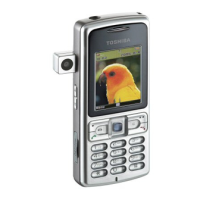
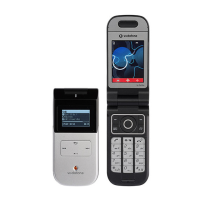
Toshiba 803 - User Manual

Toshiba 803
195 pages
Print Icon
To Next Page IconTo Next Page
Loading...
Toshiba 803 User Guide for
Europe
English
Draft
5 September, 2005
Toshiba

Table of Contents

Other manuals for Toshiba 803

Questions and Answers

Summary

Introduction

Congratulations on choosing the Toshiba 803, which is customised for Vodafone live!

Welcomes the user and highlights key features of the phone.

Network services

Explains requirements and dependencies for using network services.

Important Safety and Legal Information

End User License Agreement (EULA)

Outlines the terms and conditions for using the phone's software.

Safety Instructions

Care and Maintenance

Provides guidance on how to maintain the phone and accessories.

FCC Notice

Details compliance with FCC rules for electronic devices.

About This Manual

Symbols Used

Explains symbols used throughout the manual for clarity.

Screen Conventions

Describes how phone screens are represented in the manual.

What’s in the Box

Basic Operations

Parts & Functions

Identifies and describes the physical components and buttons of the phone.

Understanding Indicators

Main Display Indicators

Explains the icons and indicators shown on the main display screen.

SIM Card Management

SIM Card

Provides information about the SIM card and its function.

Inserting & Removing the SIM Card

Step-by-step guide for inserting and removing the SIM card.

Phone Codes

PIN Code and PIN2 Code

Explains the purpose and usage of PIN and PIN2 codes.

Emergency Calls

Battery Pack Management

Inserting & Removing the Battery Pack

Step-by-step guide for inserting and removing the battery pack.

Charging the Battery Pack

Memory Card Usage

Inserting & Removing the Memory Card

Guide to inserting and removing the memory card.

Power Management

Turning On;Off the Power

Steps to turn the phone on and off.

Date & Time Settings

Main Menu Navigation

Making Calls

Making a Call

Step-by-step guide for making voice calls.

Handling Incoming Calls

Answering a Call

How to answer an incoming voice call.

Call Operations

Other Operations During a Call

Various functions available during a call, like hold, mute, etc.

Call Log Management

Optional Services

Voicemail Service

Information on setting up and using the voicemail service.

Call Divert Service

Call Barring and Waiting

Call Waiting Service

How to place a current call on hold to answer an incoming call.

Character Input Methods

Text Entry Techniques

Entering Characters in T9 Mode

Guide to using the T9 text input method for faster typing.

Text Editing Functions

Contacts Management

Adding an Entry to the Contacts List

Step-by-step guide to saving new contact information.

Group Management

Adding a New Member to a Group

Process for adding contacts to broadcast or group lists.

Speed Calling

Using Speed Calling

How to set up and use speed dial numbers for quick calls.

Editing Contacts List Entries

Media Player Menu

Media Playback Features

Playing Music & Videos

Instructions for playing music and video files.

Media Player Controls

Switching Play Modes

Options for repeat, random, and normal playback modes.

Transferring Media Files

Transferring Music from a PC to a Memory Card

How to transfer music files from a PC to the phone's memory card.

Using Playlists

Creating a Playlist

Guide to creating custom playlists for music tracks.

Video Telephony

Making a Video Call

Step-by-step guide to initiating a video call.

Video Call Settings

Camera and Video Camera

Camera

Information on using the camera for photos, videos, and QR code scanning.

Camera Features

Modes for Taking Pictures

Explains Landscape, Portrait, and Scanner modes for picture taking.

Taking and Editing Pictures

Taking a Picture

Step-by-step guide for capturing still images.

Recording Videos

Recording a Video

Instructions for recording video clips.

Picture and Video Settings

Settings for Taking Pictures

Customizing picture quality, size, effects, and file naming.

Messaging

Messaging Capabilities

Overview of messaging services like SMS, MMS, and email.

Creating and Sending MMS

Creating & Sending an MMS Message

Guide to composing and sending multimedia messages.

Creating and Sending SMS

Creating & Sending an SMS Message

Instructions for writing and sending short text messages.

Reading Received Messages

Reading Received MMS & SMS Messages

How to access and read incoming MMS and SMS messages.

Messaging Settings

MMS;SMS Settings & Common Operations

Configuration for MMS, SMS, reply settings, font size, and page scroll.

Email Setup and Management

Setting Your Email Account

Steps to configure email account details and server settings.

Sending and Receiving Emails

Creating & Sending an Email Message

Guide to composing and sending email messages with attachments.

Vodafone live! Service

Accessing Vodafone live!

Steps to connect and use the Vodafone live! service.

Games & More Applications

Java Application Management

Managing downloaded and installed Java™ applications.

My Items Storage

Displaying Files on a TV

Instructions for connecting the phone to a TV to view content.

Memory Card Management

Formatting the Memory Card

Steps to format the memory card for first-time use.

SIM Card Operations

Using the SIM Card

How to move or copy data between the phone and the SIM card.

Settings

Display Settings

Customizing main and external display settings like wallpaper and backlight.

Phone Profiles

Personalizing Profiles

Customizing ringtone volume, vibration, keypad volume, and sound effects for profiles.

Flight Mode Setting

Call Settings Management

Showing;Hiding Caller ID

Options to automatically notify or hide your phone number during calls.

Security Settings

Initialising Your Phone

Network and Internet Settings

Convenient Functions

Calendar

Using the phone as a scheduler to save and manage appointments.

Voice Recorder Operations

Recording Sound

Instructions for recording audio using the phone's microphone.

Multi Tasking Features

Multi Task

Running and switching between multiple applications simultaneously.

File Transfer and Synchronization

File Transfer

Methods for transferring data using Bluetooth, infrared, USB, or memory card.

Bluetooth Data Transfer

Registering a Bluetooth Compatible Device

Steps to search for and pair Bluetooth™ devices.

Infrared Data Transfer

Using Infrared for Sending Data

Sending files from the phone using infrared.

USB Cable Data Transfer

Using a USB Cable for Sending Data

Sending phone data to a PC using a USB cable.

Memory Card Data Transfer

Using the Memory Card for Transferring Data

Transferring data between the phone and memory card, with backup recommendations.

Backing Up Data

Backing Up Data to the Memory Card

Steps to back up contacts and calendar data to the memory card.

Restoring Data

Restoring Data from the Memory Card

Procedures for restoring backed-up data from the memory card.

File Synchronization

Creating a Server Profile

Steps to create server profiles for data synchronization.

Appendix

Troubleshooting

Common problems and their solutions for phone operation.

Specifications and Accessories

Health and Safety Information

Safety Guidelines

General safety precautions for using the phone.

FCC RF Exposure Information

Menu Structure

Toshiba 803 Specifications

General IconGeneral
Network TechnologyGSM
EDGENo
StatusDiscontinued
SIMMini-SIM
3.5mm jackNo
OrganizerYes
2G bandsGSM 900 / 1800
Pixel density~182 ppi
Alert typesVibration
MessagingSMS
GamesYes
Predictive text inputYes
ColorsSilver

Related product manuals