EasyManua.ls Logo

Toshiba MCY-MHP0404HS-E - User Manual

Toshiba MCY-MHP0404HS-E
187 pages
Print Icon
To Next Page IconTo Next Page
Loading...
FILE NO. A10-1510
SERVICE MANUAL
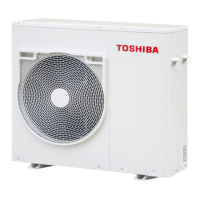
AIR-CONDITIONER (MULTI TYPE)
O
UTDOOR UNIT
Model name:
This service manual provides relevant explanations about new outdoor unit.
Please refer to the following service manuals for each indoor units.
MCY-MHP0404HS(J)-E/0504HS(J)-E/0604HS(J)-E
MCY-MHP0404HS-TR/0504HS-TR/0604HS-TR
MCY-MHP0404HS(J)/0504HS(J)/0604HS(J)
MCY-MHP0404HS-ID/0504HS-ID/0604HS-ID
MCY-MHP0404HS-A/0504HS-A/0604HS-A
Service Manual No.
<4-way Cassette Type>
(MMU-AP****H) A08-004
(MMU-AP***4HP*) (Made in Thailand model) SVM-13011
<2-way Cassette Type>
(MMU-AP****WH*) A10-007
<Concealed Duct Standard Type>
(MMD-AP***6BHP*) (Made in Thailand model) SVM-14069
<Slim Duct Type>
(MMD-AP024, A0274SPH*) A12-005
<Concealed Duct High Static Pressure Type>
(MMD-AP***6HP*) (Made in Thailand model) SVM-15032
<High-wall Type>
(MMK-AP***4MH*) (Made in Thailand model) SVM-09059
(MMK-AP***3H*) (Made in Thailand model) A10-034
<Console Type>
(MML-AP****NH*) (Made in Thailand model) SVM-11036
<Ceiling Type>
(MMC-AP***7HP*) (Made in Thailand model) SVM-13085
<Floor Standing Type>
(MMF-AP***6H*) A10-1420
<Other indoor units>
(MM*-AP*****H*) A10-033
A10-1510.indb1A10-1510.indb1 2016/04/0817:20:032016/04/0817:20:03
AMP Air Conditioning
www.ampair.co.uk | sales@ampair.co.uk

Table of Contents

Questions and Answers

  • R
    Ryan DukeNov 1, 2025
    Why does my Toshiba Air Conditioner remote controller display a check code?
    • D
      davidstewartNov 1, 2025
      If a check code is displayed on the Toshiba Air Conditioner remote controller, it could be due to several reasons: * The outdoor unit power might be off, so ensure it is turned on. * There might be an address setup error, where line addresses of connected indoor units are undefined, the outdoor line address doesn't match the indoor units, or indoor addresses are duplicated. In this case, set up the address again. * There could be indoor/outdoor communication circuit trouble. Check SW30 bit 2 of the outdoor unit and the communication connector between the indoor and outdoor units. * A transmission circuit trouble at the interface side (P.C.board failure) might exist, requiring replacement of the interface P.C. board. * Communication from all indoor units might be interrupted afte...
  • B
    Brian JeffersonNov 12, 2025
    What to do if the Toshiba Air Conditioner displays fewer connected units after address setup?
    • J
      Joshua MarshallNov 12, 2025
      If your Toshiba Air Conditioner displays a lower number of connected units than expected after address setup, and some units don't operate during a test, it could be due to: * Miswiring or unconnected communication lines between indoor units. After correcting the wiring, set up the addresses again and check the number of connected indoor units. * The indoor remote controller is not connected with a wire, or there's miswiring. Use the main indoor remote controller to start a test operation, specify the non-operating unit, and check the wiring. * Indoor remote controller communication circuit trouble, possibly due to incorrect voltage application. Use the main indoor remote controller to start a test operation, specify the non-operating unit, remove the quick connect terminal connecte...
  • C
    Connor AguilarNov 20, 2025
    Why is there no check code displayed on my Toshiba MCY-MHP0404HS-E Air Conditioner?
    • M
      Mary WhiteNov 20, 2025
      If there is no check code displayed on the 7-segment display of your Toshiba Air Conditioner, consider the following: * The communication line between the indoor and outdoor units might be disconnected. Modify the wiring. * The line address and indoor address might not be set. Set up the address. * The outdoor unit's power might be off in indoor group control. Turn on the power. * A group address might be set for a follower unit in individual control. Set the group address to “0” for individual control. * The power might not be turned on. Turn on the power. * The indoor remote controller might not be connected with a wire. Modify the wiring. * There might be miswiring of the indoor remote controller. Modify the wiring. * There could be indoor remote controller communicatio...

Summary

SERVICE MANUAL

Precautions for safety

Specifications

Wiring diagram

Parts rating

Parts layout in outdoor unit

Parts layout in inverter assembly

Interface P.C. board (MCC-1639)

Inverter P.C. board for compressor (MCC-1647) A3-IPDU

Fan motor IPDU (MCC-1597) for upper fan and lower fan

Noise filter (MCC-1551)

Refrigerant piping systematic drawing

Control outline

Outdoor unit controls

Explains the operational logic and control mechanisms for the outdoor unit.

Applied control for outdoor unit

Indoor unit setup method for priority indoor unit mode

Optional P.C. board of outdoor unit installation

Optional control P.C. boards functions

Power peak-cut control (standard)

Power peak-cut control (extended)

External master ON; OFF control

Night operation (sound reduction) control

Operation mode selection control

Error; Operation output

Test operation

Check items before test operation (before powering-on)

Lists essential checks to perform before initiating test operations for electric wiring.

Address setup

Address setup and check procedure

Step-by-step guide for setting and verifying unit addresses.

Address setting procedure 1

Procedure for automatic address setting, typically for single refrigerant lines.

Address setting procedure 2

Procedure for setting addresses, often involving manual switch adjustments for multiple lines.

Troubleshooting

Overview

Provides a general overview of troubleshooting procedures and common issues.

Troubleshooting method

General methods for identifying trouble sites using diagnostic displays.

List of Check Codes (Indoor Unit)

A comprehensive list of check codes detected by indoor units and their troubleshooting.

List of Check Codes (Outdoor Unit)

Lists check codes detected by the outdoor unit's interface P.C. board and their troubleshooting.

Troubleshooting based on information displayed on remote controller

Guide to interpreting and troubleshooting based on information shown on the main remote controller.

Diagnosis procedure for each check code

Signal transmission trouble on the remote controller

Troubleshooting steps for signal transmission issues between the remote controller and indoor units.

Communication trouble between the indoor unit and remote controller (detected on the indoor unit)

Diagnoses communication problems between indoor units and remote controllers.

Indoor; Outdoor communication circuit trouble (Detected at indoor side)

Troubleshooting for communication failures between indoor and outdoor units detected at the indoor side.

Automatic address start trouble

Troubleshoots issues during the automatic address setting process.

No corresponding indoor unit during automatic-address

Addresses situations where no indoor unit is found during automatic address setup.

High-pressure protective operation

Troubleshooting flowchart for high-pressure protective operation events.

Compressor breakdown

Troubleshooting steps for compressor breakdown, including power and circuit issues.

Low-pressure protective operation

Diagnoses and resolves issues related to low-pressure protective operation.

7-segment display function

Checking procedure to be followed in event of abnormal shutdown

Steps to check the 7-segment display for error codes during abnormal system shutdowns.

Outdoor unit parts replacement methods

Step 12: Compressor replacement

Detailed steps for removing and replacing the compressor, including refrigerant handling and brazing.

Step 13: Compressor installation

Procedures for installing the new compressor, including vacuuming and refrigerant charging.

P.C. board exchange procedures

Exploded diagram; parts list

WARNINGS ON REFRIGERANT LEAKAGE

Toshiba MCY-MHP0404HS-E Specifications

General IconGeneral
Cooling Capacity (kW)4.0
Heating Capacity (kW)4.5
Power Supply220-240V, 50Hz, 1 Phase
Cooling Capacity4.0 kW
Heating Capacity4.5 kW

Related product manuals