EasyManua.ls Logo

Toshiba MD20FN3/R - User Manual

Toshiba MD20FN3/R
48 pages
Print Icon
To Next Page IconTo Next Page
Loading...
Owner’s Manual
Before operating the unit, please read this manual thoroughly.
MD20FN3/R
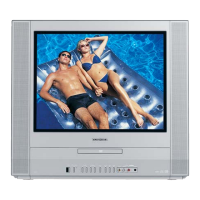
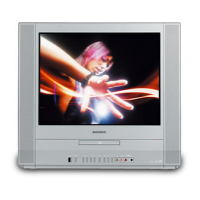
COMBINATION 20” FLAT COLOR TELEVISION
AND DVD/CD PLAYER
ATTENTION
For your protection in the event of theft or loss of this product, please fill in the
information listed below which is for your own personal records.
TV/CATV MODE SELECTION
When shipped from the factory, the TV/CATV menu option is set to the
“CATV”(Cable Television) mode.
If not using CATV, set this menu option to the “TV” position.
Date of Purchase :
Serial No. :
Place of Purchase :
DIGITAL VIDEO
5F00401C (Cover) 6/25/03, 14:461


Questions and Answers

  • L
    lauramasseySep 9, 2025
    Why won't my Toshiba MD20FN3/R TV DVD Combo start playback?
    • A
      Angela MorganSep 9, 2025
      Playback may not start on your Toshiba TV DVD Combo if no disc is inserted, or if the disc is dirty, clean up the disc. Also, the unit cannot play CD-ROMs, etc.
  • J
    Jenny NixonAug 23, 2025
    How to fix Toshiba MD20FN3/R TV DVD Combo that does not turn on?
    • B
      Barbara MooreAug 23, 2025
      If your Toshiba TV DVD Combo is not operating, ensure the power cord is properly plugged in. If it is, try plugging it into another AC outlet. Also, check the fuse or circuit breaker to ensure power is available. As a last resort, unplug the unit and then plug it back in to see if it resets.
  • D
    Douglas MooreAug 25, 2025
    Why is there no sound on my Toshiba TV DVD Combo?
    • D
      Daniel WalkerAug 25, 2025
      If you are experiencing poor or no sound on your Toshiba TV DVD Combo, first check if the station or CATV is experiencing problems by tuning to another station. Then, check your volume adjustments and look for any sources of possible interference that may be affecting the sound quality.
  • M
    Meredith MccoyAug 27, 2025
    Why is the picture quality bad on my Toshiba TV DVD Combo?
    • J
      Jesus BradleyAug 27, 2025
      If your Toshiba TV DVD Combo has poor or no picture, try tuning to another station to rule out station or CATV issues. Check the antenna or CATV connections and reorient the antenna. Also, check for sources of possible interference and ensure your picture control adjustments are properly set.
  • B
    brandon86Aug 27, 2025
    How to fix no CATV reception on Toshiba MD20FN3/R TV DVD Combo?
    • M
      Mr. Harold ClementsAug 28, 2025
      If your Toshiba TV DVD Combo is not receiving CATV, ensure all CATV connections are secure. Set the TV/CATV menu option to the CATV mode. If problems persist, try tuning to another station to rule out issues with the current station or CATV system.
  • C
    Cameron RichardAug 29, 2025
    Why is there poor or no color on my Toshiba MD20FN3/R TV DVD Combo?
    • J
      jessica48Aug 29, 2025
      If your Toshiba TV DVD Combo displays poor or no color, first tune to another station to rule out station or CATV problems. Ensure that channels are set into memory. Check your picture control adjustments, antenna or CATV connections, and reorient the antenna. Finally, check for any sources of possible interference.
  • H
    hinesgabrielleSep 18, 2025
    Why can't I change audio language on Toshiba MD20FN3/R?
    • N
      Nancy FoxSep 18, 2025
      The audio soundtrack and/or subtitle language cannot be changed on your Toshiba TV DVD Combo because multilingual language is not recorded on the DVD disc.
  • J
    Julie MayoSep 18, 2025
    Why can't I change the angle on my Toshiba MD20FN3/R?
    • J
      Jennifer FoleySep 18, 2025
      Angle cannot be changed on your Toshiba TV DVD Combo because multi-angles are not recorded on the DVD disc.
  • J
    Jennifer BrownSep 7, 2025
    What to do if Toshiba MD20FN3/R operation key is not functioning?
    • C
      courtney22Sep 8, 2025
      If the unit or remote operation key on your Toshiba TV DVD Combo is not functioning, turn off the unit and unplug the AC power cord for several minutes, then replug it.
  • R
    Robert MeltonSep 4, 2025
    How to fix no reception above channel 13 on Toshiba TV DVD Combo?
    • D
      dominicgregorySep 4, 2025
      If your Toshiba TV DVD Combo is not receiving channels above 13, make sure the TV/CATV menu option is in the appropriate mode. If you are using an antenna, check the UHF antenna connections.

Summary

IMPORTANT SAFEGUARDS

READ INSTRUCTIONS

Essential guidelines for safe operation.

HEED WARNINGS

Follow all warnings on unit and in instructions.

WATER AND MOISTURE

Precautions regarding water and moisture exposure.

VENTILATION

Importance of airflow for proper unit operation.

POWER SOURCE

Information on connecting to the correct power supply.

IMPORTANT SAFEGUARDS (Continued)

OBJECT AND LIQUID ENTRY

Preventing objects and liquids from entering the unit.

LASER BEAM

Warning against direct exposure to the laser beam.

SERVICING

Instructions on when to seek qualified service personnel.

LIGHTNING

Steps to protect the unit during lightning storms.

CONNECTING

Safety steps when connecting to other equipment.

Notes on discs

On handling discs

Proper techniques for handling discs to avoid damage.

On cleaning discs

Methods for cleaning discs for optimal playback.

On storing discs

Best practices for storing discs to prevent warping.

Parts and functions

Front

Labels and functions of the front panel controls and connections.

Remote control;Power source

Power source

How to connect the TV/DVD to a standard AC power outlet.

Setting the language

TV operation

To memorize channels

Setting the V-Chip

TO REGISTER PASSWORD

Establishing a password for V-Chip settings.

TO SET THE V-CHIP

Selecting TV rating levels for content filtering.

To change the V-Chip

Picture control adjustment

Sound control adjustment

Disc

Playable discs

List of compatible disc formats and playback times.

Playback procedure

Special playback

Zooming and Locating Functions

Zooming Function

Magnifying parts of the video image.

Locating Desired Scene

Using time, chapter, or title to find playback points.

Setting language

Setting the aspect ratio of TV screen;Setting on screen display

Setting the aspect ratio of TV screen

Selecting the correct screen format (16:9, 4:3).

Parental control setting

Parental Level

Choosing the severity of content restrictions.

Password

Setting or managing the V-Chip password.

To change the parental level

Connections to other equipments

Using an AV Amplifier with built-in digital surround

Connecting the TV/DVD to an AV amplifier for surround sound.

Problems and troubleshooting

How to Obtain Warranty Service

Toshiba MD20FN3/R Specifications

General IconGeneral
BrandToshiba
ModelMD20FN3/R
CategoryTV DVD Combo
LanguageEnglish

Related product manuals