Pre#arallon:
• Turn 0N tt_eTV a_ _elecethe _:r_es_on_Jn_ wJeo jn_
• press VC_ DVD _,elec_orto _]ect the VCR mo_e
/The VCR mdm_t_r _V_llI_g_ /
1 C_n_ect _,,_eA_te_e,a _r Cab_e _ystem _
PlU9 the AC Power cord _o me AC out_e_.
Make _u_e the DVDNCR is tu_ed _ff
W_t _t I_ast three m_utes an_ _ress
4 POWE_
Pre_s CALL _o cheek the e_o_ setting o_
Sine on _cree_ display¸
O
The a_ _1_,_ adju stm_t w_l_be eNlated at 6:00
AI_, _2:00 PM aral 6:OO PM everyday w_ the
DVDNgR t_ed off
• _ you use a cable box a_ you wa_t AUTO CLOCK
betwee_ _he _t_lt ._ dock t_me and the actu_ _e
a_stme_t to be pe_me_ the cable box m_st be
• The AUTQ CLQCK _tmen_ _s n_t effective when
the_e Js_ d_eren_e o_ mo_ th_ 5 m_U_S ex_
124
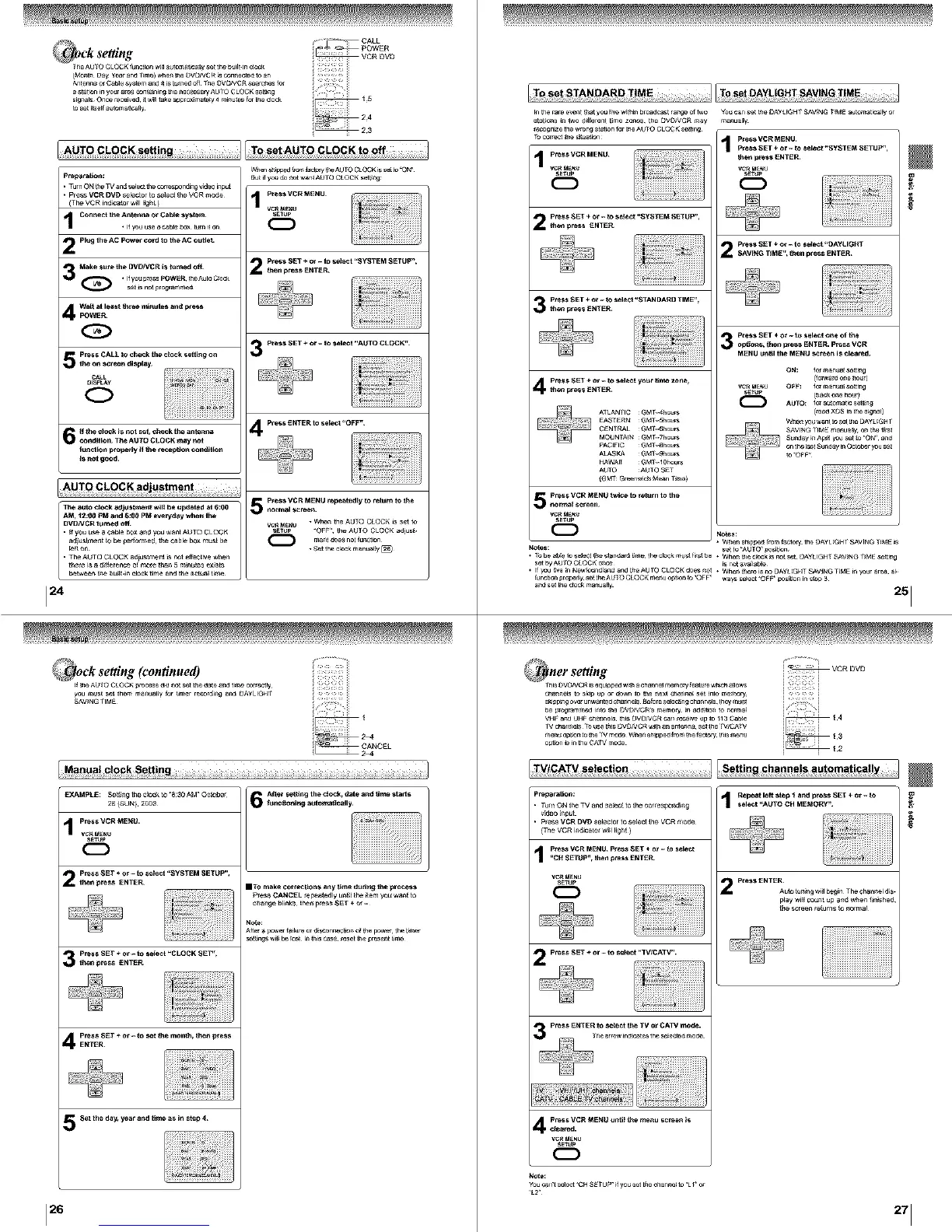
_ck setting (continued)
_ e_e Auto CLOCK process _ _ot ,_et _ _ate a_d time correctly
you mull Sel them ma_a][y [or _mer re_or _i_ a_ DAYLI_H_
_WNG _IME
But i_yo_ _ _t w_nt AU_Q C_OCK sett_n_
p_e_ VCR MENU ¸
s_uP
C:D
P_e_ _ET ÷ o_ - to se_et "_YSTEM SETUP _,
2 men _ress ENTER
26
P_e_ VCR MENU _e_eated_y t_ retur_ to the
5 normal s_ree_.
Vc_E_ " W_'_ the AU_Q CLOCK _S_et to
S_Up -Q_F th_A0_O CLOCK adjust.
me_t _0eS not _r*tion
• Set the clock ma_w_y [_
After se_n9 the e_oe_, date a_ _.e _tartsEXAMp_._: Set_thec]ock_'830AM'Oo_ber
26 (SUN}¸ 2OO3
_tmc_o_l_ a_o_m_cally_
vc_. _NU
C:D
Pr@@$_ET ÷ O_- to _e_i "SysTEM _ETUP" ,
2m_ _ress _NT_R IT o make CO_c_/O_S a_y _e flu_i_ fl_e _rocess
P_e_ CANCEL _epeatedly _ _he _temyo_ w_t to
Pre_s SET ÷ or _ to select "CLO_K _ET,.
3 m_ _ress _NTER
p_sSET÷or_se_emon_,the_e_s
ENTER
5_e_ the day, year and time as I_ ste# 4
_nthe r_e event _ y_ _iw _t_m brought r_ o__o Yo_ c_n set me OA¥_GHT _V_NG r_ automatically or
st_o_s m _wo d_erent _me zones, t_ DV_)_VCR may manually
reco_n_e the _on_ _on f_ _ AUTO CL0C K se_._
prems vCR MENU _he_,l_e_ INTER
vc_ _E_u vc_ _tJ
12221 _
Pr_s SET ÷ or - m s_tect "$YSTE_,I S_TUP",
_ge_ $[T ÷ ot- to _eet "OAyUGHT
I ;°_ 8_VING TIM[", Nn _fe_s ENTER
3 _le_* SET ÷ °l - t_ *ele¢l °_e *f _e
/_ M_NU _n_ll the M_IU _n I_cleated
ON: f_ man_l_ setting
_,_ i_.e,_ _NTER. VC_E _lJ O_F: for m_nua_ setting
for automatic s,_t_[n_
_ A_ LANflC GMT 4hour_ (r_a ×DS in _, s_gnal)
EASgaRN _NI houN _s_x_n_U want m set #_eOAyL_GH r
C_N I_L _N l 6houP_
MOUN rAIN GMT 7hou_
P_CI_IC _N 14h_P_
_S_ (_N I _ghour_
_AWAr_ ONI 10_ours
A010 ;AUIO $E
{GM_ Gr _nwic[_M_n r_rno)
5 nPo_al_s_e_ hENU ..................
vc_ _E_U
12221
• _b be al_ to salect _e sta_a_ _me the c_OckmUS_firs_I)e. When #_e e_oc_ _Snol set DAYLIGH[ SAVING T_NE setLing
set byAU ?0 CLOCK orlc_ is not ava_l_Ne
• if7ou uve in Ne_4ounalana ar_ LheAUTO CLOCK do_ rmt • When #_re is ao [3_yLIGHI S_V]NG TINE tn 7_r ar_a al
_une_or_pro_e_y se_LN_AU _OCLOCK menu o_tmn m OFF ways se_ct -OFF _s_mn in s_p 3
ariel set [_._ crock ma¢_ual]y
Pr_araUor_:
• Turn ON _he TV a_ _e_t to the corresponding
• p_e_ V_ DVD _elec_or to select _he VCR tootle
(The VCR md_c_t_ w_l _Jg_ )
_, VCR MN'IU PI'eS_ SET ÷ o_ w _ sele_
.C_ SETUP- _hen i_re_s ENTER
vc_. _NU
SE'_Jp
2 press SET ÷ or _ _ _eel -TVICATV,,.
4 _er_r_ cR MENU ...............
Note:
Repot I_ _tep _ ar.,l i_es$ SET ÷ o_ - _o
_elec_ ,,AffrO CH MEMOR.¢,,
2 P_e_ ENTE_t_to _n9 w_l beg_n The cha_ld_s.
play wH_0o_t up a_ _e_ _m_e_,
the _rse_ retum_ t_ _rma_
251



 To Next Page
 Loading...









