English - 23 -
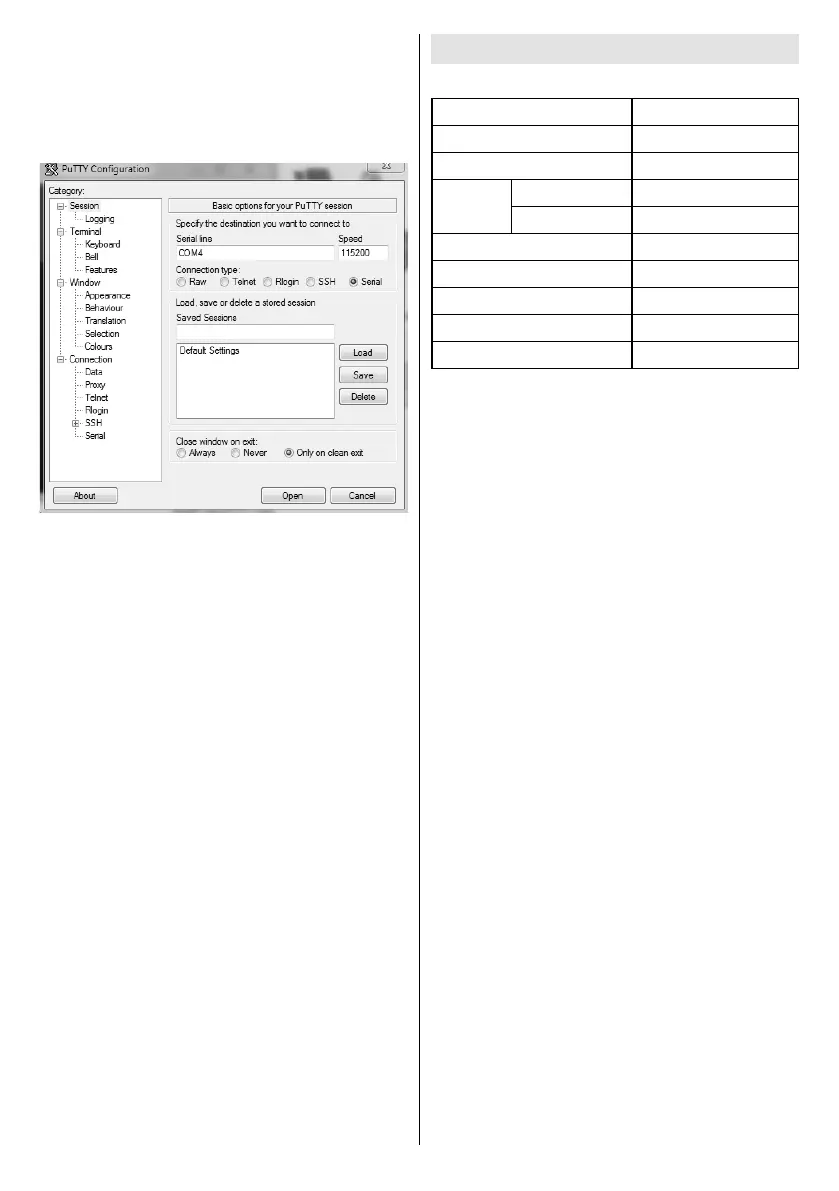
Connecting to the Display (RS232 port)
Run the software and select Serial as Connection
Type
Serial Line (in the following example it is COM4)
and “115200”
Open button.
System Features
Panel
Panel type
1920x1080
Active Area
1073.78(H) x 604.0(V)
Visual
angle
178°
Perpendicular
178°
Typ : 400 cd/m²
Max. Contrast
Typ : 1200
6ms
H-Frequency
60 Khz
67.5 Khz
Audio
2 x 8 W Audio Output Power
Network Connection
Ethernet (LAN)
802.11 a/b/g/n built in
Input/Output Ports
1 x USB 2.0 port
1 x USB 3.0 port
1 x Internal USB 3.0 port
1 x HDMI 2.0 In port (1.4 for FHD panels)
1 x VGA port
1 x Audio input port
1 x Audio output port
1 x RS232 port
1 x RJ12 port (Service only)
1 x Video In port
1 x YPbPr port
1 x SPDIF Coaxial Out port
1 x DVI port
1 x DiplayPort v1.2 In
1 x DiplayPort v1.2 Out
1 x Headphone port
1 x IR port
Power
110-240V AC 50-60Hz 1.05A
notice.


 To Next Page