TRWS indicator user’s manual
Calibration:
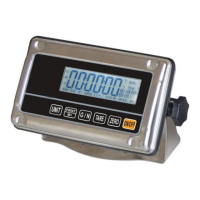
Press UNIT and PRINT/M+ button at the same time when you are in weighing mode.
Press TARE until display shows ProG
Press ZERO key and press G/N; UNIT; ZERO to enter into programming.
Press TARE until display shows P 2 CAL then press ZERO
Press TARE until you see CAL on the display.
Press ZERO to select nonL in (not linear calibration, for simple zero and span calibration)
Press ZERO display will show Unload (at this time you can also choose to calibrate in LB or
KG by pressing the UNIT button)
Make sure nothing is on the scale then press ZERO
Next display will show full scale capacity, if you don't have that much test weight toggle
between the digits using the G/N button (toggle between digits), using the Tare button
(increase the numbers 0-9) to enter your actual weight that you will use to calibrate, Then press
ZERO display will show LoAd (LB or KG you can still select the calibration unit by using the
UNIT button) load test weight on platform and press ZERO, display will show PASS and
automatically restart the indicator.
-20-


 To Next Page