12
Before actually beginning the nailing work, test the
Nailer by using the checklist below. Conduct the
tests in the following order.
If abnormal operation occurs, stop using Nailer and
contact a TOUA authorized service center immediately.
(1) REMOVE ALL NAILS, FUEL CELL AND BATTERY
FROM NAILER.
■ ALL SCREWS MUST BE TIGHTENED.
■ THE PUSH LEVER AND TRIGGER MUST MOVE
SMOOTHLY with pulling back the feeder knob.
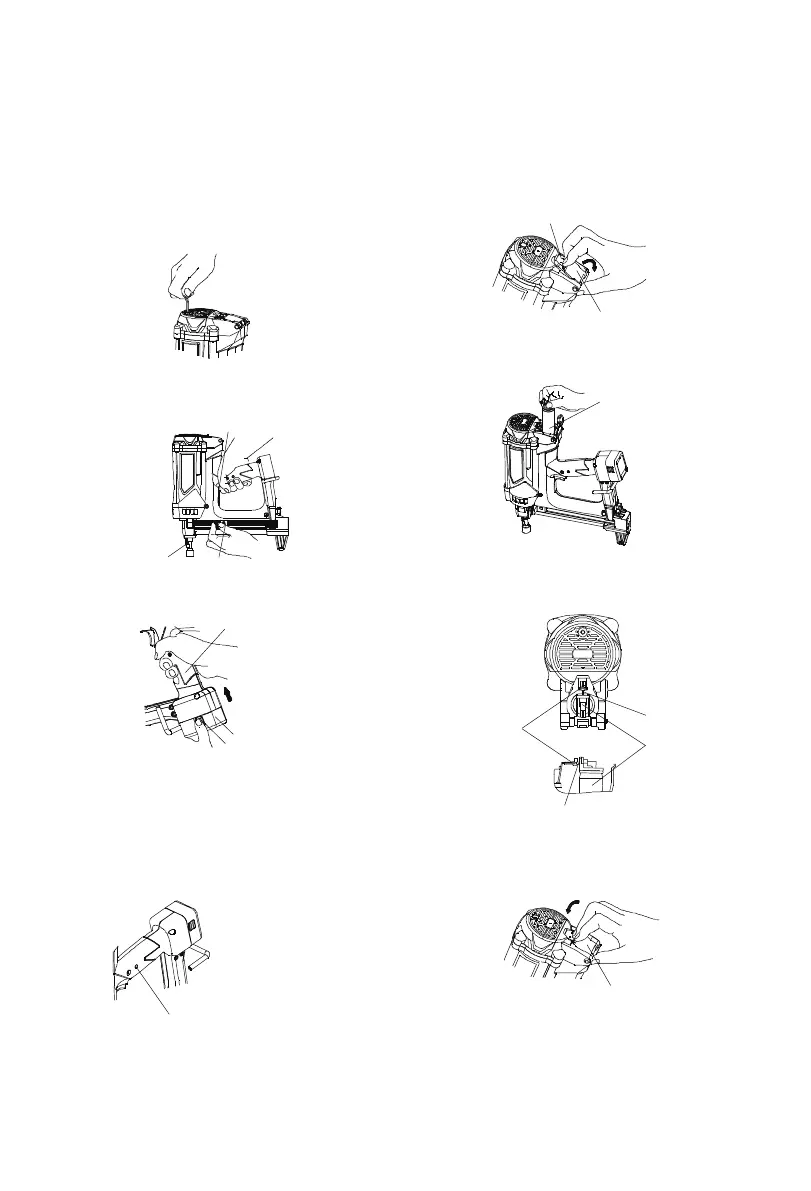
(2) Installing the battery.
Do not operate the push lever or trigger while installing
the battery.
Make sure the battery indicator light is flashing green.
If the battery indicator light is flashing red, the battery
doesn't have enough power and it needs to be charged.
BATTERY INDICATOR LIGHT
Trigger
Nail Feeder
Push Lever
Handle
Battery Pack
Latch
insert
Flashing GREEN: Enough power remaining
(The light turns steady during operation).
Flashing RED: Insufficient power remaining
(The light turns steady during operation).
(3) INSERT FUEL CELL INTO NAILER.
① Pulling the latch and open the cell cover.
② Insert the fuel cell into nailer.
③ Insert the stem of fuel cell into the hole of
adaptor.
④ Close the cell cover.
⑤ Lock up the latch .
Battery Indicated Light
Latch
Cell Cover
Fuel Cell
Fuel Cell
Stem
Stem
Adapter
Cell Cover



 To Next Page