3 Getting Started
3-1
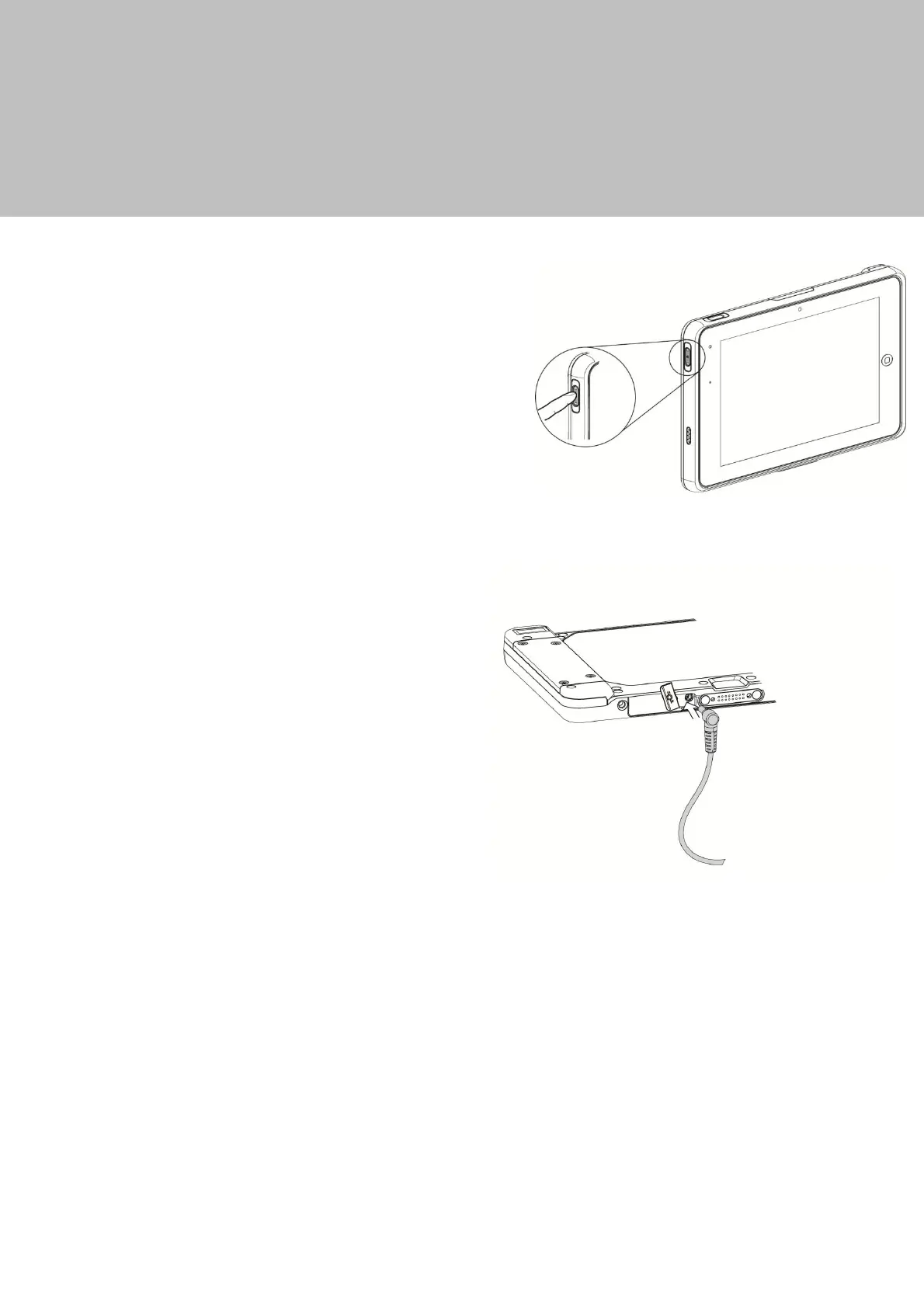
Power On/Off the System
1.
Push the power button 1 second to turn
on the system and hold 4 seconds to
power
off the tablet.
Note:
For best touch performance, remove the
protect
ive
plast
ic overlay from the LCD screen
by peeling it away from one of the corners.
Be sure to use a soft point
ing device or finger
t
ip to avoid scratching the screen during
normal use.
3-2 Charging the Battery
To charge the battery, open the
rubber
cover to expose the DC-in port
and plug
in the AC adaptor cable supplied
with the
tablet.
Power level is indicated by the battery status indicator LED on the front of the tablet.
GREEN
–
Battery fully charged(Tablet is plugged in or placed in dock)
ORANGE
–
Battery charging(Tablet is plugged in or placed in dock)
RED/Flashing
–
Battery is low
RED
–
Battery nearly depleted
Alternatively the battery Status can be checked by pressing the button on the
battery itself.


 To Next Page