13
PART 3. BREWING A CARAFE
Brew Your Family Size Coffee
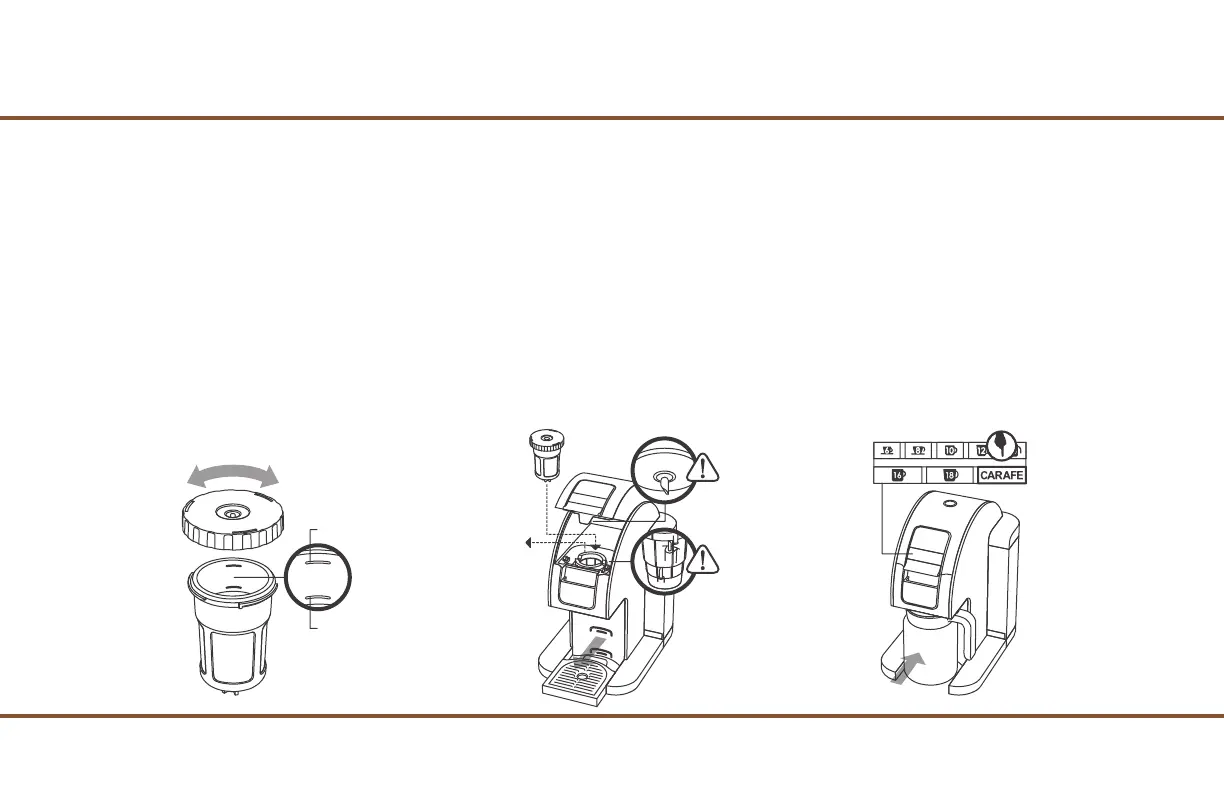
1. Twist the Lid off from the Refill Jumbo Cup.
2. Pack a desire amount of your own grind coffee into the Refill Jumbo Cup.
NOTE: To fill a Travel Mug, pack just above the Minimum Fill Line, and use the 16 or 18 oz button. To fill a Carafe, pack up to the Maximum Fill Line, and
use the Carafe button. (Fig. 16)
3. Twist back on the Lid to the Refill Jumbo Cup.
4. Open the Cover and remove the Red Cup Holder from the Brewer, and insert the Refill Jumbo Cup in its place. (Fig. 17)
5. Remove the bottom Drip Tray (Fig. 17), and place the Carafe in its place. (Fig. 18)
6. Press the Carafe Button to start brewing. (Fig. 18)
7. Once the brewing is done, open the Cover and remove the Refill Jumbo Cup and clean it for later use.
CAUTION: DO NOT overpack. Refill Jumbo Cup will be HOT!
Fig. 16 Fig. 17 Fig. 18
Maximum Fill Line
Minimum Fill Line


 To Next Page