22
Press auto cook key Auto Cook Menu Minimum Weight Maximum Weight Weight Step
Once ROAST LAMB 500 g 2000 g 100 g
Twice ROAST BEEF 500 g 2000 g 100 g
3 times ROAST CHICKEN 800 g 2000 g 100 g
4 times BAKED FISH 300 g 900 g 100 g
5 times FRESH VEGETABLE 100 g 900 g 50 g
Auto Cook Menu Start Temp. Method Cookware
ROAST LAMB
Chilled temp.
1. Tie the joint into a neat shape.
2. Place the meat on the dish.
3. Brush with a little oil.
4. Place roasts fat-side down on the dish.
5. Cook on "AUTO COOK-ROAST LAMB or ROAST BEEF".
6. Turn over when hearing the beep.
7. Remove from oven. Drain off any excess juices.
8. Stand for 10 minutes in foil before serving.
Glass Turntable +
Metal rack
ROAST BEEF
ROAST
CHICKEN
Chilled temp.
1. Wash and dry chicken. Tie the legs loosely together with string.
2. Pierce the skin a couple of times just under the legs.
3. Brush butter mixture all over the chicken on the dish.
4. Place roasts breast-side down on the dish.
5. Cook on "AUTO COOK-ROAST CHICKEN".
6. Turn over when hearing the beep.
7. Remove from oven. Drain off any excess juices. Season with salt if
required. Stand for 10 minutes in foil before serving.
Glass Turntable +
Metal rack
BAKED FISH
Chilled temp.
1. All types of fresh fish(except battered or breadcrumbed fish) can be
cooked whether whole, fillets or steaks.
2. Place the prepared fish in a buttered dish.
3. Season with salt and pepper, sprinkle with lemon juice and dot with
butter. Do not cover dish.
4. Place on dish on the metal rack on the turntable.
5. Cook on "AUTO COOK- BAKED FISH".
Micro and heat proof
shallow dish.
(e.g Pyrex.)
Glass Turntable +
Metal rack
FRESH
VEGETABLE
1. Wash and trim.
2. Place prepared vegetables into a suitable sized container.
3. Sprinkle with 4-5 tbs. of water.
4. Cover with pierced cling film or a lid.
5. Place on dish on the turntable.
6. Cook on "AUTO COOK- FRESH VEGETABLES.
* For best results cut vegetables into similar sized pieces.
Microproof dish.
(e.g Pyrex.)
Glass Turntable
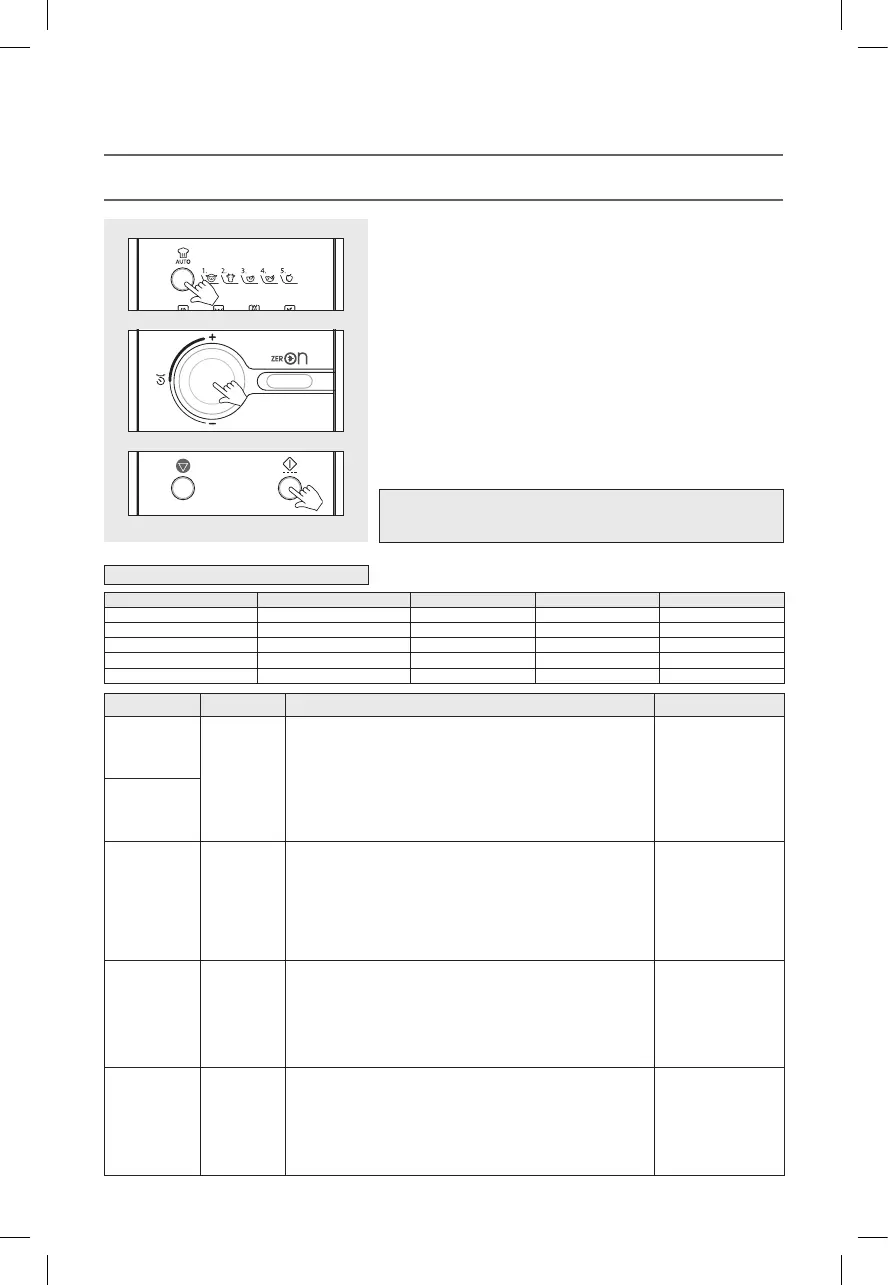
1. Press the Auto Cook button once.
The Auto Cook indicator lights.
“AC-1” will show in the display.
2. Select the menu by pressing the Auto Cook button until the required menu is
displayed.
Refer to the auto cook menu chart below for further details.
3. Turn the dial knob to set the cooking weight.
For a cooking weight of 1000 grams, turn the dial knob to set 1000.
(up to 2000 grams can be set)
“1000” and shows in display.
Refer to the auto cook menu chart below for further details.
4. Press the START/SPEEDY COOK button.
The oven light comes on and the turntable starts rotating.
Cooking starts and the time in the display will count down.
Note : You can check the current cook setting while the cooking is in progress
by pressing the Auto Cook button.
This function allows you to simply and automatically cook a range of popular foods.
Always use oven gloves when touching the utensils in the oven.
AUTO COOK
Auto Cook Menu Chart
RKW(TOWER)_KOC9C5TT(KOC9Q5TTTUB017USC5)(�)_A5.indd 22 2020-07-17 �� 5:25:48


 To Next Page