EasyManua.ls Logo

Tower Hobbies T17086 - Dehydration Mode and Settings; Dehydrate Mode Operation Guide; Extended Ingredient Settings Table

Tower Hobbies T17086
18 pages
Print Icon
To Next Page IconTo Next Page
To Previous Page IconTo Previous Page
Loading...
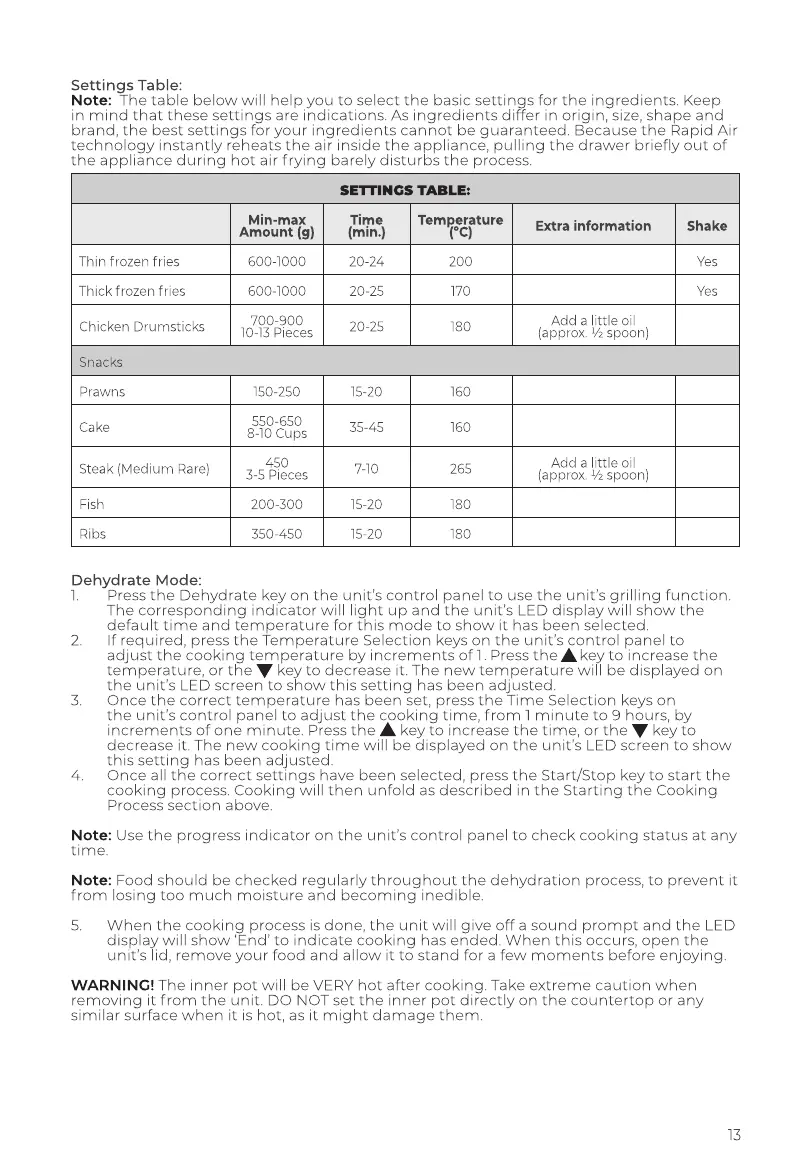
Settings
Table:
Note:
The
table
below
will
help
you
to
select
the basic
settings
for
the
ingredients.
Keep
in
mind
that
these
settings
are
indications.
As
ingredients
differ
in
origin,
size,
shape
and
brand,
the
best
settings
for
your
ingredients
cannot
be
guaranteed.
Because
the
Rapid
Air
technology
instantly
reheats
the
air
inside
the
appliance,
pulling
the
drawer
briefly
out
of
the
appliance
during
hot
air
frying
barely
disturbs
the
process.
SETTINGS
TABLE:
Min-max
Time
Tempsepture
Extra
information
Amount
(g)
(min.)
Thin
frozen
fries
600-1000
20-24
200
Thick
frozen
fries
600-1000
20-25
170
: ;
700-900
Add
a
little
oil
Chicken
Drumsticks
10-13
Pieces
20-25
180
(approx.
%
spoon)
Snacks
Prawns
150-250
550-650
Cake
8-10
Cups
:
450
Add
a
little
oil
Steak
(Medium
Rare)
3-5
Dieces
(approx.
%
spoon)
Fish
200-300
Ribs
350-450
Dehydrate
Mode:
1.
Press
the
Dehydrate
key
on
the
unit's
control
panel
to
use the
unit's
grilling
function.
The
corresponding
indicator
will
light
up
and
the
unit’s
LED
display
will
show
the
default
time
and
temperature
for
this
mode
to
show
it
has
been
selected.
If
required,
press
the
Temperature
Selection
keys
on
the
unit’s
control
panel
to
adjust
the
cooking
temperature
by
increments
of
1.
Press
the
&
key
to
increase
the
temperature,
or
the
W
key
to
decrease
it.
The
new
temperature
will
be
displayed
on
the
unit’s
LED
screen
to
show
this
setting
has
been
adjusted.
Once
the
correct
temperature
has
been
set,
press
the
Time
Selection
keys
on
the
unit's
control
panel
to
adjust
the
cooking
time,
from
1
minute
to
9
hours,
by
increments
of
one
minute.
Press
the
&
key
to
increase
the
time,
or
the
W
key
to
decrease
it.
The
new
cooking
time
will
be
displayed
on
the
unit's
LED
screen
to
show
this
setting
has
been
adjusted.
Once
all
the
correct
settings
have
been
selected,
press
the
Start/Stop
key
to
start
the
cooking
process.
Cooking
will
then
unfold
as
described
in
the
Starting
the
Cooking
Process
section
above.
Note:
Use
the
progress
indicator
on
the
unit's
control
panel
to
check cooking
status
at
any
time.
Note:
Food
should
be
checked
regularly
throughout
the
dehydration
process,
to
prevent
it
from
losing
too
much
moisture
and
becoming
inedible.
5.
When
the
cooking
process
is
done,
the
unit
will
give
off
asound
prompt
and
the
LED
display
will
show
‘End’
to
indicate
cooking
has
ended.
When
this
occurs,
open
the
unit's
lid,
remove
your
food
and
allow
it
to
stand
for
a
few
moments
before
enjoying.
WARNING!
The
inner
pot
will
be
VERY
hot
after
cooking.
Take
extreme
caution
when
removing
it
from
the
unit.
DO
NOT
set
the
inner
pot
directly
on
the
countertop
or
any
similar
surface
when
it
is
hot,
as
it
might
damage
them.

Related product manuals