256
4-5. Using the driving support systems
Corolla_TMMT_EE (OM12F04E)
Operate Simple-IPA according to the multi-information display and the
buzzer.
The system detects parking spaces on the front passenger’s side of the
vehicle and assists with parking in a detected space.
When parking in a space on the driver’s side of the vehicle, move the turn
signal lever to indicate turning on the driver’s seat side. Leave the turn sig-
nal lever in that position until automatic steering begins.
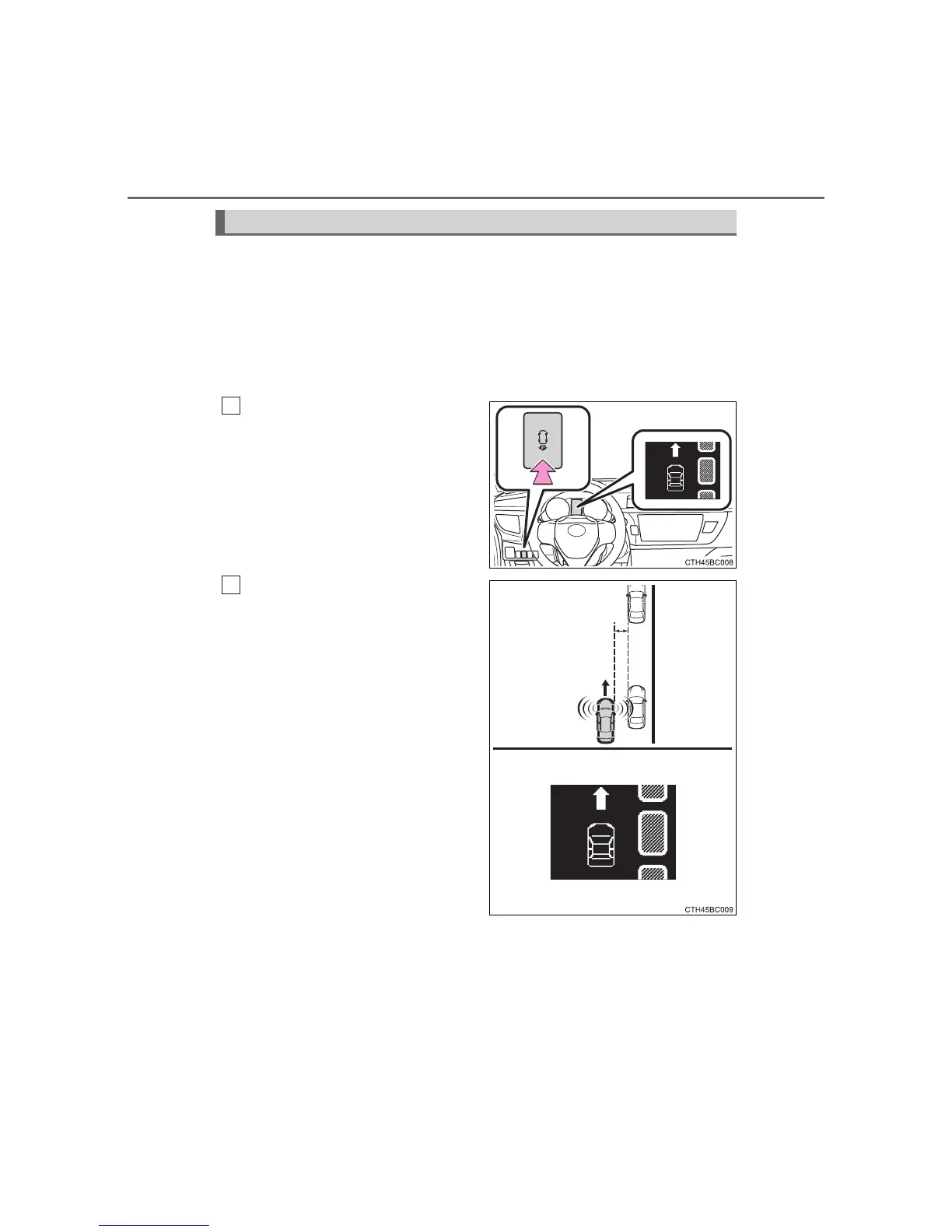
Turn the Simple-IPA switch on
with the vehicle driving at 30
km/h (18 mph) or less.
The multi-information display
changes to the parking space
detection screen when the system
is operating.
Drive the vehicle while main-
taining a distance of approxi-
mately 1 m (3 ft.) from the
parked vehicles.
Drive the vehicle as parallel to the
parked vehicles and curb as possi-
ble.
Lower vehicle speeds allow the
system to assist in parking the
vehicle more parallel to the parked
vehicles and curb, and in a more
proper position between vehicles
at the front and rear of a parking
space.
The required length for a parking
space to be detected is the total
vehicle length plus approximately 1
m (3 ft.).
Maintain a vehicle speed of 30
km/h (18 mph) or less.
Operating Simple-IPA
1
2






 To Next Page