72
Chapter 14
Customize Your Network Settings
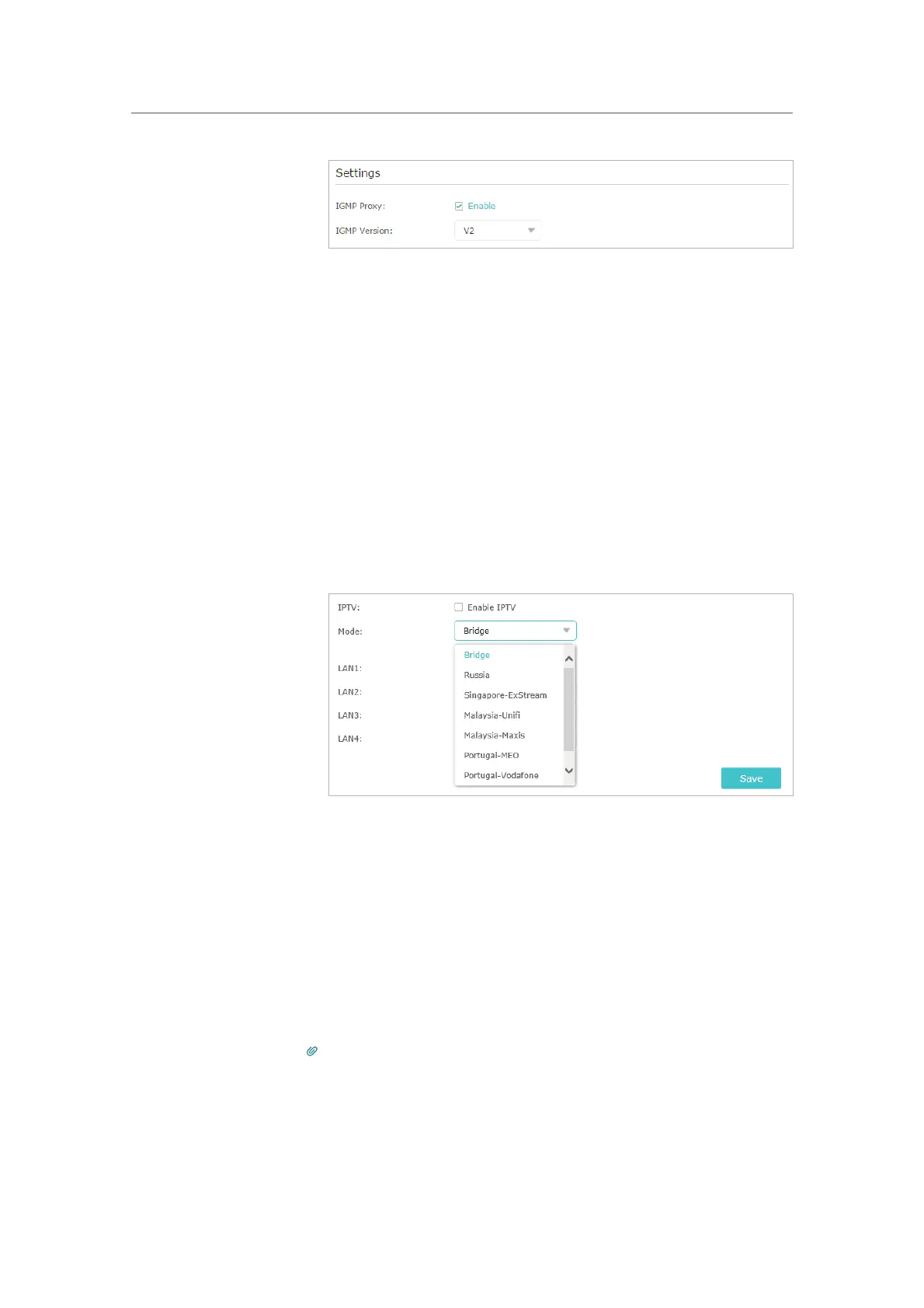
2 ) Click Save.
3 ) After configuring IGMP proxy, IPTV can work behind your
router now. You can connect your set-top box to any of
the router’s Ethernet port.
If IGMP is not the technology your ISP applies to provide
IPTV service:
1 ) Tick
Enable IPTV.
2 ) Select the appropriate
Mode according to your ISP.
• Select
Bridge if your ISP is not listed and no other
parameters are required.
• Select
Custom if your ISP is not listed but provides
necessary parameters.
3 ) After you have selected a mode, the necessary
parameters, including the LAN port for IPTV connection,
are predetermined. If not, select the LAN type to
determine which port is used to support IPTV service.
4 ) Click
Save.
5 ) Connect the set-top box to the corresponding LAN port
which is predetermined or you have specified in Step 3.
Your IPTV setup is done now! You may need to configure your
set-top box before enjoying your TV.
Tips:
Qos and IPTV cannot be enabled at the same time.
Done!











 To Next Page