EasyManua.ls Logo

TP-Link Archer C2 - Page 3

TP-Link Archer C2
18 pages
Print Icon
To Next Page IconTo Next Page
To Previous Page IconTo Previous Page
Loading...
2
English
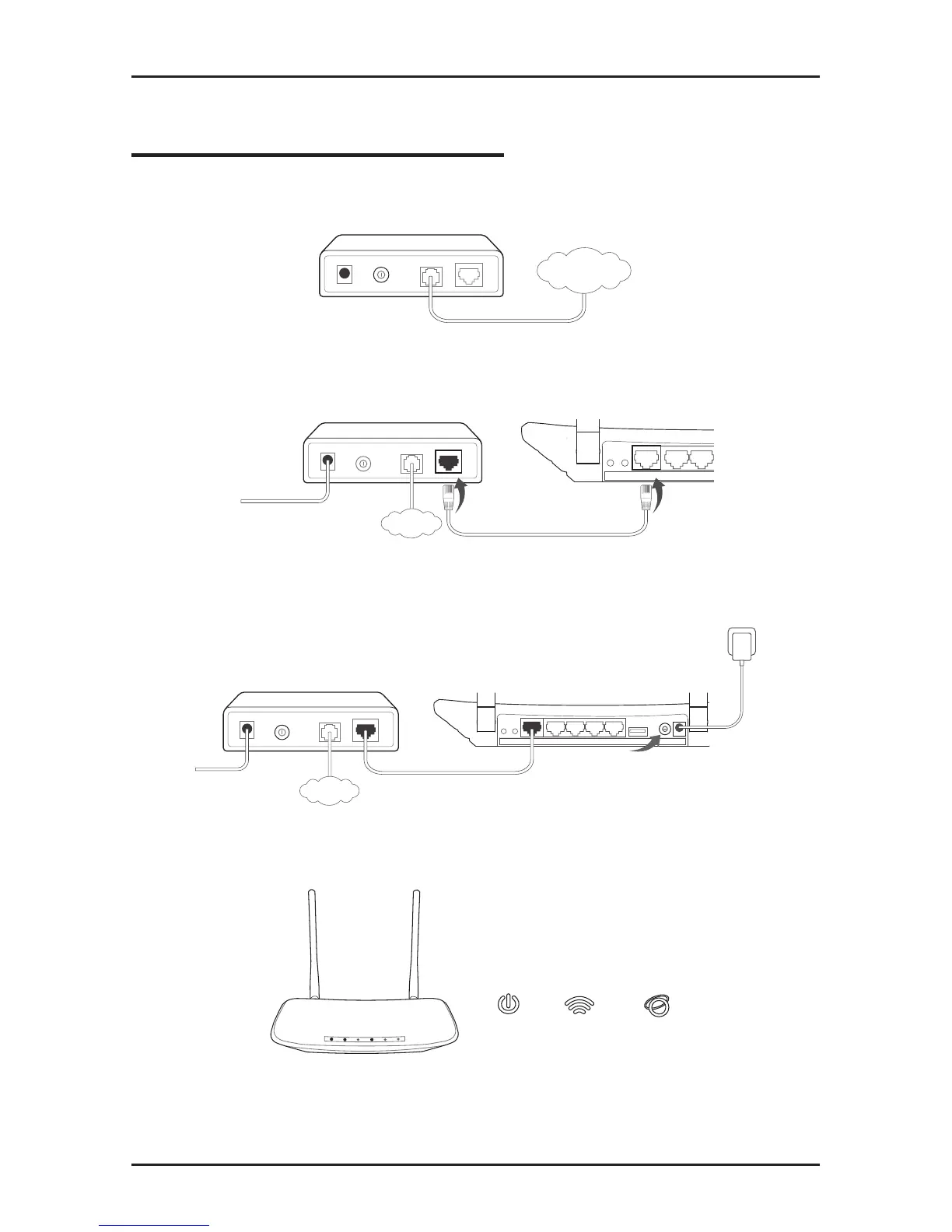
Connect the Hardware
1. Power off the modem, and remove the backup battery if any.
Power Off
LAN
INTERNET
2. Connect the modem to the Internet port on your router with an
Ethernet cable.
INTERNET
WPS/
Reset
Internet
Ethernet
1 2
Wireless
On/Off
3. Power on the modem, wait for 2 minutes and then power on
the router.
Power On
INTERNET
Power On
WPS/
Reset
Power
On/Off
PowerInternet Ethernet1 2 3 4 USB
Wireless
On/Off
4. Check the following LEDs to ensure the hardware connection
is correct.
On
Power
On
2.4G/5G
On
Internet
Note: If your Internet comes via an Ethernet cable from the wall instead
of any DSL/Cable/Satellite modems, please connect the Ethernet cable
directly to the router’s Internet port.