24Chapter 8 . Camera and video
Camera and video
This chapter contains the following sections.
• Get to know camera
• Take a photo
• Record a video
• Gallery
• Video Player
8. 1 Get to know camera
Launch the camera app
• On the Home screen: Tap
Camera.
• On the lock screen: Press the Power button. Then swipe left until the camera app is launched.
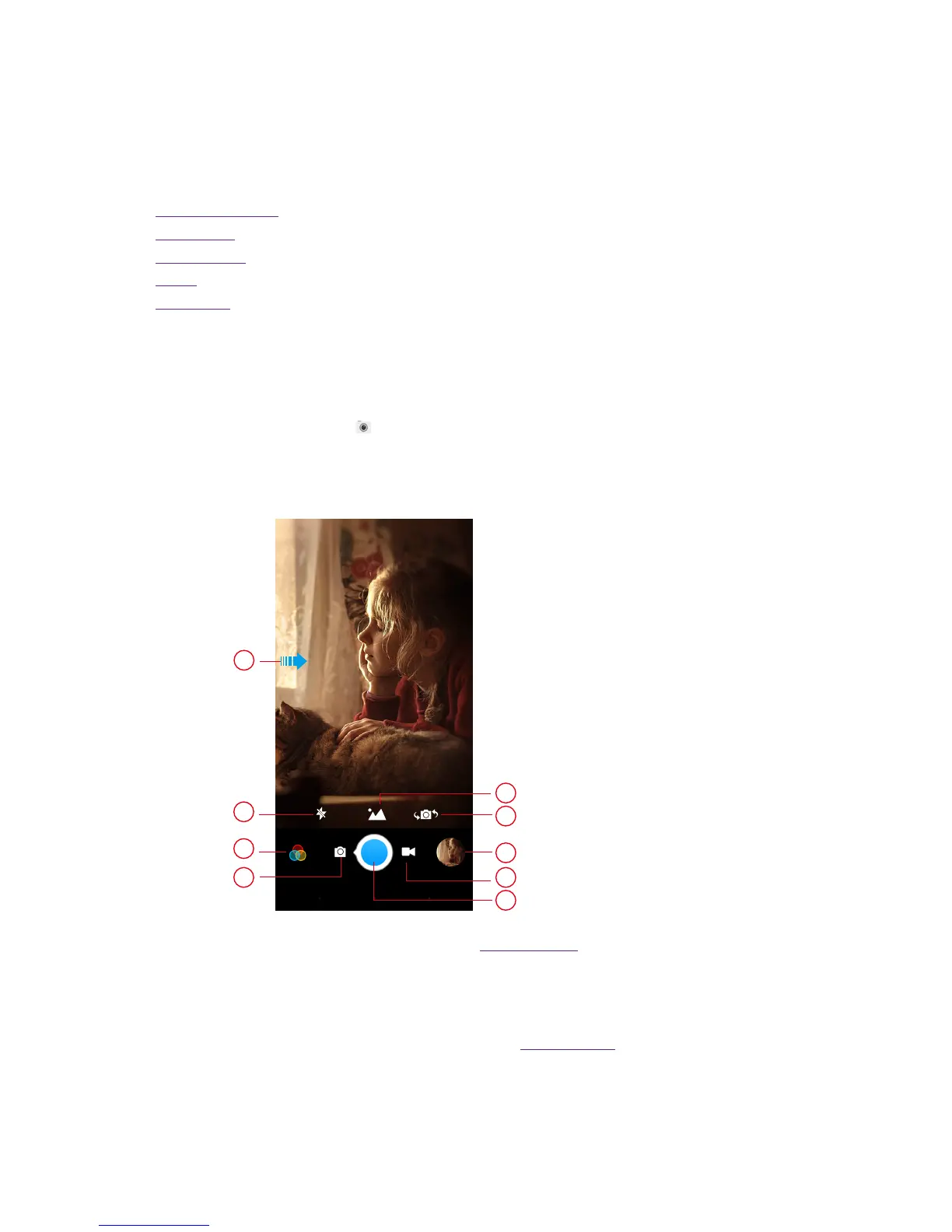
Camera home screen
1
2
3
4
5
8
7
6
9
1. Swipe right for settings. For more information, see Camera settings.
2. Tap to switch to the flash mode.
3. Tap to select filter.
4. Switch to camera mode.
5. Tap to set the shooting mode. For more information, see Shooting mode.
6. Switch between front camera and back camera.
7. View the photos and videos you have taken.
8. Switch to video mode.
8









 To Next Page