Configuration Guide 620
Configuring ACL Configuration Example for ACL
■ Configure four permit rules to match the packets with source IP address 10.10.70.0/24,
and destination ports TCP 80, TCP 443 and TCP/UDP 53. These allow the Marketing
department to visit http and https websites on the internet.
■ Configure a deny rule to match the packets with source IP address 10.10.70.0/24. This
rule blocks other network services.
The switch matches the packets with the rules in order, starting with Rule 1. If a packet
matches a rule, the switch stops the matching process and initiates the action defined in
the rule.
■ Binding Configuration
Bind the IP ACL to port 1/0/1 so that the ACL rules will apply to the Marketing department
only.
Demonstrated with T1500-28PCT, the following sections explain the configuration
procedure in two ways: using the GUI and using the CLI.
3.3 Using the GUI
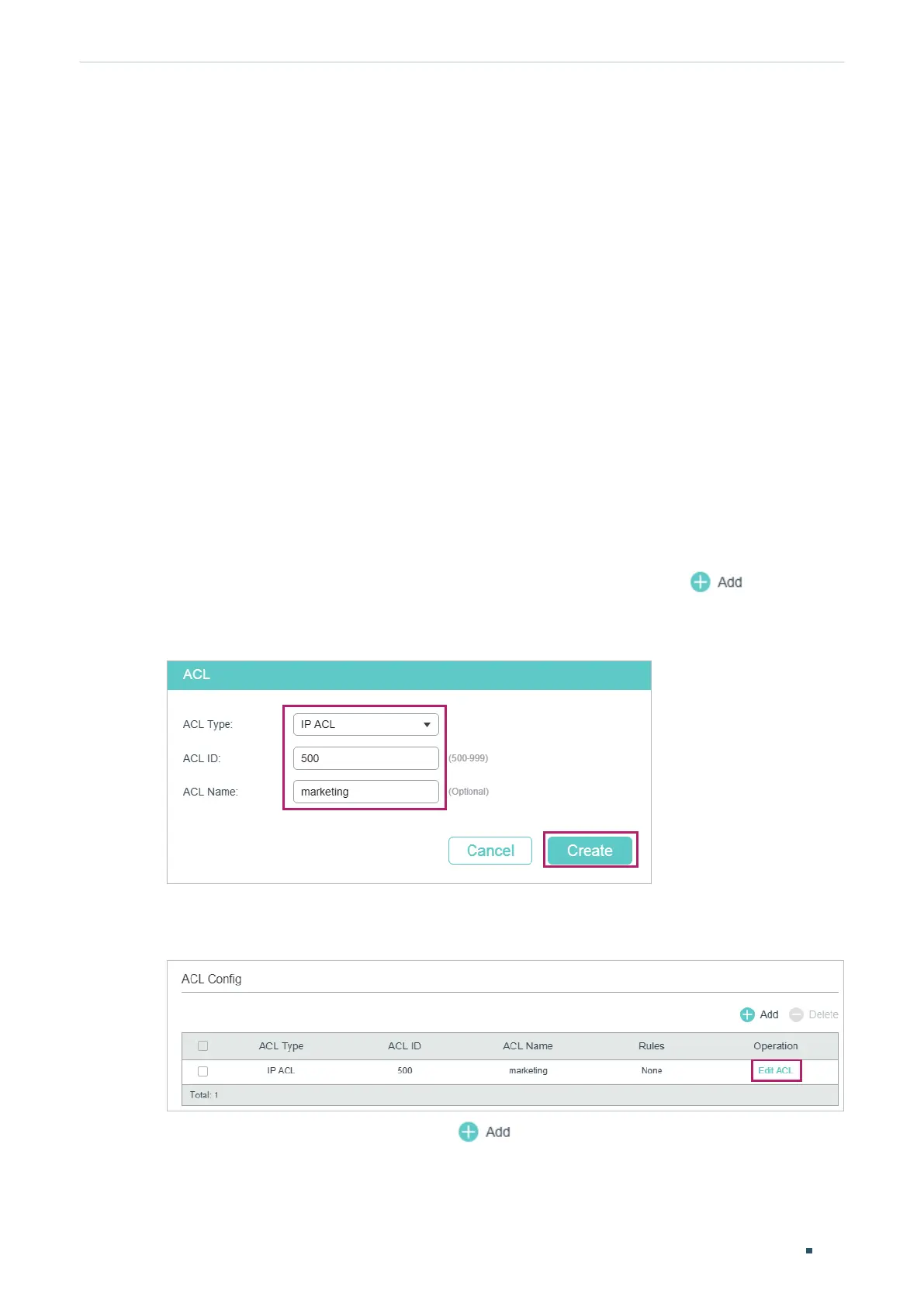
1) Choose the menu SECURITY > ACL > ACL Config and click to load the
following page. Then create an IP ACL for the marketing department.
Figure 3-2 Creating an IP ACL
2) Click Edit ACL in the Operation column.
Figure 3-3 Editing IP ACL
3) On the ACL configuration page, click .




 To Next Page