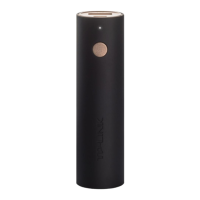
This document describes the TP-LINK TL-PBG3350, a portable power bank designed for charging various devices.
Function Description:
The TP-LINK TL-PBG3350 is a compact and portable power bank that allows users to charge their electronic devices on the go. It features a single USB output port for charging other devices and a micro-USB input port for recharging the power bank itself. A power indicator LED provides visual feedback on the device's status, and a power button allows users to check the battery level.
Important Technical Specifications:
- USB Output: 5V/1.5A
- Micro-USB Input: 5V/1A
- Power Indicator LED: Displays "On," "Blinking," or "Off" to indicate charging status and battery level.
- Model Number: TL-PBG3350
Usage Features:
Charging the Power Bank:
To charge the TL-PBG3350, plug it into a wall charger or a computer's USB port using a USB charging cable.
- When the power bank is charging, the power indicator LED will display "Charging."
- Once fully charged, the LED will indicate "Fully charged."
Charging Other Devices:
To charge another device, plug its USB charging cable into the 1.5A USB output port of the power bank.
- The power bank will provide power to the connected device.
- The power indicator LED will show "Sufficient battery" or "Low battery" depending on the power bank's charge level.
Checking the Battery Status:
Press the power button on the side of the power bank to check its current battery level.
- The power indicator LED will show "Sufficient battery" if there is enough charge.
- If the indicator LED is blinking, it means the battery is low, and it is recommended to charge the power bank.
Maintenance Features and Important Attention Points:
General Safety and Handling:
- Keep the device away from water, fire, and extreme temperatures to prevent damage or malfunction.
- Avoid deliberately dropping or impacting the device, as this can cause internal damage.
- Do not attempt to extrude or pierce the device, as this may lead to a short circuit or other hazards.
- Do not attempt to disassemble, modify, or repair the device yourself. Such actions can void warranties and potentially cause harm.
- Do not use a damaged wall charger or USB charging cable to charge this device, as it could damage the power bank or pose a safety risk.
- If the product shows signs of bulging or any other visible abnormalities, immediately stop using it and contact TP-LINK or your distributor for assistance.
Environmental and Charging Practices:
- Please recycle this device at an approved disposal location to ensure environmentally responsible disposal.
- To maintain battery life, charge the device at least once every three months, even if not in regular use. This helps prevent deep discharge and extends the battery's overall lifespan.
- Always use the recommended power adapter to charge this device. Note that the power adapter is not provided by TP-LINK and must be acquired separately.
For any questions related to this product, users can refer to the support page on the TP-LINK website at www.tp-link.com.
Customer support can also be reached by phone at TEL: +86 755 2650 4400.
The document version is 7106505887 REV1.0.0, copyrighted ©2016 TP-LINK.

 Need help?
 General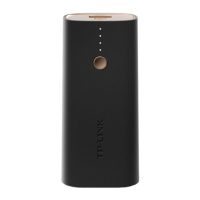



 To Next Page