- 17 -
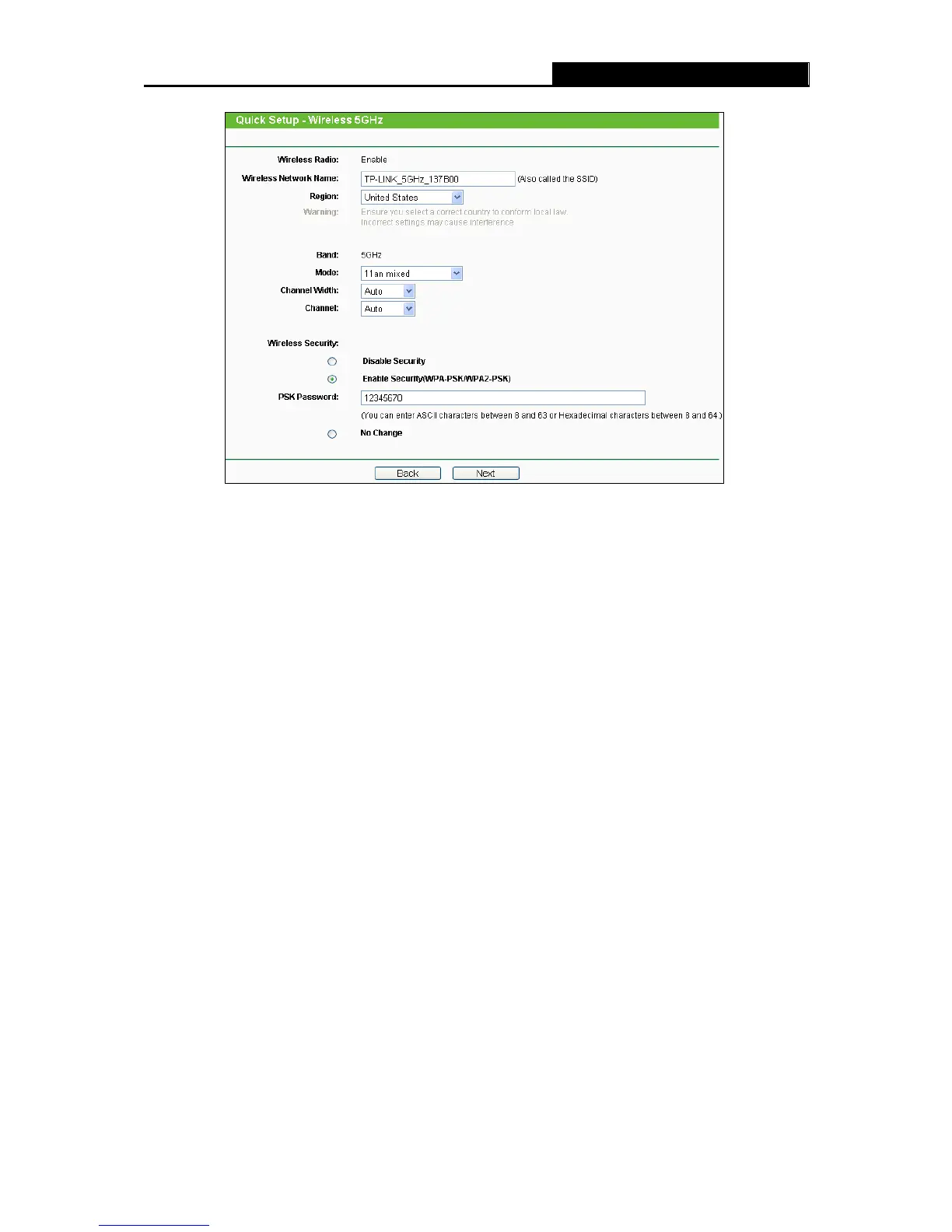
Figure 3-13 Quick Setup – Wireless
Wireless Radio - Choose from the drop-down list to enable or disable the wireless
radio.
Wireless Network Name - Also called the SSID (Service Set Identification). Enter a
value of up to 32 characters. The same name must be assigned to all wireless devices
in your network. The default SSID is set to be TP-LINK_5GHz_XXXXXX. This value is
case-sensitive. For example, TEST is NOT the same as test.
Region - Select your region from the drop-down list. This field specifies the region
where the wireless function of the Router can be used. It may be illegal to use the
wireless function of the Router in a region other than one of those specified in this field.
If your country or region is not listed, please contact your local government agency for
assistance.
Note:
Limited by local law regulations, version for North America does not have region
selection option.
Band - This field displayed the operating frequency being configured.
Mode - This field determines the wireless mode which the Router works on.
11a only - Select if all of your wireless clients are 802.11a.
11n only- Select only if all of your wireless clients are 802.11n.
11an mixed - Select if you are using both 802.11a and 802.11n wireless clients.













 To Next Page