- 42 -
3. Delete all or disable all entries if there are any entries already.
4. Click the
Add New...
button.
1) Enter the MAC address
00-0A-EB-B0-00-0B/00-0A-EB-00-07-5F
in the MAC Address field.
2) Enter wireless station A/B in the Description field.
3) Select Enabled in the Status drop-down list.
4) Click the Save button.
5) Click the Back button.
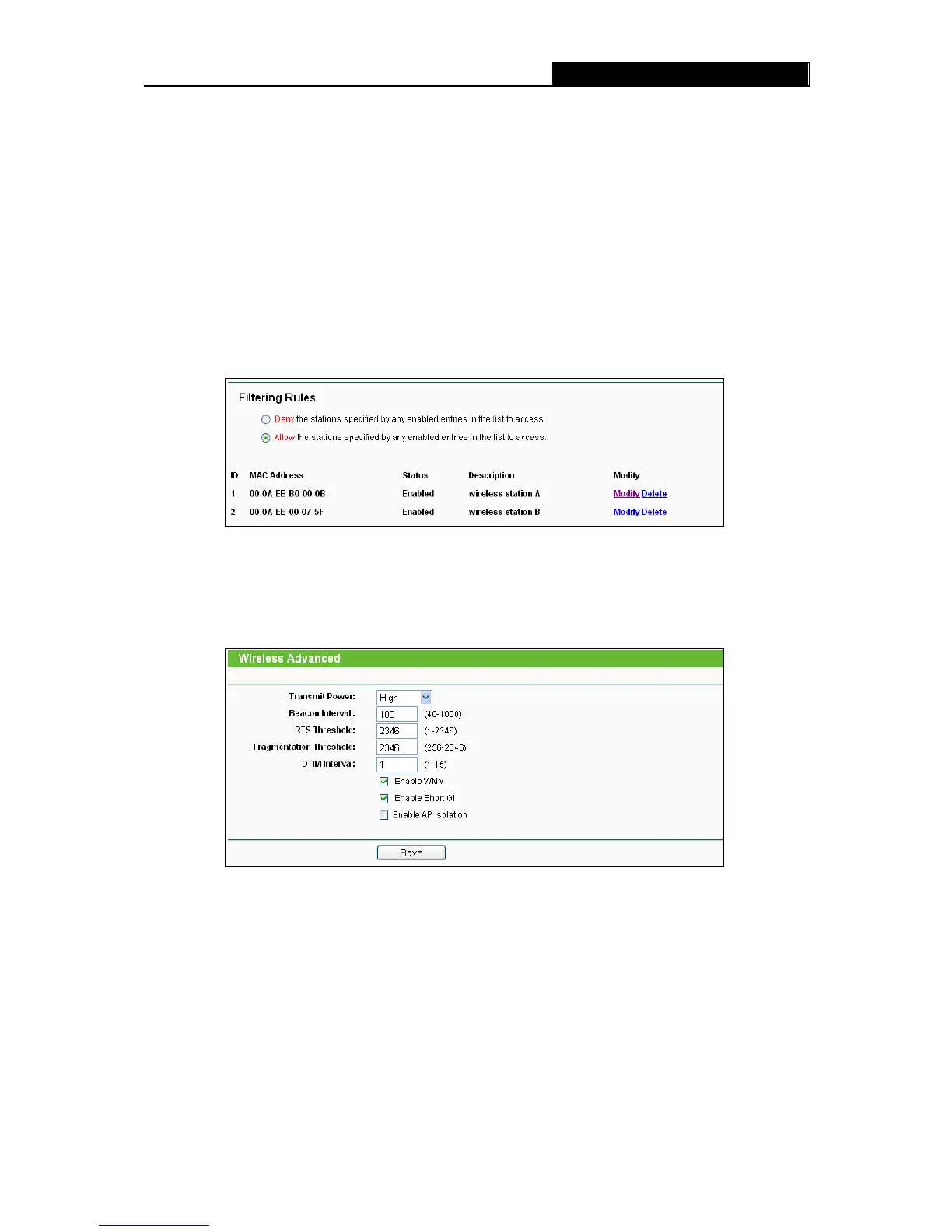
The filtering rules that configured should be similar to the following list:
4.6.5 Wireless Advanced
Choose menu “Wireless 2.4GHz
Wireless Advanced”, you can configure the advanced
settings of your wireless network.
Figure 4-26 Wireless Advanced
Transmit Power - Here you can specify the transmit power of Router. You can select High,
Middle or Low which you would like. High is the default setting and is recommended.
Beacon Interval - Enter a value between 20-1000 milliseconds for Beacon Interval here.
The beacons are the packets sent by the Router to synchronize a wireless network. Beacon
Interval value determines the time interval of the beacons. The default value is 100.
RTS Threshold - Here you can specify the RTS (Request to Send) Threshold. If the packet
is larger than the specified RTS Threshold size, the Router will send RTS frames to a













 To Next Page