- 86 -
Method One:
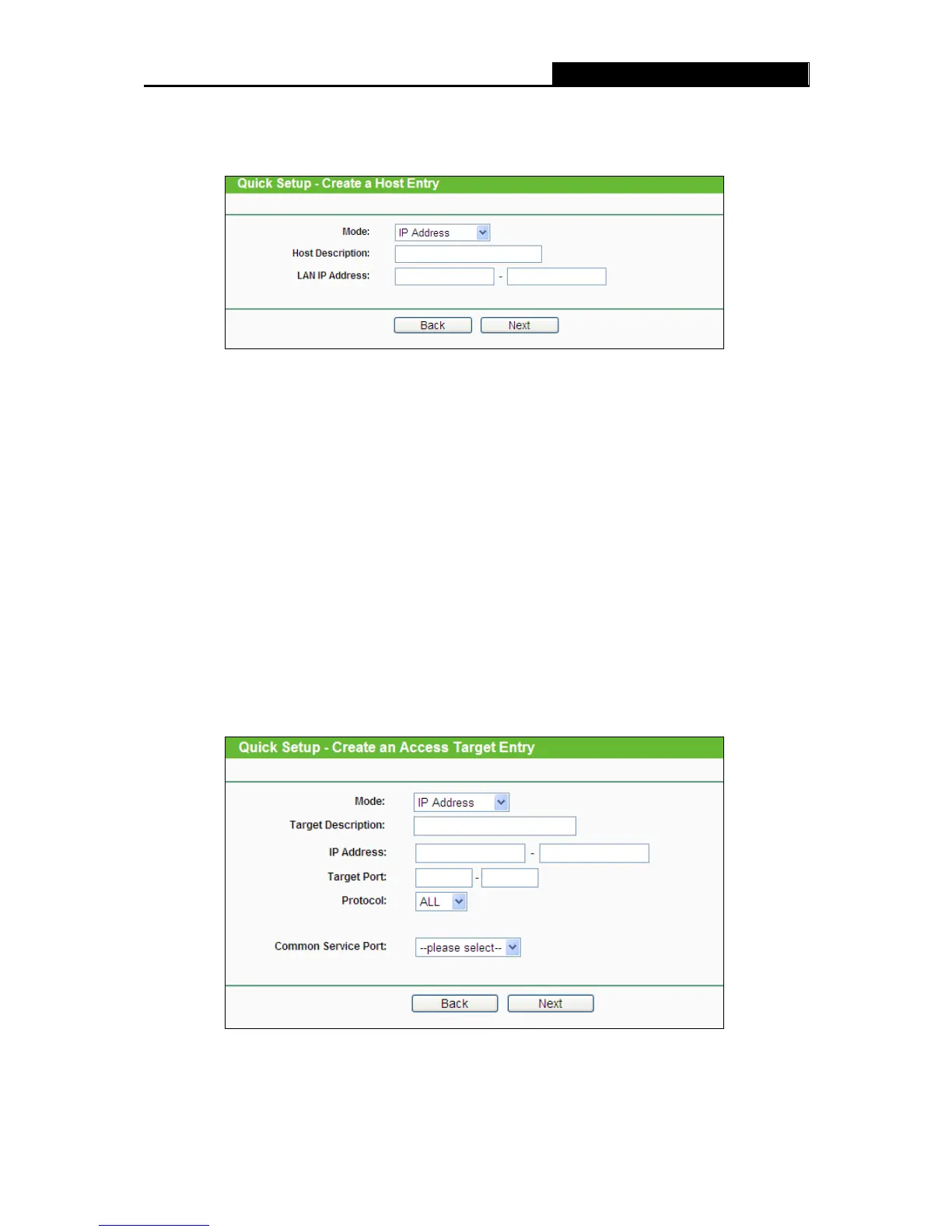
1. Click Setup Wizard button and the next screen will appear as shown in Figure 4-82.
Figure 4-82 Quick Setup – Create a Host Entry
Host Description - In this field, create a unique description for the host (e.g. Host_1).
Mode - Here are two options, IP Address and MAC Address. You can select either of them
from the drop-down list.
If the IP Address is selected, you can see the following item:
LAN IP Address - Enter the IP address or address range of the host in dotted-decimal format
(e.g. 192.168.0.23).
If the MAC Address is selected, you can see the following item:
MAC Address - Enter the MAC address of the host in XX-XX-XX-XX-XX-XX format (e.g.
00-11-22-33-44-AA).
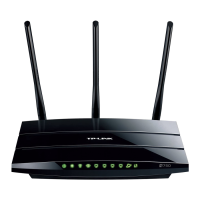
2. Click Next when finishing creating the host entry, and the next screen will appear as shown in
Figure 4-83.
Figure 4-83 Quick Setup – Create an Access Target Entry
Target Description - In this field, create a description for the target. Note that this description
should be unique (e.g. Target_1).













 To Next Page