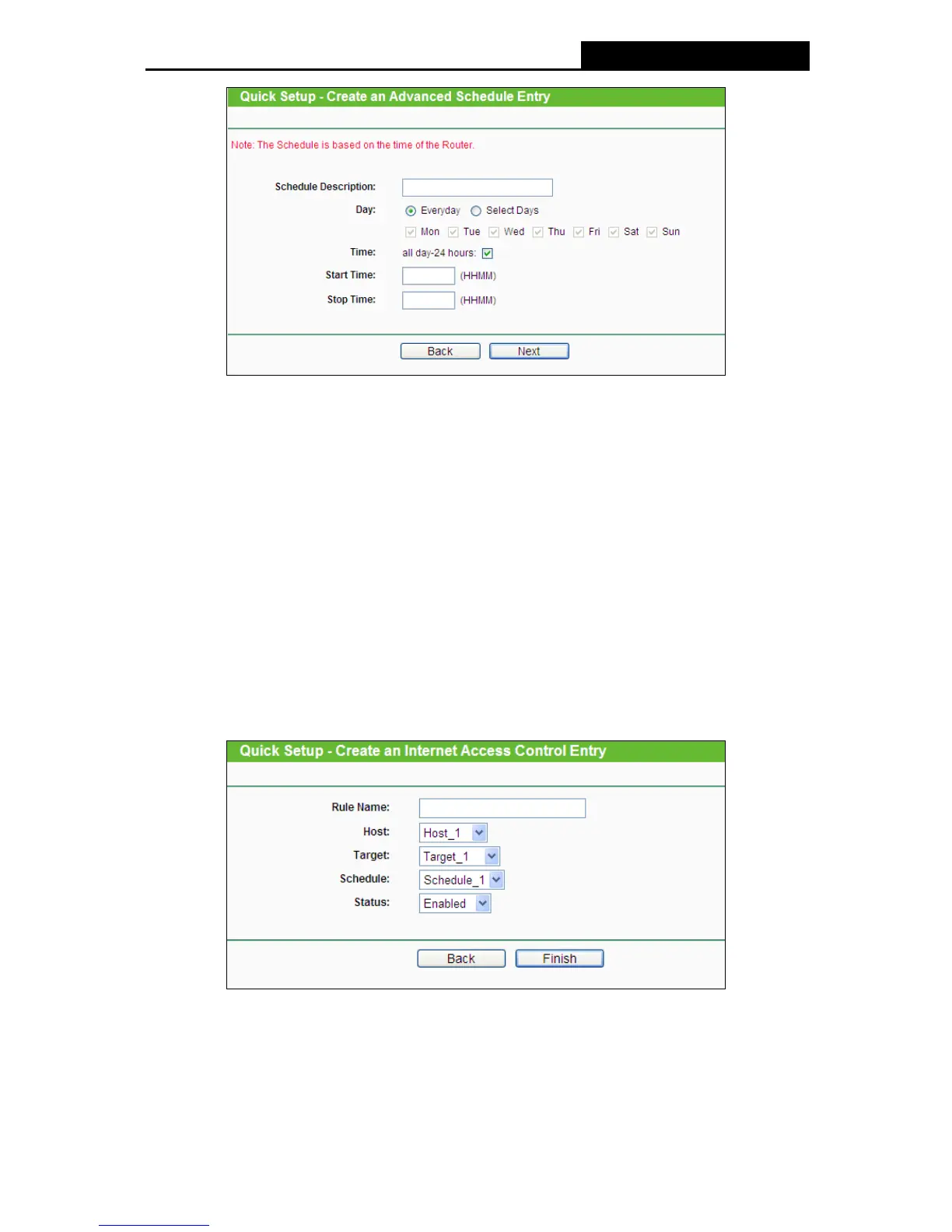
Figure 4-50 Quick Setup – Create an Advanced Schedule Entry
Schedule Description - In this field, create a description for the schedule. Note that this
description should be unique (e.g. Schedule_1).
Day - Choose Select Days and select the certain day (days), or choose Everyday.
Time - Select "24 hours", or specify the Start Time and Stop Time yourself.
Start Time - Enter the start time in HHMM format (HHMM are 4 numbers). For example
0800 is 8:00.
Stop Time - Enter the stop time in HHMM format (HHMM are 4 numbers). For example
2000 is 20:00.
4. Click Next when finishing creating the advanced schedule entry, and the next screen will
appear as shown in Figure 4-51.
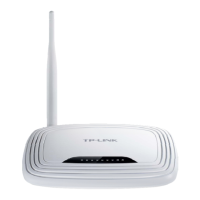
Figure 4-51 Quick Setup – Create an Internet Access Control Entry
Rule Name - In this field, create a name for the rule. Note that this name should be
unique (e.g. Rule_1).
Host - In this field, select a host from the drop-down list for the rule. The default value is
the Host Description you set just now.
60











 To Next Page