76
Chapter 5
Configure the Router in Hotspot Router Mode
after a specified inactivity period (Max Idle Time) and not be able to re-establish
when you attempt to access the internet again.
• Authentication Type - Choose an authentication type.
Note:
Sometimes the connection cannot be terminated although you have specified the Max Idle Time because some
applications are visiting the internet continually in the background.
• Service Name/Server Name - The service name and server name should not be
configured unless you are sure it is necessary for your ISP. In most cases, leaving
these fields blank will work.
• MTU(Bytes) - The default MTU size is 1480 bytes. It is not recommended that you
change the default MTU size unless required by your ISP.
• Use IP Address Specified by ISP - If your ISP does not automatically assign IP
addresses to the router, please select this item and enter the IP address provided by
your ISP in dotted-decimal notation.
• Echo Request Interval - The router will detect Access Concentrator online at every
interval. The default value is 0. You can input the value between 0 and 120. The value
0 means no detect.
• Set DNS Server Manually - If your ISP does not automatically assign DNS addresses to
the router, please select this item and enter the IP address in dotted-decimal notation
of your ISP’s primary DNS server. If a secondary DNS server address is available,
enter it as well.
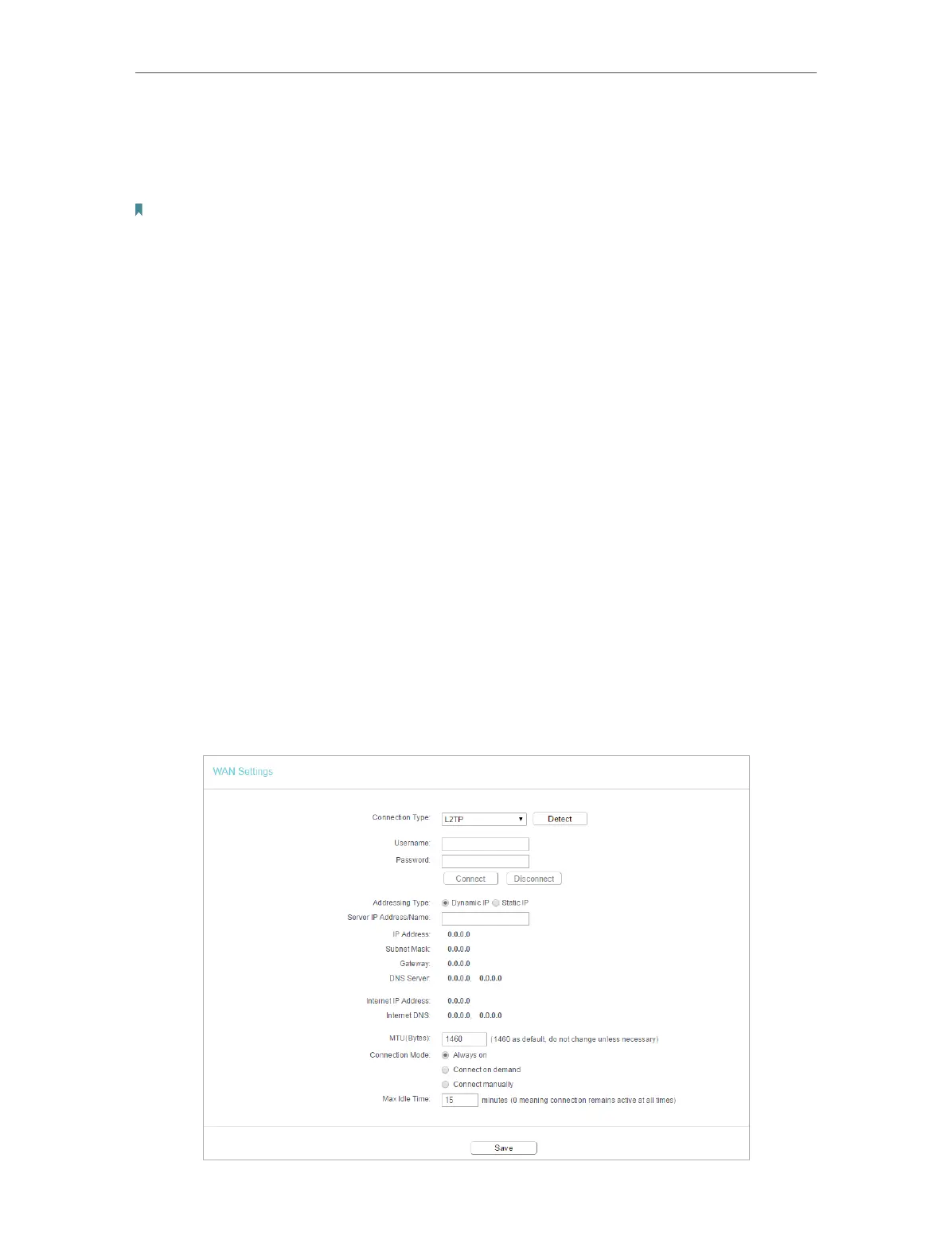
L2TP
If your ISP provides L2TP connection, please select L2TP.


 To Next Page