55
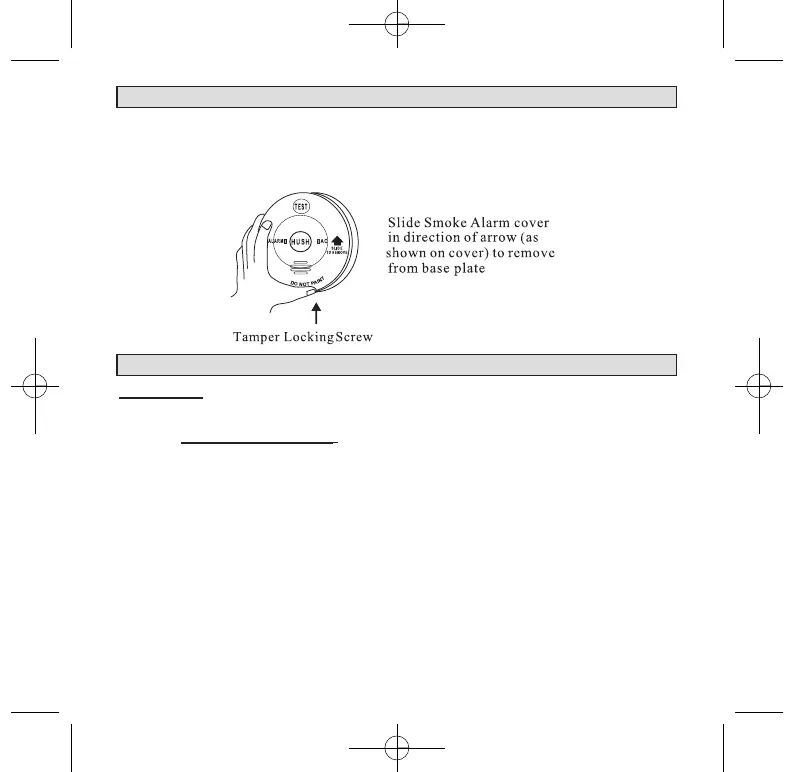
5. HOW TO REMOVE SMOKE ALARM FROM BASE PLATE
5.1 Look for ‘SLIDE TO REMOVE’.
5.2 Remove Tamper Locking Screw if installed.
5.3 Push firmly towards arrow until smoke alarm unhinges from base plate.
5.4 To re-install smoke alarm follow FIGURE 2 procedure 1 to 3. See page 9.
6. INSTALLATION
WARNING: THIS SMOKE ALARM MUST BE INSTALLED BY
QUALIFIED (LICENSED) ELECTRICIANS ONLY.
6.1
Wiring Instructions:
6.1.1 In the interests of safety, this smoke alarm and all wiring must be installed by
a licensed electrician in accordance with the relevant requirements of the
SAA Wiring Rules - AS3000.
6.1.2 For model TRFSD240PERL; Connecting the smoke alarm on the base plate
will activate the lithium battery. Please note, the long absence of mains
power may damage the rechargeable battery. Warranty is void if the battery
is damaged. If the mains power is turned off for a long period of time, for
example, if the building is not occupied, disconnect the smoke alarm from
the base plate. When mains power is turned on, ensure the smoke alarm is
then connected to the base plate. The battery may be low in new smoke
alarms, please allow up to 8 hours for the battery to fully charge. Smoke
alarms may chirp until the battery is fully charged. When recharging do not
press Test or Hush button.



 To Next Page