www
.
T
r
a
il
F
X
.
c
om
Page 4 of 8 Rev 051918
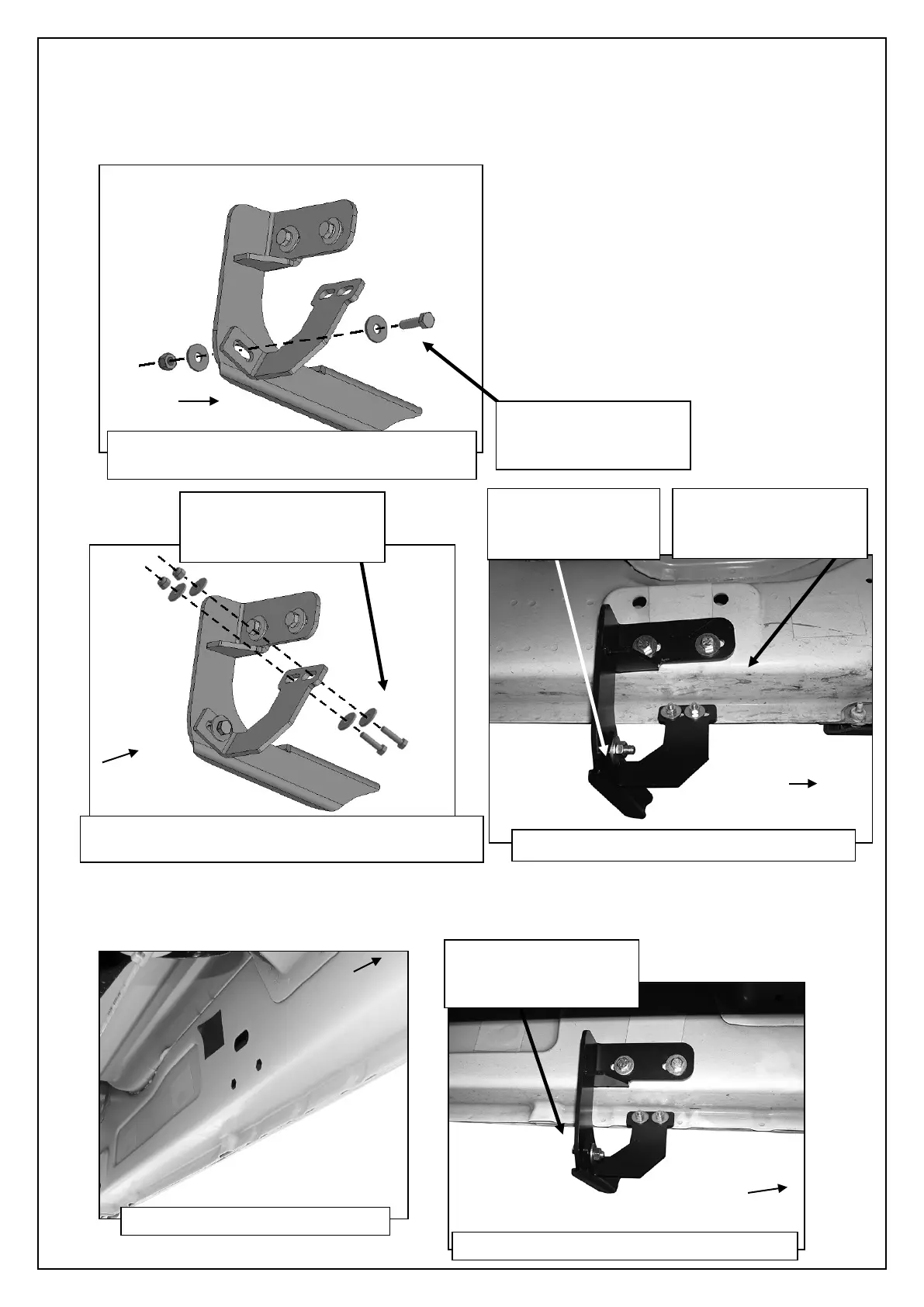
4. Next, select the driver side front Support Bracket. Attach the Bracket to the front facing side of the front Bracket with (1) 8mm x
30mm Hex Bolt, (2) 8mm Flat Washers and (1) 8mm Nylon Lock Nut, (Figure 10). Rotate the Support Bracket to the back of
the pinch weld. Line up the slots in the top of the Support Bracket with the (2) factory holes in the pinch weld. Attach the Bracket
to the back of the pinch weld with (2) 6mm x 25mm Hex Bolts, (4) 6mm Flat Washers and (2) 6mm Nylon Lock Nuts, (Figures
11 & 12). Do not fully tighten hardware at this time. IMPORTANT: 2009-10 models are not equipped with factory holes and will
require drilling through the pinch weld to attach the Support Bracket. Do not drill through pinch weld at this time, (see Step 9).
5. Move along the side of the body panel to the center mounting location, (Figure 13). Repeat the appropriate Step 3 to install the
driver side center Bracket, (Figure 14). Select (1) driver side front/center Support Bracket. Repeat Step 4 to attach the Support
Bracket to the front of the center bracket and factory holes (if equipped) in the pinch weld, (Figure 15).
(Fig 10) Attach Driver/Left front Support Bracket
to front facing side of Mounting Bracket
(2) 8mm Flat Washers
(Fig 11) Attach Support Bracket to back of pinch
weld (models with factory holes in pinch weld only)
(4) 6mm Flat Washers
(2)
6
mm Nylon Lock Nuts
(4) 6mm Flat Washers
(2)
6
mm Nylon Lock Nuts
(Fig 12) Driver side front Bracket assembly
(2) 8mm Flat Washers
8mm Nylon Lock Nut
(Fig 13) Driver/Left center location
(Fig 14) Driver/Left center Brackets installed
(2) 8mm Flat Washers


 To Next Page
 Loading...