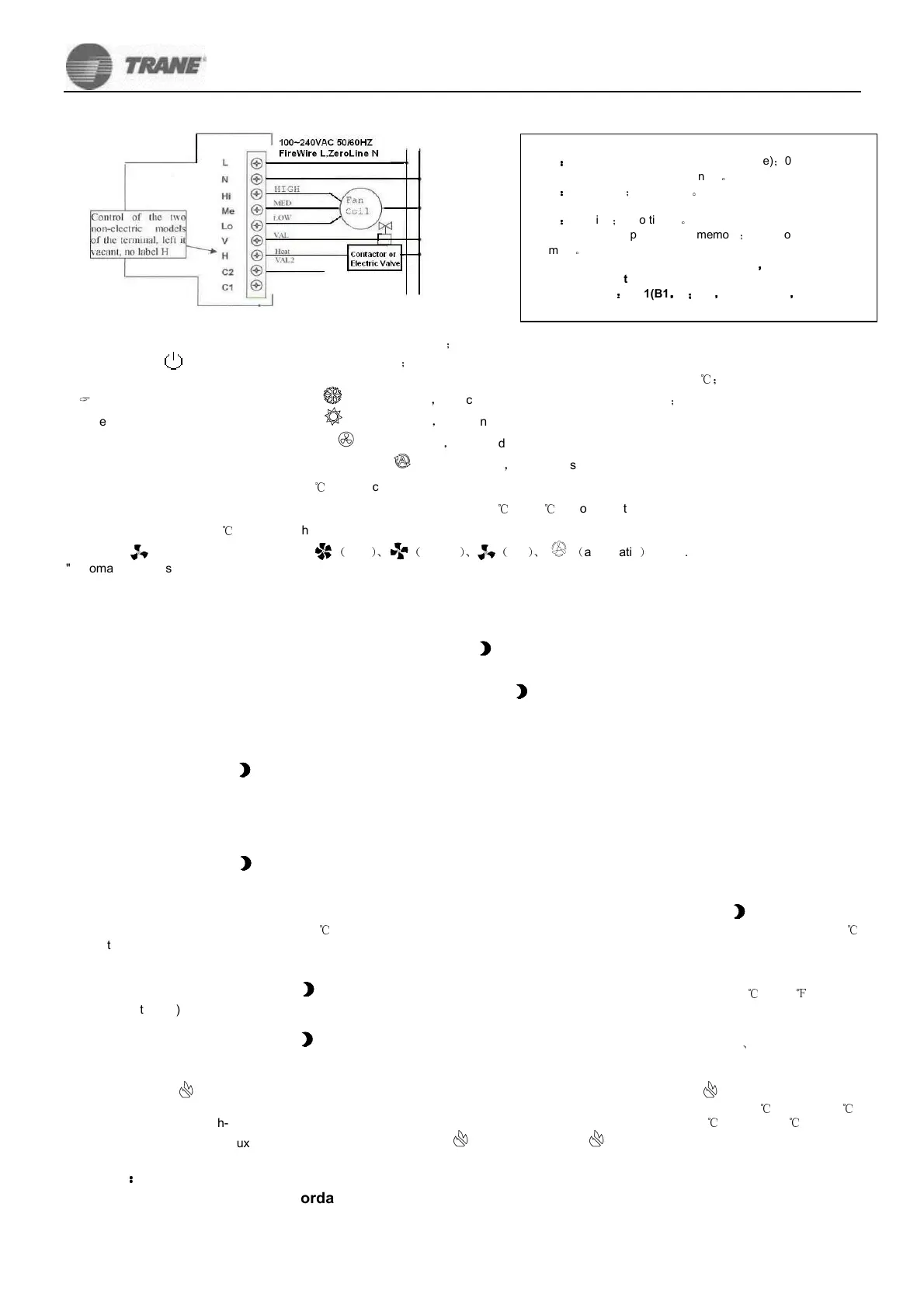
Electrical wiring diagram:
::
: 2 DIP switch selection
Operation explain:
::
:
When the backlight is shut down, the first button only lit backlight
;
ON/OFF:the
press first time turn on, then shutdown
;
Temperature settings:the "5" key set higher temperature, a"6"button is lower temperature. Change ever time l
℃
;
Cooling settings: press "M" button, until a symbol flashes
,
5 seconds after the automatic recognition
;
Heating settings: press "M" button, until a symbol flashes
,
5 seconds after the automatic recognition
Ventilation settings: press "M" button, until a symbol flashes
,
5 seconds automatically confirmed that the choice of fan speed operation;
Automatic mode settings: press "M" button, until a symbol flashes
,
5 seconds after the automatic recognition, when the room
temperature and the temperature settings ≥3
℃
, Select cooling mode, when temperature set same with the room temperature turn to ventilation
function. When the room temperature and the temperature settings between -3
℃
and 3
℃
,choose ventilation mode. When room temperature and
the temperature settings ≤-3
℃
,choose the heating mode, When temperature set same with the room temperature turn to ventilation function.
Press “ ” button to select fan speed "
(
high
)、 (
middle
)、 (
low
)、 (
automatic
)
" CYC.
"Automatic" means wind speed, wind speed automatic transmission, that is, when the temperature set at room temperature and the difference
more than 1 °C. low wind speed automatic choice when the temperature set at room temperature and the difference more than 2 °C. the
automatic selection turn to (in) when the room temperature settings and Temperature difference more than 3 °C, the automatic selection of high
winds.
Function:
::
:
Sleep settings: in the power on state, when press the "" button, the symbol flashes, will turn to sleeping setting, at this moment press
5will turn to sleeping state, press 6 over the operation.
Standard Time settings: In standby mode. when press the button. the symbol flashes, press"M" button, enter the standard time
settings. press "5" or "6" can adjust the current week, adjusted to the expectation vaule, press to comfirm; when "AM" or "PM" flashing, press
"5" or "6" to adjust the current AM or PM, adjusted to the expectation vaule, press to comfirm; Same operation with the seconds and hours
settings. (No timing models do not get this function)
Timing ON settings and cancellation:
When press the button, the symbol flashes, press "M" button twice, enter the timing ON settings. " Timing open " button flashing, and the
"AM" or "PM" flashing, press "5" or "6" can adjust the selection, adjusted to the expectation vaule, press to comfirm. " Timing open " button
flashing, and the hour symbol flashes, press "5" or "6" can adjust the when you want turn on, adjusted to the expectation value, press to
comfirm; Same with expectation second setting. When "timing on" sign flashes, and "hh:mm" All flashes, press 5 to keep setting, and press 6 to
cancel the setting. (No timing models do not get this function)
Timing OFF settings and cancellation:
When press the button, the symbol flashes,and press "M" button three times, enter the timing OFF settings. The other setting same with
the timing ON settings.
Temperature cablibration:
When the temperature is not accurate, then we have to carry out this operation. In standby mode, press the button, the symbol flashes,and
press "M" button four times, it will display "XX "("Room" symbol do not show), Which XX for the current room temperature, fla
℃
shing display,
℃
for the temperature unit, no flashing. Press "5" or "6" key to adjust to the correct temperature. By "" button to confirm kept out.(No timing
function types turn to this function directly)
Farenheit and Celsius switching:
In standby mode, press the button, the symbol flashes,and press "M" button five times, It will be flashing display "XX "
℃
or"XX
℉
"("Room"
symbol do not show), Press "5" or "6" key to switch . By "" button to confirm kept out.
12-hour and 24-hour clock switching:
In standby mode, press the button, the symbol flashes,and press "M" button six times, It will be flashing display "AM
、
PM"symbol , Press
"5" or "6" key to switch. By "" button to confirm kept out.
Auxiliary electric heater functions (with two electric controls, optional, H label, H auxiliary electric hearter): the heating mode, press "M"
and "5" button,the " "symbol flashes,at this moment, it allow electric heating work; press "M" and "6" button,the " "Icon is not display,at this
moment, it don’t allow electric heating work; at room temperature lower than the setting, when the temperature exceeds 3 (including 3 )
℃ ℃
started heating, Air coil high-speed operation. When the temperature setting and room temperature to less than 1 (including 1 ), auxiliary
℃ ℃
electric hearter closed. When auxiliary electric hearter open will show " " icon, when closed, " " icons do not show(4 H control at the terminal
to electric hot water valve).
Warning
:
::
:
Electrical wiring must be in accordance with the wiring diagram properly connected to prevent water, mud
and other debris into the temperature control, so as to avoid damage to the device! Installation if you use
hard plastic line, prior to bending the right angle!
B1
:
::
:
1 fan opened(after the vavle clearance)
;
0 Wind
authorities(after the vavle clearance)
。
B2
:
::
:
1 4 control
;
0 2 control
。
▼DP2
B1
:
::
:
1 timing
;
0 no timing
。
B2: 1 switch-a power-down memory
;
0 no Power-down
memory
。
0 means DIP switches for the OFF status
,
,,
,
1 means DIP switches for the ON status
Factory default
:
::
:
DP1(B1
,
,,
,
1
;
;;
;
B2
,
,,
,
0) DP2(B2
,
,,
,
1)


 To Previous Page
 Loading...