16
NETWORK CONNECTIONS
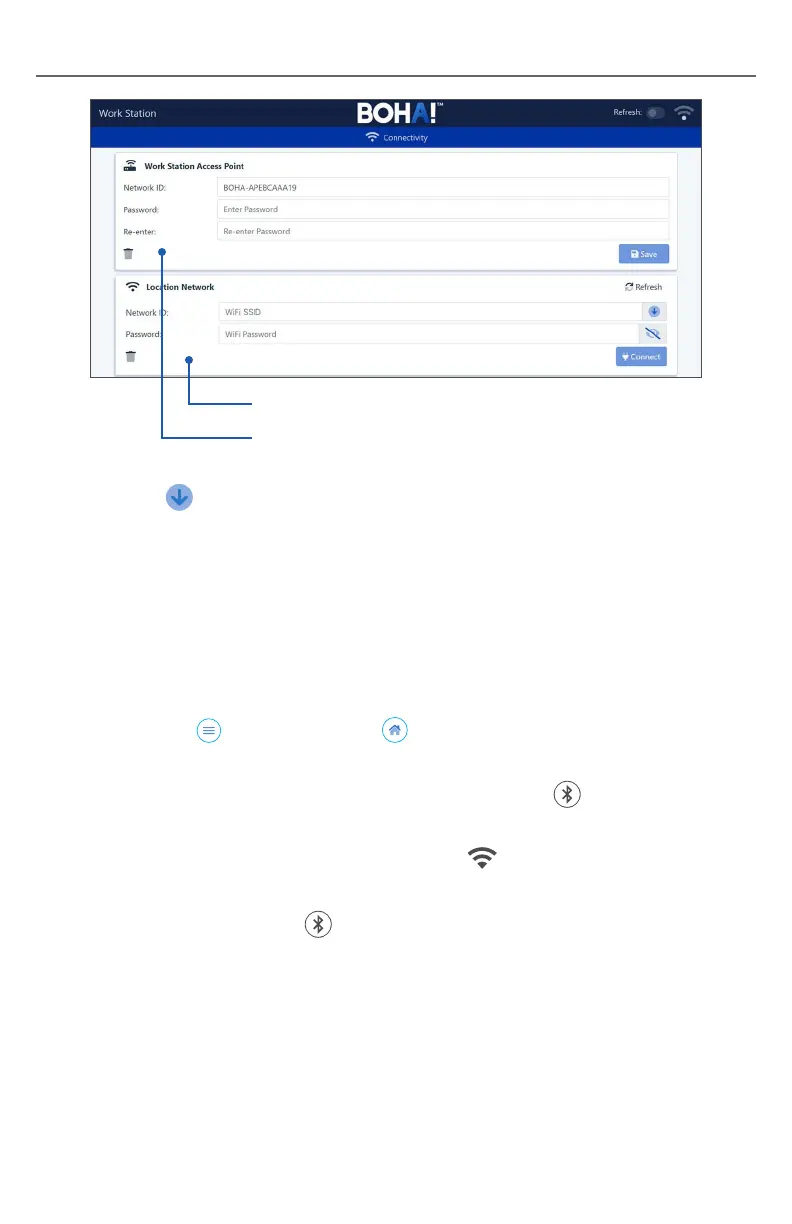
4. Click on the in the Local Network section to display available networks
and select your desired network. If your network is hidden, enter the
information manually.
5. Enter the Password for the selected Network ID.
Note: Do not change the WorkStation Access Point Information.
Doing so will cause you to lose connection to the configuration pages.
6. Select Connect to join the network.
7. Open the menu and select Home to return to the configuration
overview page.
8. On the BOHA!
®
WorkStation, press the Bluetooth button to exit
configuration mode.
9. When the connection is complete, the Network LED on the BOHA!
WorkStation front panel will change to solid green.
10. Press the Bluetooth button for two seconds and release to print a summary
of the network configuration. This should match the network settings defined in
the steps above.
11. Close the browser connection.
12. Put your tablet or PC back on its original network. Your tablet and BOHA!
WorkStation should now be on the same network.
13. The BOHA! WorkStation is now ready for operation.
Local Network Settings
Configuration Access Settings


 To Next Page