Need help?
Do you have a question about the TransAct BOHA and is the answer not in the manual?
Outline of unboxing, loading, tablet linking, and login steps.
Lists the BOHA! WorkStation, mount, guide, and power cord.
Location, Wi-Fi range, and app download requirements.
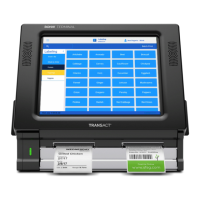
Front panel, ports, connections, and printer controls.
Functions of controls and meanings of status indicators.
Steps to connect power and start the workstation.
Steps for preparing and loading label rolls.
Sliding sidewalls to fit the label roll correctly.
Visual guide to proper and improper label alignment.
Steps to release and open the tablet mount cover.
Positioning the tablet for charging connection.
Plugging in the charging cord and seating the tablet.
Procedure to detach the tablet from the mount.
Lists Wi-Fi (pre-configured, manual) and Ethernet options.
Detailed steps for connecting to a Wi-Fi network.
Username and password for accessing the portal.
The home page showing network status and information.
Accessing network settings via the menu.
List of available settings within the menu.
Steps to join a desired Wi-Fi network.
Finishing setup and printing network details.
Plugging in the Ethernet cord for connection.
Steps in the app for Ethernet setup.
Methods to log into the BOHA! Ops application.
Finding account details on the BOHA! Control Center.
Using the manager to find location-specific data.
Choosing the correct location from a list.
Using the information button to view details.
Using a QR code for automatic login via the app.
Directing the tablet camera at the displayed QR code.
Inputting account, location, and code into BOHA! Ops.
Indicates that BOHA! Labeling is ready to use.
Accessing the labeling feature within the app.
Initiating the process to pair a printer.
Choosing the paired workstation from found printers.
Setting the label type and size for the printer.
Finalizing printer configuration.
Choosing the specific item to print a label for.
Changing the number of labels to print.
Activating the label printing command.
Information on USB-A and USB-C charging ports.
Naming the workstation for identification.
Steps via the web portal to rename the device.
Ways to get help via website, email, or phone.
Information on ordering labels and their importance.
 General
| Category | Touch Terminal |
|---|---|
| Storage | 128GB SSD |
| Connectivity | Wi-Fi, Bluetooth |
| Ports | USB, serial, Ethernet |
| Dimensions | Varies by model |
| Weight | Varies by model |
| Operating Temperature | 0°C to 40°C |
| Certifications | CE |

 To Next Page