12
Option 1 – Pre-configured Devices:
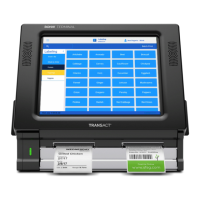
1. If the BOHA! WorkStation was pre-configured, it will automatically connect to
your Wi-Fi network at power up.
Note: The power up/connection process may take up to 1 minute.
2. When the connection is complete, the Network LED on the BOHA!
WorkStation front panel will change from flashing to solid green.
3. The BOHA! WorkStation is now ready for operation.
The BOHA!
®
WorkStation and tablet must be on the same network
to successfully print.
Review the options below to find your set up process. For all options, ensure
labels have been loaded in the print mechs prior to configuration.
Option 1: Pre-configured Devices: Follow the steps for this option, if your
device has already been configured to join your local network and your System
LED indicator is solid green.
Option 2: Manual Network Configuration: Follow the steps for this option,
if your device has not been pre-configured or your local network settings
have changed.
Option 3: Ethernet Connection: Follow the steps for this option, if you are
using an Ethernet cable to establish a network connection.
NETWORK CONNECTIONS


 To Next Page