8
LABEL LOADING
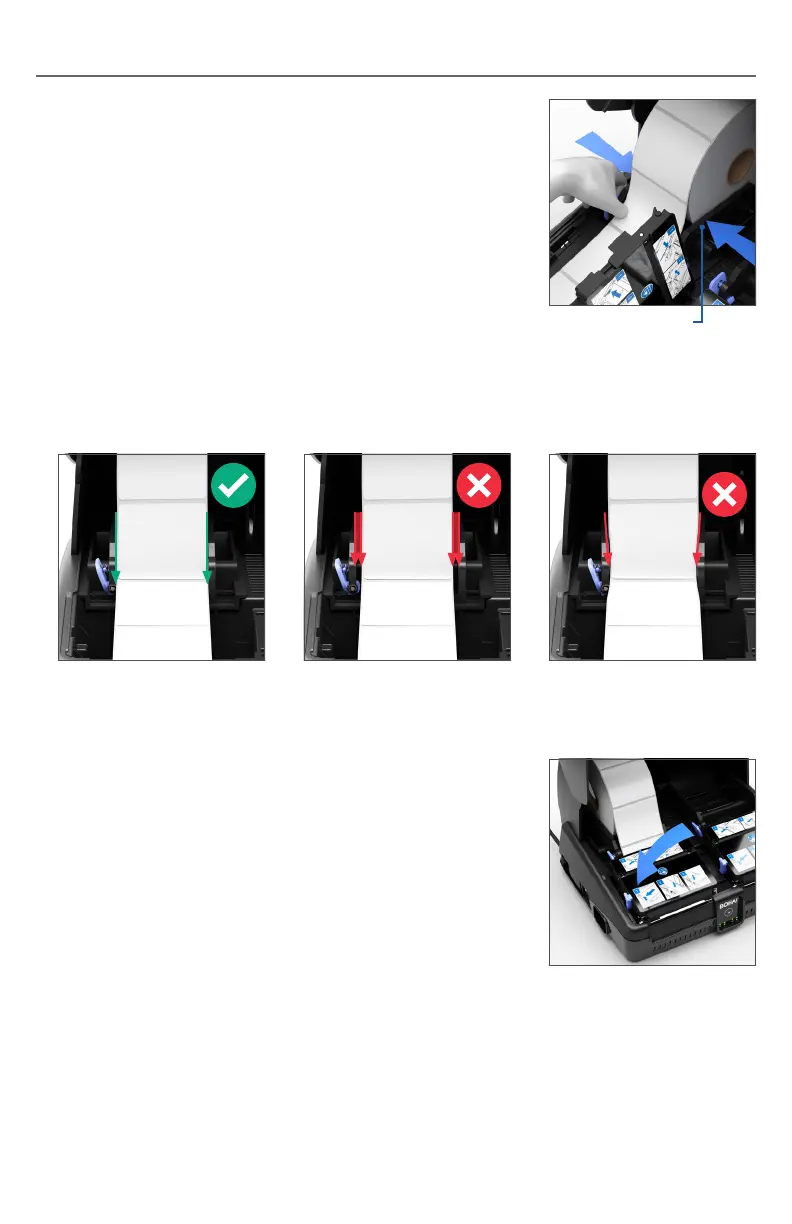
4. Pinch the blue bucket width adjustment lever on
the side of the paper bucket and gently slide the
sidewalls so they close in on the paper roll. The
sidewalls should be straight against the label roll
(as shown in Fig.1). A gap between the label roll
and sidewall (Fig.2) will cause a too loose alignment
and when the sidewalls are pinched too tightly and
angled downwards (Fig.3) will cause a too tight
alignment.
Sidewall
5. Close the print mechanism cover and press down
firmly. The labels will automatically align for printing.
Note: If the paper bucket width is set incorrectly
there may be issues with label feeding and tracking.
Fig.1
Correct Alignment
Fig.2
Too Loose Alignment
Fig.3
Too Tight Alignment


 To Next Page