EasyManua.ls Logo

Transcend DrivePro 550B - Function Buttons; LED Indicator Chart

Transcend DrivePro 550B
32 pages
Print Icon
To Next Page IconTo Next Page
To Previous Page IconTo Previous Page
Loading...
8
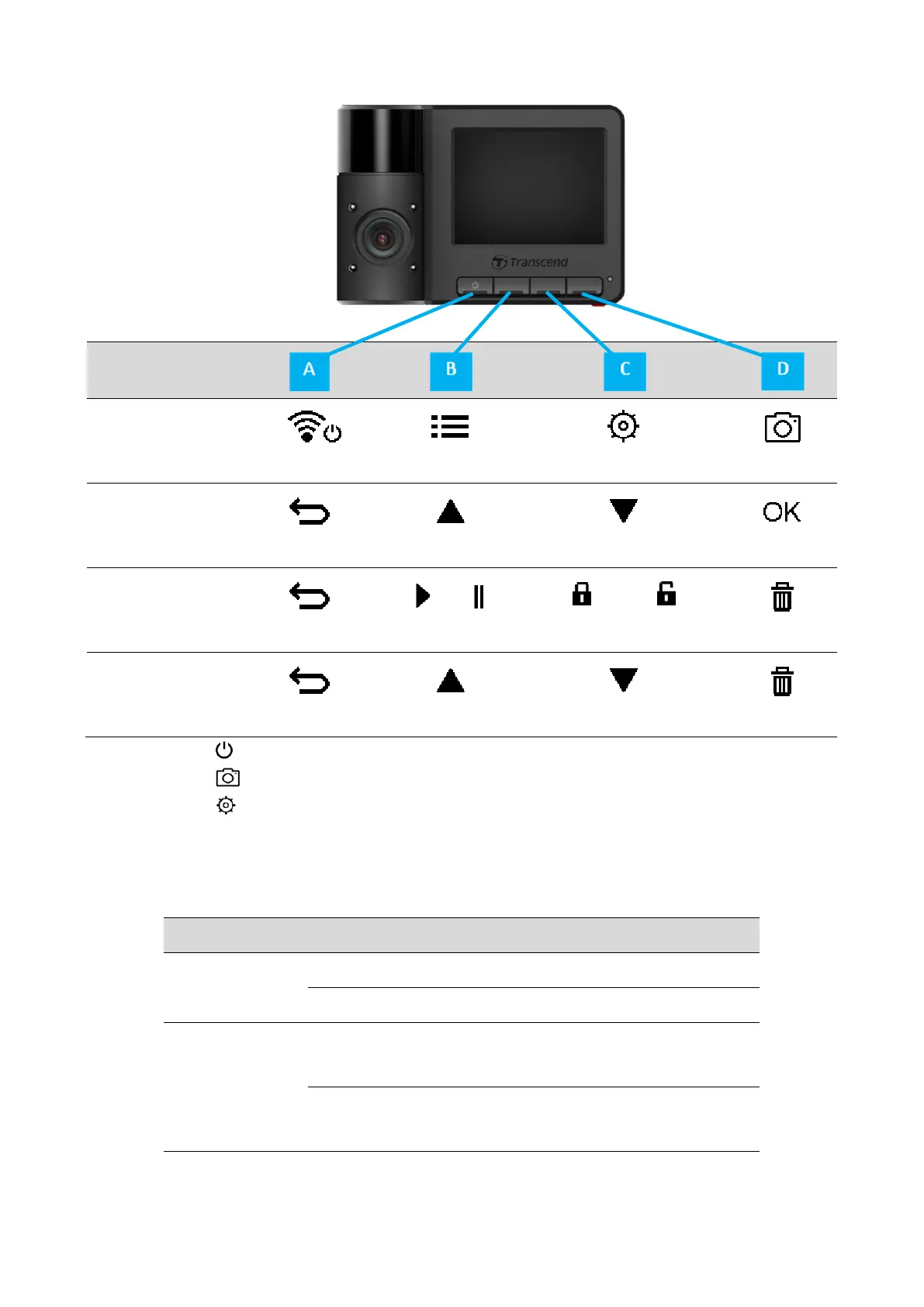
3-5 Function Buttons
Mode
Video
Recording
Power / Wi-Fi
Browse Files
Settings
Snapshot
Browse/Settings
Back
Up
Down
OK
Video Playback
Back
Play/Pause
/
Protected/Unprotected
Delete
View Photos
Back
Up
Down
Delete
Long press the button to manually turn on/off the DrivePro in any mode.
Long press the button to quickly turn on/off the microphone.
Long press the button to quickly enter the Time-Lapse Video menu.
Wi-Fi connection is only available when the DrivePro is connected to power.
3-6 LED Indicator Chart
LED
Wi-Fi
Status
Definition
On
Flashing
Recording with Wi-Fi
Solid
Standby with Wi-Fi
Off
Flashing
Recording without Wi-Fi
Recoding in Parking mode
Solid
Standby without Wi-Fi
Standby in Parking mode
Note: Wi-Fi connection is only available when the DrivePro is connected to power.


Related product manuals