actuation of this switch.
A strapping cycle is completed only after
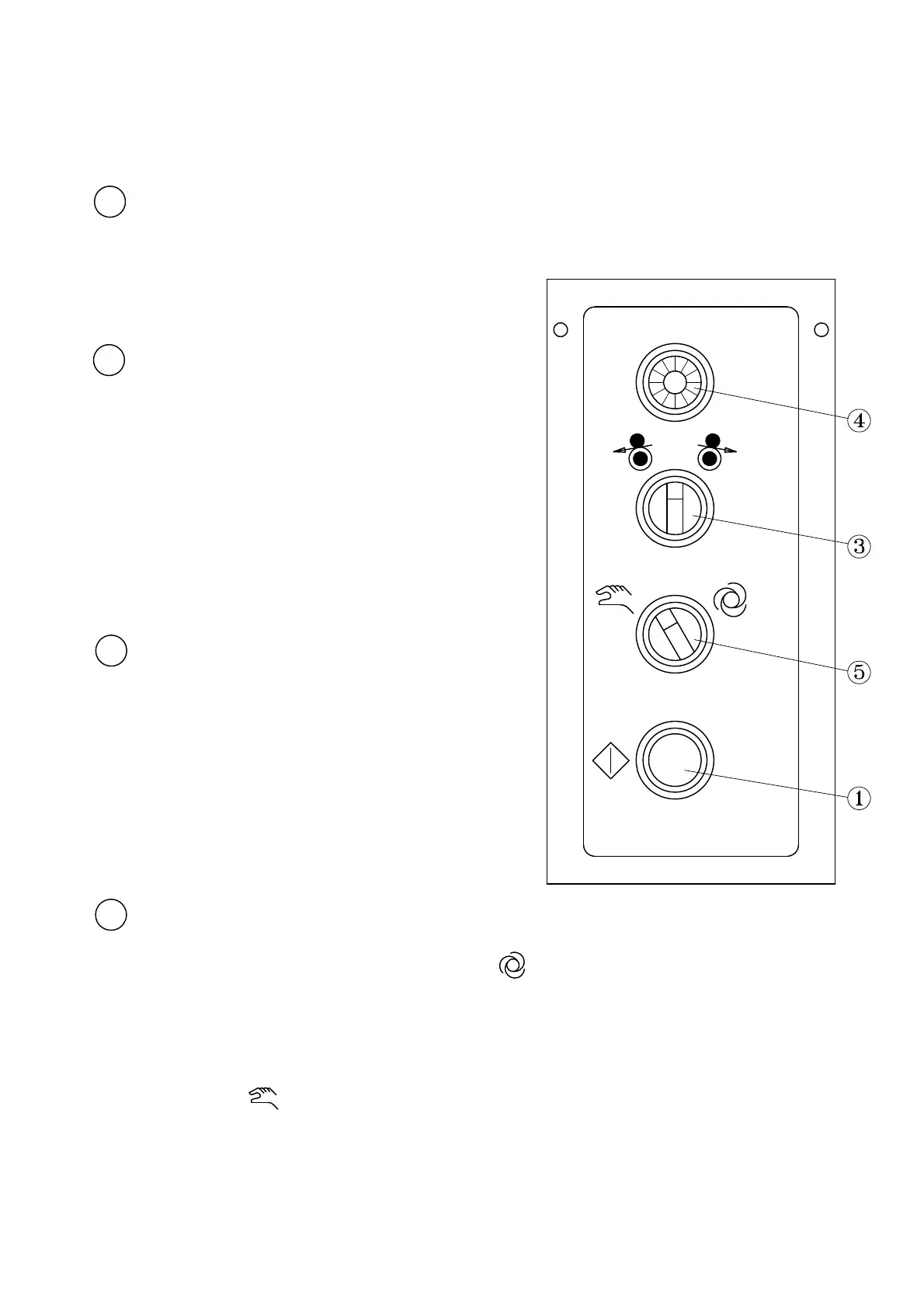
This is the switch to start a strapping operation
1 Start switch
3 F/R switch
(Feed and Reverse)
After P.P. strap is fed and the main power switch is
on, turn this switch counterclockwise to feed P.P.
the arch track to the accumulator box.
clockwise, P.P. strap reverses and returns strap from
strap around arch. When the switch is turned
4 Power pilot lamp
When the main power switch is turned on, the pilot
lamp lights up, showing that electric power is being
supplied. If the machine has the short feed sensor,
has reset function and lights up if under power.
5 Auto/Hand selector switch
While selector switch is placed to the position ,
the machine will automatically strap the package
to the position , after positioning the package under
remains under the arch. ) While the selector switch is placed
( the strapping cycle will continue, if the package
be applied.
the arch, push the "START" switch, then one strap will
When strap no at home position sealing this switch
-6-
b. (For CE Version)



 To Next Page