The TRASSIR Cloud TR-W2C1 is a Wi-Fi camera designed for surveillance and monitoring. This compact device offers a range of features for both personal and professional use, integrating seamlessly with the TRASSIR Cloud service for enhanced functionality.
Function Description:
The TRASSIR Cloud TR-W2C1 is an IP camera primarily used for video surveillance. It captures high-definition video and can record footage locally onto a MicroSD card or stream it to the TRASSIR Cloud service. The camera is equipped with a motion detector, allowing it to initiate recording upon detecting movement, which is a key feature for security applications. It also includes a microphone and speaker for two-way audio communication, enabling users to listen in on the camera's surroundings and speak through the camera. The camera's Wi-Fi connectivity simplifies installation and allows for remote access and management via the TRASSIR Client mobile application. Its day/night mode with mechanical ICR and IR illumination ensures clear video capture even in low-light or complete darkness.
Important Technical Specifications:
- Model: TR-W2C1
- Image Sensor: 1/2.9" CMOS 2MP
- Resolution: FullHD (1920×1080)
- Frame Rate: FullHD@25fps
- Day/Night Mode: Mechanical ICR
- Sensitivity: 0.005Lux (F1.8) / 0Lux (IR on)
- IR Range: Up to 10 m
- Lens: 2.8 mm
- WDR: Real WDR (105dB)
- Video Compression: H.265 / H.264
- Bitrate: 8Mbps
- Local Storage: MicroSD up to 128Gb (MicroSD card not included)
- Audio: Microphone/Speaker
- Motion Detector: Digital
- Wi-Fi: 2.4 GHz
- Power Supply: 5V DC (1A)
- Power Consumption: 4.5 W
- Dimensions: 110 x 66 x 66 mm
- Net Weight: 250 g
- Working Temperature: -10°C ... +50°C
Usage Features:
The TRASSIR Cloud TR-W2C1 is designed for easy setup and operation.
- Quick Start: To begin, connect the camera to the power supply. After a minute, the LED indicator will flash quickly, signaling it's ready for setup.
- TRASSIR Client Application: The camera is managed through the TRASSIR Client application, which can be downloaded to a mobile device. Users need to create an account on trassircloud.com or log in with existing credentials.
- Adding the Camera: Within the TRASSIR Client app, navigate to "Settings," then "Add camera," select "Trassir," and follow the on-screen instructions to connect the camera to the Wi-Fi network.
- MicroSD Card Installation: For local storage, insert a MicroSD card (up to 128 GB) into the designated slot until it clicks. The camera will automatically begin recording to the MicroSD card when motion is detected.
- Remote Viewing: The TRASSIR Client mobile application allows users to view the archive stored on the SD card remotely, provided the camera is connected to the TRASSIR Cloud service and an appropriate tariff plan is active.
- Status LED Indicator: The camera features a status LED that provides visual feedback:
- Off: No power supply.
- Flashes fast: Camera is available for setup.
- Flashes slow: No connection to a 2.4 GHz Wi-Fi network.
- Steady: Camera is connected to the Wi-Fi network.
- Reset Functionality: A "Reset" button is available on the back panel, likely for restoring factory settings or troubleshooting connectivity issues.
- Mounting: The package includes a fixing kit with a mounting hole template, suggesting flexible installation options.
Maintenance Features:
While the manual does not explicitly detail maintenance procedures, several aspects can be inferred:
- Power Supply: The camera requires a stable 5V DC (1A) power supply. Using the provided power supply unit and cable is recommended to ensure proper operation.
- Environmental Conditions: The camera is designed to operate within a temperature range of -10°C to +50°C. Operating outside this range may affect performance or damage the device.
- Software Updates: As a Wi-Fi-connected IP camera, it is likely that the TRASSIR Client application or the camera's firmware may receive updates to improve functionality, security, and performance. Users should keep the application updated.
- MicroSD Card Management: Regular checks of the MicroSD card's health and available storage are advisable, especially if continuous local recording is critical. The camera supports cards up to 128 GB, offering substantial storage capacity.
- Connectivity: Maintaining a stable 2.4 GHz Wi-Fi connection is crucial for the camera's remote access and cloud service integration. Troubleshooting Wi-Fi issues can be done by observing the status LED indicator.
- Cleaning: Although not specified, periodic gentle cleaning of the lens and camera body with a soft, dry cloth would help maintain optimal image quality and device appearance. Avoid using harsh chemicals or abrasive materials.

 Need help?
 General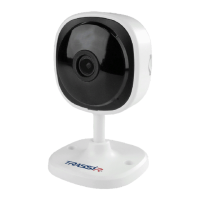

 To Next Page