XRT ULTIMATE
•
31
TQ
i
ADVANCED TUNING GUIDE
Throttle Trim Seek Mode
When the Multi-Function knob is set to
throttle trim, the transmitter remembers
the throttle trim setting. If the throttle
trim knob (Multi-Function knob) is
moved from the original setting while
the transmitter is o, or while the
transmitter was used to control another
model, the transmitter ignores the
actual position of the trim knob. This
prevents the model from accidentally
running away. The LED on the face of the
transmitter will rapidly blink green and
the throttle trim knob (Multi-Function
knob) will not adjust the trim until it
is moved back to its original position
saved in memory. To restore throttle trim
control, simply turn the Multi-Function
knob either direction until the LED stops
blinking.
Fail-safe
Your Traxxas radio system is equipped
with a built-in fail-safe function that
returns the throttle to its last saved
neutral position in the event of a signal
loss. The LED on the transmitter and the
receiver will rapidly ash red.
Starting Over:
Restoring Factory Defaults
When programming your TQi transmitter,
you may feel the need to start over with
a clean slate. Follow these simple steps to
restore the factory settings:
1. Turn the transmitter o.
2. Hold both MENU and SET.
3. Turn the transmitter on.
4. Release MENU and SET. The
transmitter LED will blink red.
5. Press SET to clear settings. The
LED will turn solid green and the
transmitter is restored to default.
Available Tuning Adjustments
The following items can be adjusted most easily using your mobile
device and the Traxxas Link application. All the features described
below may also be accessed using the MENU and SET buttons on
the transmitter and observing signals from the LED. An explanation
of the menu structure follows on page 37.
Your Traxxas transmitter has a programmable Multi-Function knob
that can be set to control various advanced transmitter functions
(set to Traxxas Stability Management by default, see page 17).
Experiment with the settings and features to see if they can improve
your driving experience.
Steering Sensitivity (Exponential)
The Multi-Function knob on the TQi transmitter can be set
to control Steering Sensitivity (also known as exponential).
The standard setting for Steering Sensitivity is “normal (zero
exponential),” with the dial full left in its range of travel. This setting
provides linear servo response: the steering servo’s movement will
correspond exactly with the input from the transmitter’s steering
wheel. Turning the knob clockwise from center will result in
“negative exponential” and decrease steering sensitivity by making
the servo less responsive near neutral, with increasing sensitivity
as the servo nears the limits of its travel range. The farther you
turn the knob, the more pronounced the change in steering servo
movement will be. The term “exponential” comes from this effect;
the servo’s travel changes exponentially relative to the input
from the steering wheel. The exponential effect is indicated as a
percentage—the greater the percentage, the greater the effect. The
illustrations below show how this works.
Normal Steering Sensitivity
(0% exponential):
In this illustration, the steering
servo’s travel (and with it, the
steering motion of the model’s
front wheels) corresponds precisely
with the steering wheel. The ranges
are exaggerated for illustrative
purposes.
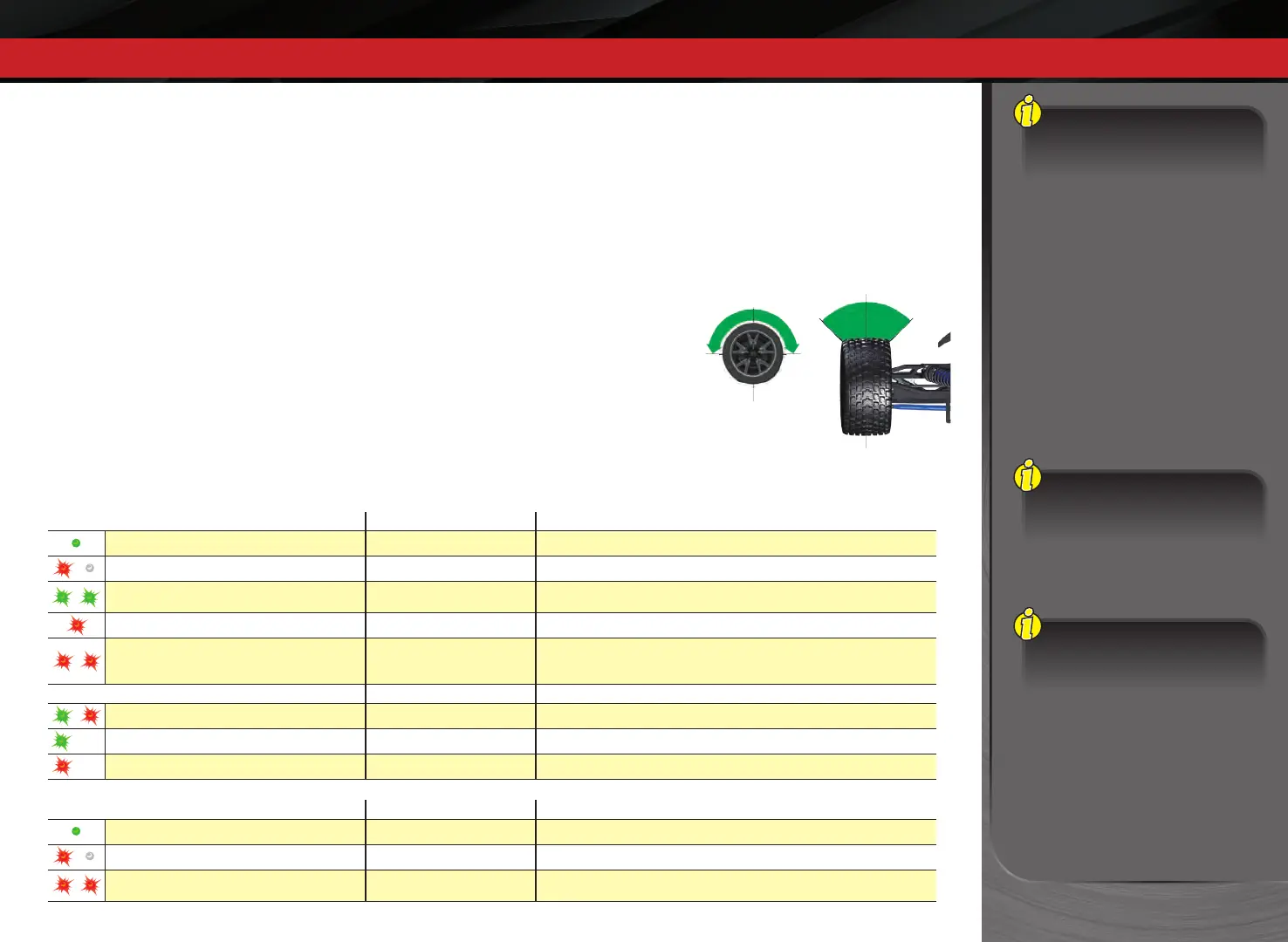
LED Color / Pattern Name Notes
Solid green Normal Driving Mode See page 15 for information on how to use your transmitter controls.
Slow red (0.5 sec on / 0.5 sec o) Binding See page 16 for more information on binding.
Flashing fast green (0.1 sec on / 0.15 sec o) Throttle Trim Seek Mode
Turn the Multi-Function knob right or left until the LED stops ashing.
See sidebar for more information.
Flashing medium red (0.25 sec on / 0.25 sec o) Low Battery Alarm Put new batteries in the transmitter. See page 13 for more information.
Flashing fast red (0.125 sec on / 0.125 sec o) Link Failure / Error
Transmitter and receiver are no longer bound. Turn the system o and then
back on to resume normal operation. Find source of the link failure (i.e., out of
range, low batteries, damaged antenna).
Programming Patterns
Counts out number (green or red) then pauses Current menu position See Menu Tree for more information.
Fast green 8 times Menu setting accepted (on SET)
Fast red 8 times Menu SET invalid User error such as trying to delete a locked model.
LED Color / Pattern Name Notes
Solid green Normal Driving Mode See page 15 for information on how to use your transmitter controls.
Slow red (0.5 sec on / 0.5 sec o) Binding See page 16 for more information on binding.
Flashing fast red (0.125 sec on / 0.125 sec o) Fail-Safe / Low-Voltage Detect
Consistent low voltage in the receiver triggers Fail-Safe so there is enough
power to center the throttle servo before it completely loses power.
x
8
x
8
or
TRANSMITTER LED CODES
RECEIVER LED CODES









 To Next Page