4.2.2 Select a pre-stored unit weight
Key in the number of the pre-stored weight (01-16) using the numeric key pad, press MEM/READ
key and select the pre-stored sample unit weight, press ENTER to confirm.
4.2.3 High/Low Check Weighing with Counting
- Turn scale on
- Wait for "0" to appear on the display.
- If necessary, press ZERO key to set the display to “0”
- Press QTY/SET key, display will show CH=OFF or CH=ON
- Press the ENTER key to select “ON”
- Press [*] key, display will show a flashing “0” at UNIT WEIGHT, key in the lower limit using
the numeric key pad, press [*] gain, display will show a flashing “0” at TOTAL, key in the upper
limit using the numeric keypad.
-Press QTY/SET key to confirm the setting and return to weighing mode.
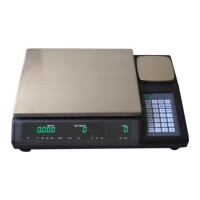
- Press the SCALE/SELECT key to select either SCALE 1 or SCALE 3, be sure to place the
additional pieces on the scale that is selected.
***NOTE: When adding items onto the scale, the scale will beep in a particular tone if the
weight (number of items) is less than the lower limit and beep in another tone if it is higher than
the upper limit.


 To Next Page