4.2 Program options
Besides performing accurate simple weighing, your versatile weighing machine can also perform
pieces counting
4.2.1 Pieces counting
4.2.1.1 Counting pieces with known sample unit weight
- Turn scale on
- Wait for "0" to appear on the display.
- If necessary, press ZERO key to set the display to “0”
- Key in unit weight, press UNIT WEIGHT key to confirm
-Store the unit weight by pressing MEM/STORE key, display will show a flashing number for
example “01”, this is the location where the stored sample unit weight can be found. Press [*]
key to toggle between 01-16, press the ENTER key to confirm the selection.
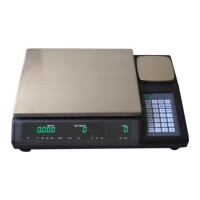
- Press the SCALE/SELECT key to select either SCALE 1 or SCALE 3, be sure to place
the additional pieces on the scale that is selected.
***NOTE: The items being weighed should be within the selected scales capacity.
4.2.1.2 Counting pieces without known sample unit weight
- Turn scale on
- Wait for "0" to appear on the display.
- If necessary, press ZERO key to set the display to “0”
- Press SCALE/SELECT key to select SCALE 2, press ENTER to confirm
-Put a pre-known number of samples onto SCALE 2, key-in the known number using the numeric
keypad.
- Press SAMPLE to get the sample unit weight
- Press the SCALE/SELECT key to select either SCALE 1 or SCALE 3, be sure to place the
additional pieces on the scale that is selected, it will display the total number of items.
***NOTE: The items being weighed should be within the selected scales capacity.


 To Next Page