2023 Fetch+ 4
4
Steering Dr ivetrain Routing Battery Headsets Frame Accessor ies
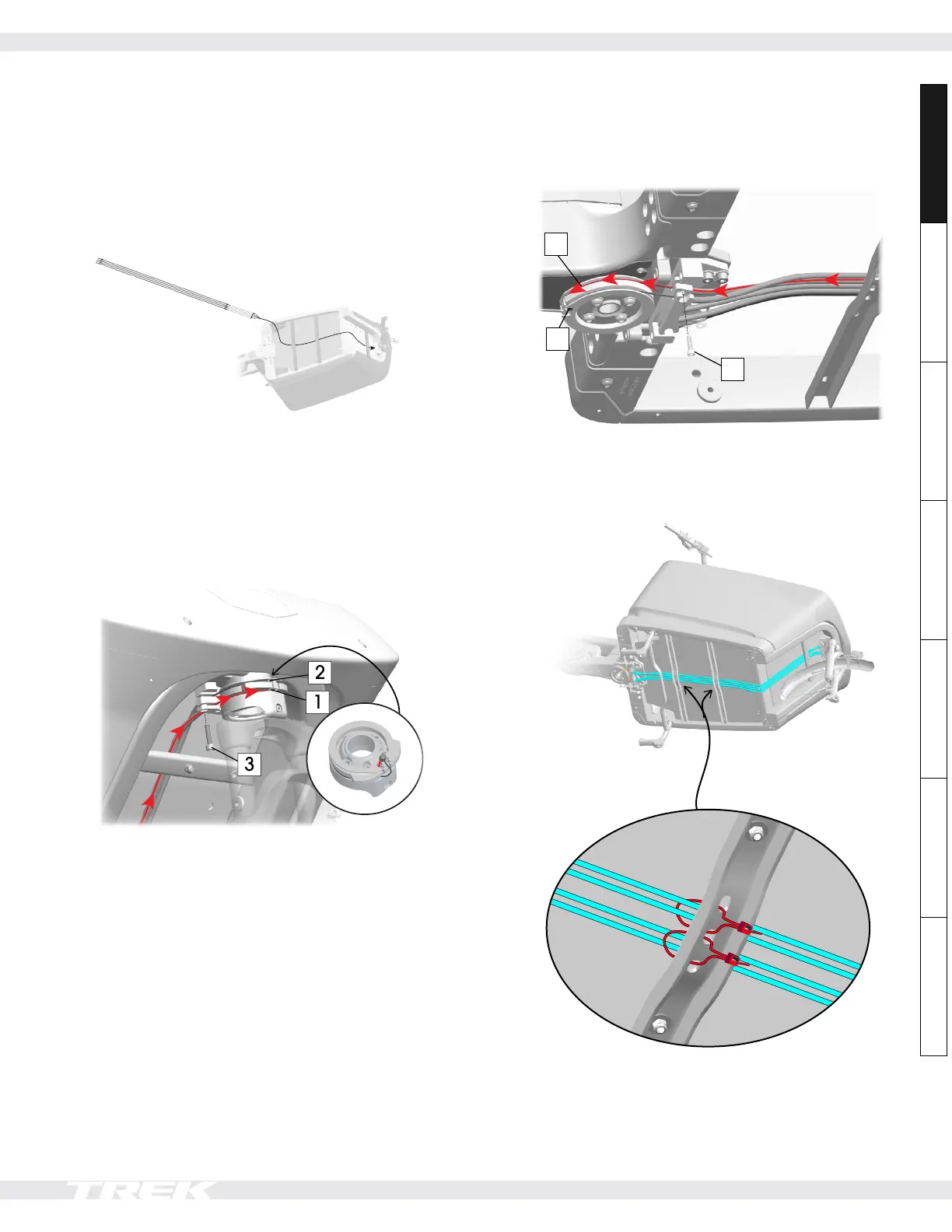
Insert the cables into the front disc
NOTE: The cables may be slightly different lengths — there
is no certain order you need to install them. They will
stretch and even out after use.
1. Route the four cables through the frame brackets.
2. Route one cable into the lower section of the front
steering disc. Then, route another cable in the upper
section. Install one bolt (12) into the cable mount
and torque to 4Nm to secure the two cables.
IMPORTANT: Make sure the cable end stop is fully
inserted into the cable mount or you will not have
enough slack when you install the cables in the rear
disc.
3. Repeat Step 2 for the other side.
Insert the cables into the rear disc
1. Route the rear cables as shown below.
1
3
2
2. Tension the cables followings Steps 3-7 on page 2.
3. Use six zip ties to attach the cables to the frame as
shown below.
Steering: replace the steering cables (continued)










 To Next Page