
 Need help?
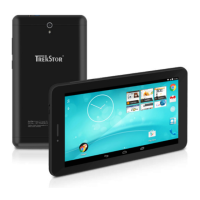
Do you have a question about the TrekStor SurfTab ventos 7.0 and is the answer not in the manual?
Essential safety and usage instructions, manufacturer liability, and product improvement notices.
Critical warnings regarding battery, water, overheating, and hearing protection.
Instructions for switching the device on/off and charging the battery.
Step-by-step guide to connecting the SurfTab to a Wi-Fi network.
Detailed instructions for capturing still images, including settings.
Instructions for recording videos and using the zoom function.
Guide to downloading and installing new apps from Google Play.
Steps to remove applications that have been installed by the user.
Procedures for rebooting into recovery mode or resetting the device.
 General
| Display Size | 7.0 inches |
|---|---|
| Resolution | 1024 x 600 pixels |
| Display Type | TFT |
| RAM | 1 GB |
| Internal Storage | 8 GB |
| Camera (Rear) | 2 MP |
| Camera (Front) | 0.3 MP |
| Battery Capacity | 3000 mAh |
| Expandable Storage | microSD up to 32 GB |
| Connectivity | Wi-Fi 802.11 b/g/n |


 To Next Page
