VARIJIG
-8-
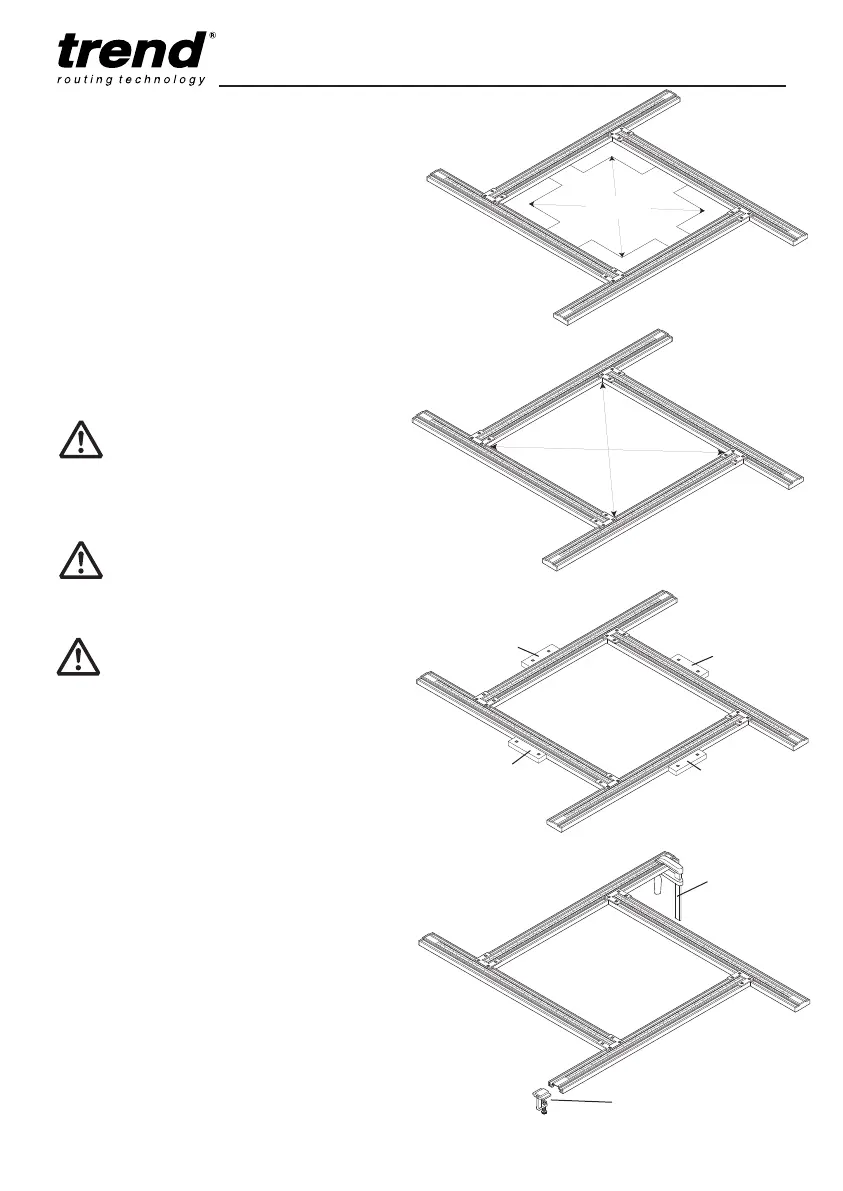
Adjusting Frame for Size
■ Loosen the silver screws.
■ Set required size of square or rectangle and
use a square to set corner squareness.
■ Check each corner.
Another method to check squareness is to
measure across diagonals. If the measurement
is equal the frame is square, if the measurement
is out adjust as necessary.
The scales are for repetitive work and have
some lengthways adjustment to allow zero
setting.
=
=
Clamping Varijig Frame
■ Clamp frame to component using shallow
battens with pins or gripper clamps if they do
not foul router, or use the optional accessory
clamps.
When using battens ensure the pins do not foul
the path of router. The battens should have a
thickness of maximum 12mm. Four battens will
be needed.
Gripper clamps can be used if the frame is set to
a smaller size and the overhanging parts of the
extrusion can be held. The clamps must not foul
the router path. At least two clamps should be
used to hold the frame securely.
The accessory clamps are sold as a pair and
they slide into the underside of the extrusion and
do not foul the router path.
Batten
Batten
Gripper
clamp
Batten
Batten
Only loosen silver screws to adjust
frame.
After every adjustment, the frame
will need to be checked for
squareness.
Square
Accessory clamp
e.g. Ref. VJS/CK
Ensure the jig is sitting correctly and
clamped securely to the component.
Ensure component is clamped properly.
MANU-VJS v3.0_MANU-VJS v3 18/06/2012 09:41 Page 8


 To Next Page