EasyManua.ls Logo

TRENDnet TBW-101UB - User Manual

TRENDnet TBW-101UB
42 pages
Print Icon
To Next Page IconTo Next Page
Loading...

Other manuals for TRENDnet TBW-101UB

Question and Answer IconNeed help?

Do you have a question about the TRENDnet TBW-101UB and is the answer not in the manual?

Summary

Basic Operations

Insert Adapter

Instructions for connecting the Bluetooth adapter (USB or CF card) to the computer.

Install the Software

Step-by-step guide for installing the BlueSoleil software, including pre-installation checks.

Start BlueSoleil

How to launch the BlueSoleil application on your computer.

Search for Other Bluetooth Enabled Devices

Guide on initiating a scan to discover nearby Bluetooth devices.

Establish Connection

Steps to create a wireless connection between your computer and a remote Bluetooth device.

Bluetooth Security

Explains how to configure security settings for Bluetooth connections.

BlueSoleil User Guides

Main Window

Detailed explanation of the Main Window interface, local and remote devices, and operations.

Device Configurations

Security Configuration

Pair; Un-pair Devices

Procedures for establishing and removing secure pairing relationships between devices.

General Security

Setting the overall security level (Low, Medium, High) for Bluetooth connections.

Summary

Basic Operations

Insert Adapter

Instructions for connecting the Bluetooth adapter (USB or CF card) to the computer.

Install the Software

Step-by-step guide for installing the BlueSoleil software, including pre-installation checks.

Start BlueSoleil

How to launch the BlueSoleil application on your computer.

Search for Other Bluetooth Enabled Devices

Guide on initiating a scan to discover nearby Bluetooth devices.

Establish Connection

Steps to create a wireless connection between your computer and a remote Bluetooth device.

Bluetooth Security

Explains how to configure security settings for Bluetooth connections.

BlueSoleil User Guides

Main Window

Detailed explanation of the Main Window interface, local and remote devices, and operations.

Device Configurations

Security Configuration

Pair; Un-pair Devices

Procedures for establishing and removing secure pairing relationships between devices.

General Security

Setting the overall security level (Low, Medium, High) for Bluetooth connections.
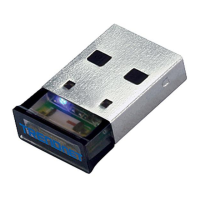
TRENDnet TBW-101UB Specifications

General IconGeneral
BrandTRENDnet
ModelTBW-101UB
CategoryAdapter
LanguageEnglish

Related product manuals