14
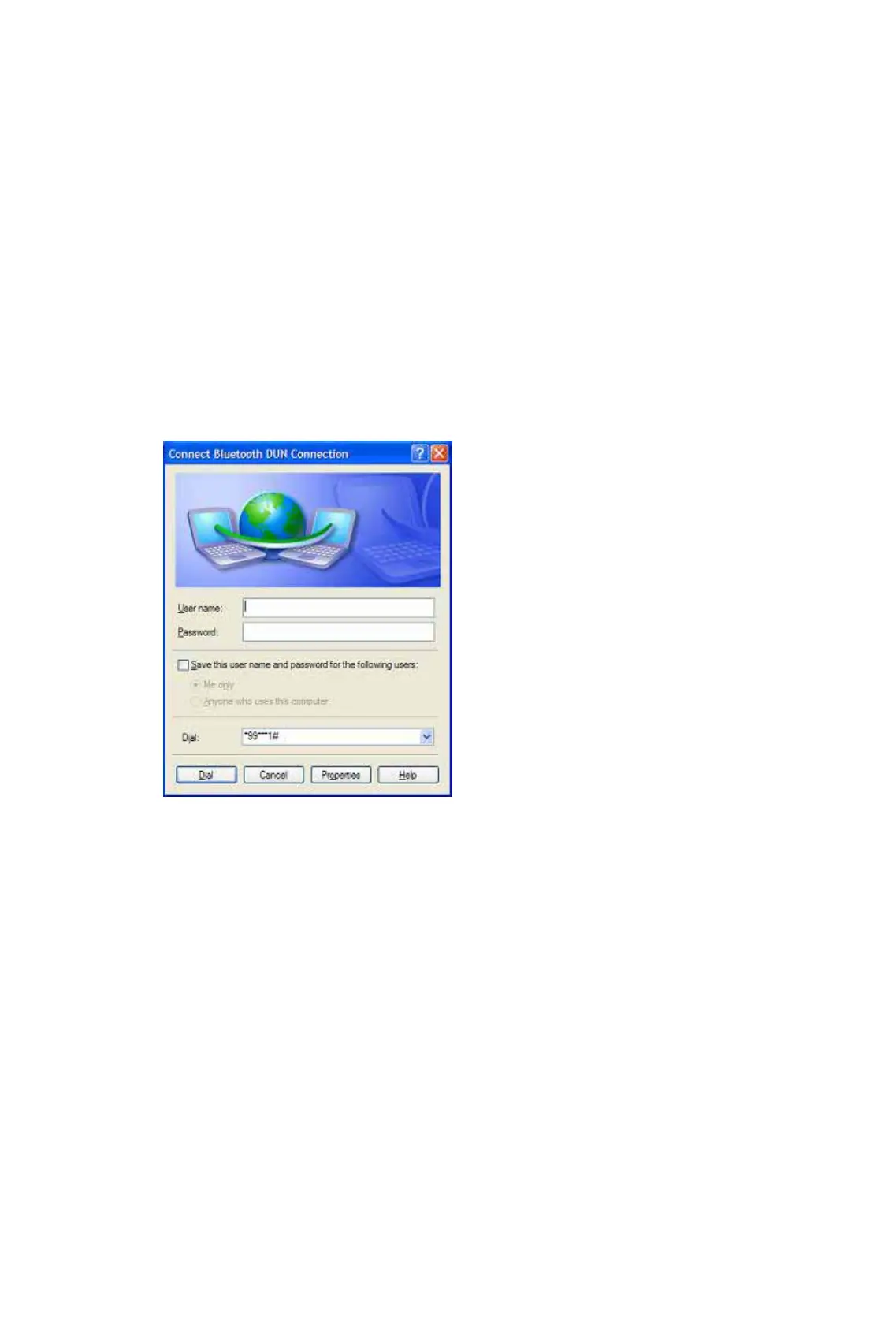
Step 2: The Dial-Up Dialog will appear (Figure 3.2). Enter the dial-up
number, User name, and Password. Make sure the correct
dial-up number is entered, then click on the Dial button.
Note: The default dial-up number *99***1# only works with
certain GPRS phones and service providers in the United States.
If necessary, enter the correct dial-up number for your Internet
Service Provider (ISP).
Note: After you successfully connect, you can also select Save Connection
As Shortcuts to create a desktop dial-up shortcut. This would allow you to
conveniently dial up and connect by simply clicking on the shortcut, without
having to manually start BlueSoleil.
Figure 3.2 Dial-Up Dialog
Dial-up to the Internet via a Bluetooth enabled modem.
Step 1: Connect to the modem’s Dial-Up Networking Service, following
the instructions in Chapter 2.
Step 2: The Dial-Up Dialog will appear. Enter the dial-up number, User
name, and Password. Enter the correct dial-up number, then
click on the Dial button.
Note: The default dial-up number *99***1# does NOT work
with modems. You need to enter the correct dial-up number for
your Internet Service Provider (ISP).
Step 3: Use your email, Internet browsing or other application that
utilizes a dial-up connection.









 To Next Page