Remote Testing
Note:
Do NOT use the TC-NT2 for live wire testing. The TC-NT2 is for testing cables only.
Do not connect the TC-NT2 to an Ethernet cable that is connected to a switch,
router, computer, etc. Doing so will damage the device. Ensure the cable being
tested is not connected to a live device.
RJ-45 Cable
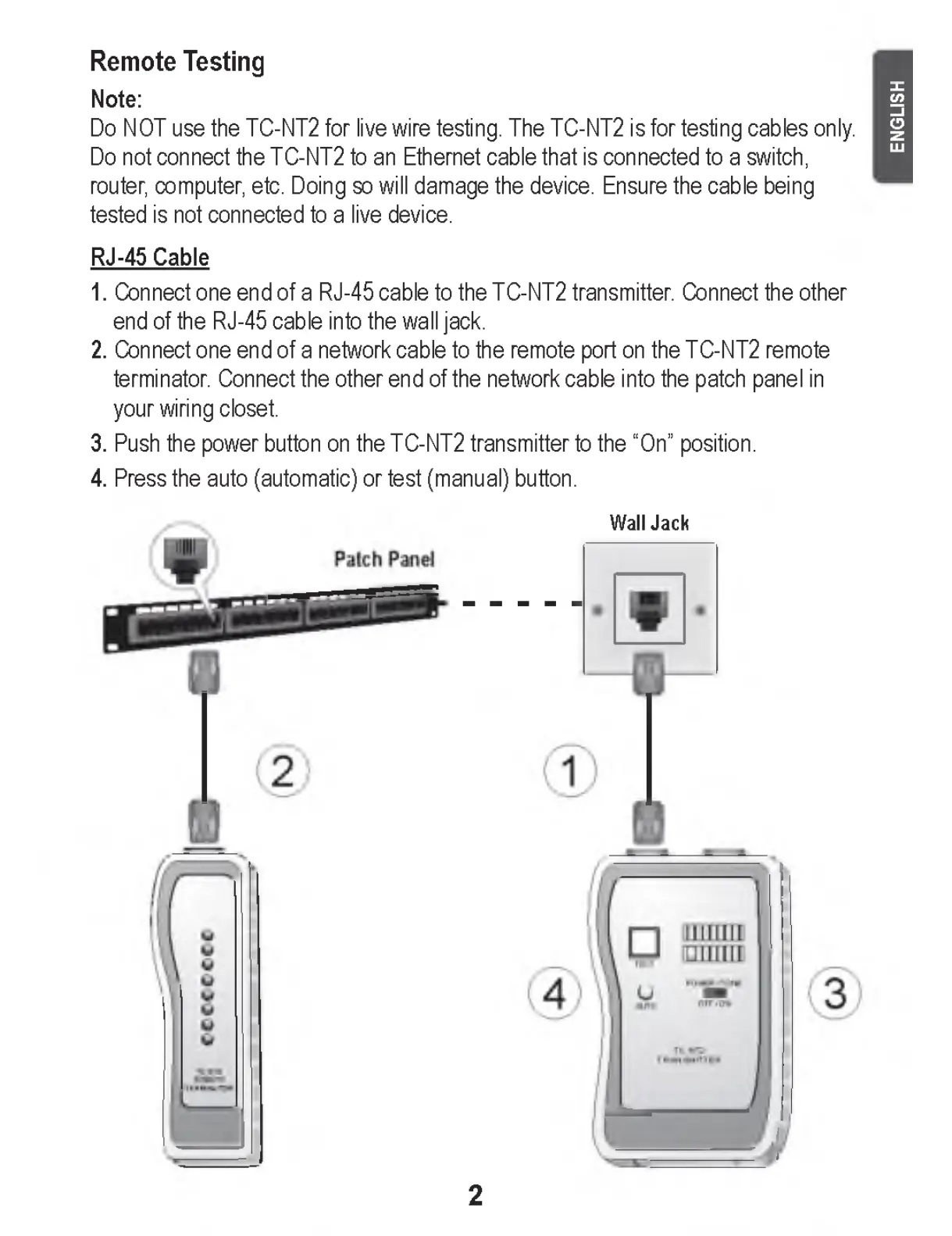
1. Connect one end of a RJ-45 cable to the TC-NT2 transmitter. Connect the other
end of the RJ-45 cable into the wall jack.
2. Connect one end of a network cable to the remote port on the TC-NT2 remote
terminator. Connect the other end of the network cable into the patch panel in
your wiring closet.
3. Push the power button on the TC-NT2 transmitter to the “On” position.
4. Press the auto (automatic) or test (manual) button.
Wall Jack
2
E N G LIS H


 To Next Page