Optional Accessory TC-NTUF (Sold Separately)
IEEE 1394 (6-pin) / USB Cable
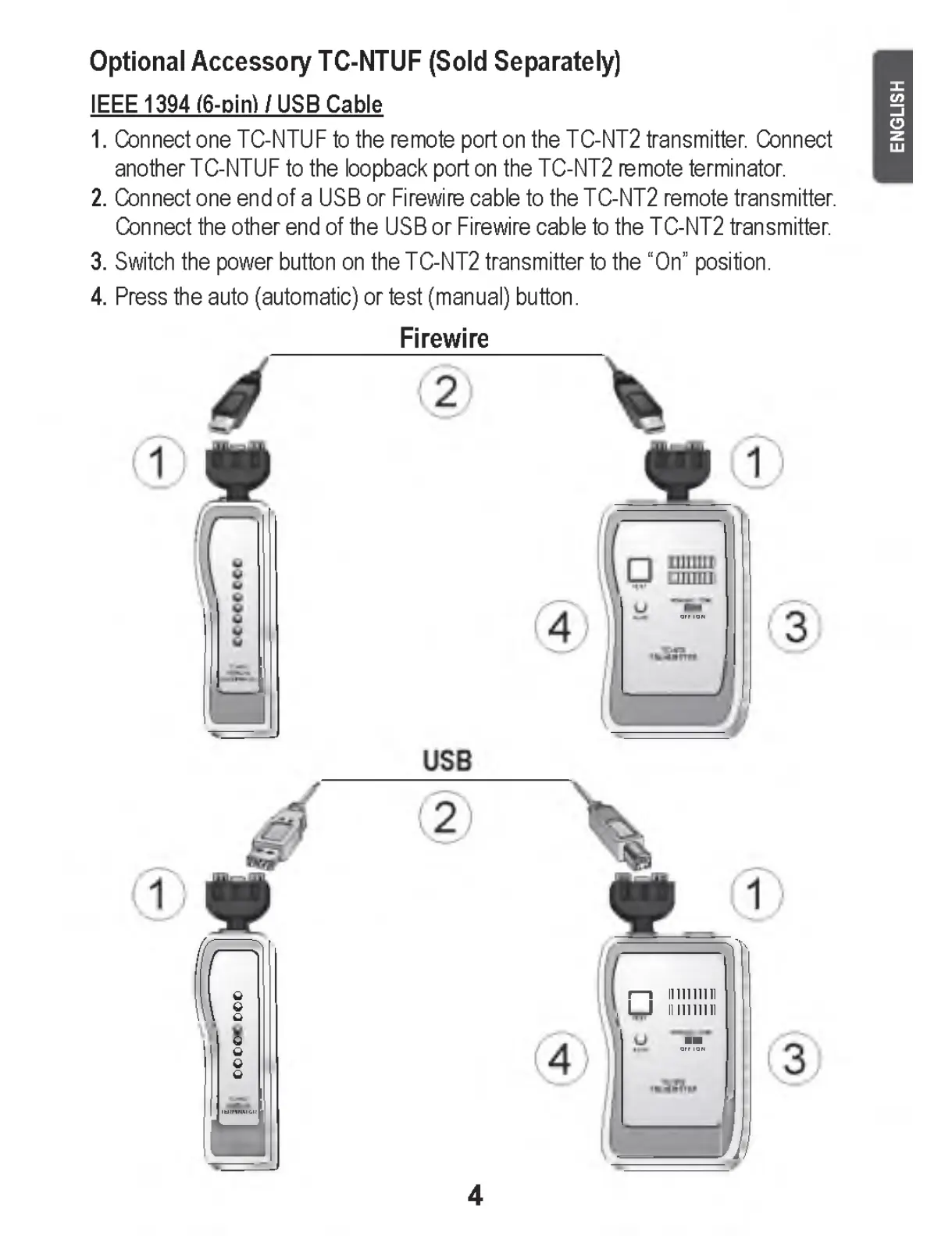
1. Connect one TC-NTUF to the remote port on the TC-NT2 transmitter. Connect
another TC-NTUF to the loopback port on the TC-NT2 remote terminator.
2. Connect one end of a USB or Firewire cable to the TC-NT2 remote transmitter.
Connect the other end of the USB or Firewire cable to the TC-NT2 transmitter.
3. Switch the power button on the TC-NT2 transmitter to the “On” position.
4. Press the auto (automatic) or test (manual) button.
Firewire
Q
— — yjv
1— 1 lll ll lllll
, L J lll ll lllll
o
o
o
o
" "
- - - -
IJ
LJ
4
E N G LIS H


 To Next Page