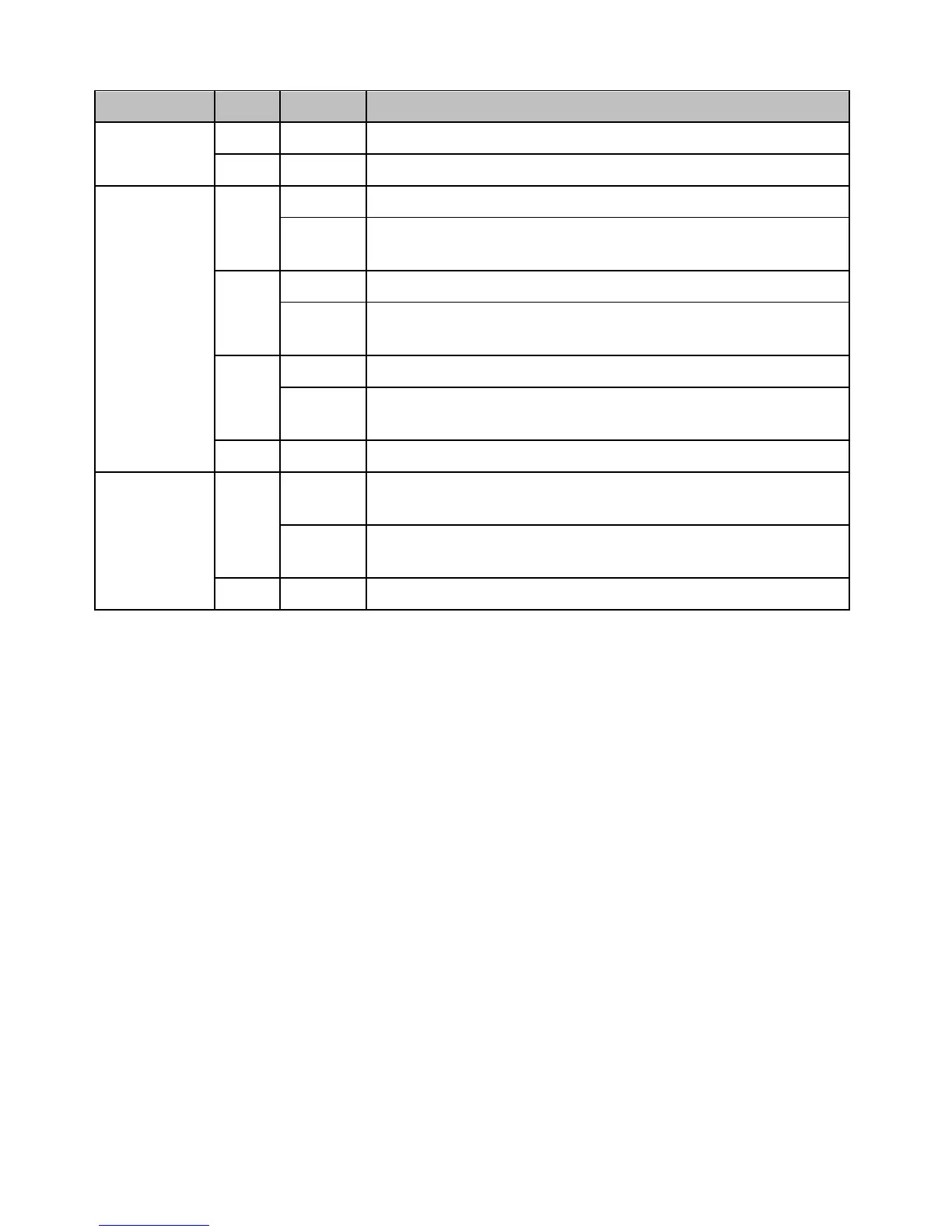
PL
(Powerline)
Note: LED
color indicates
the strength
and quality of
the powerline
connection
through the
electrical
system
Powerline Connected (Connection Quality is Best)
Syncing or Powerline Data Transmitting/Receiving (Connection
Quality is Best)
Powerline Connected (Connection Quality is Better)
Powerline Data Transmitting/Receiving (Connection Quality is
Better)
Powerline Connected (Connection Quality is Good)
Powerline Data Transmitting/Receiving (Connection Quality is
Good)
Powerline is not synced or connected
10/20 Mbps, 100/200Mbps, or 1000/2000Mbps (Half/Full
Duplex) Connected
10/20Mbps, 100/200Mbps, or 1000/2000Mbps (Half/Full
Duplex) Data Transmitting/Receiving
Port Disconnected/No Ethernet Link
*Note: The following factors may affect the powerline network’s connection quality:
Noise – Generated by appliances that are connected to your electrical system through power outlets
that have high power consumption requirements. (e.g. Microwaves, ovens, blow dryer, iron,
dishwasher, etc.) The quality of your household electrical wiring may also cause additional noise on
your electrical system.
Distance – Long lengths of electrical wiring through your electrical system between connected
powerline adapters.












 To Next Page