15
IP 360 S8
CONNECTIONS AND REMOTE CONTROL
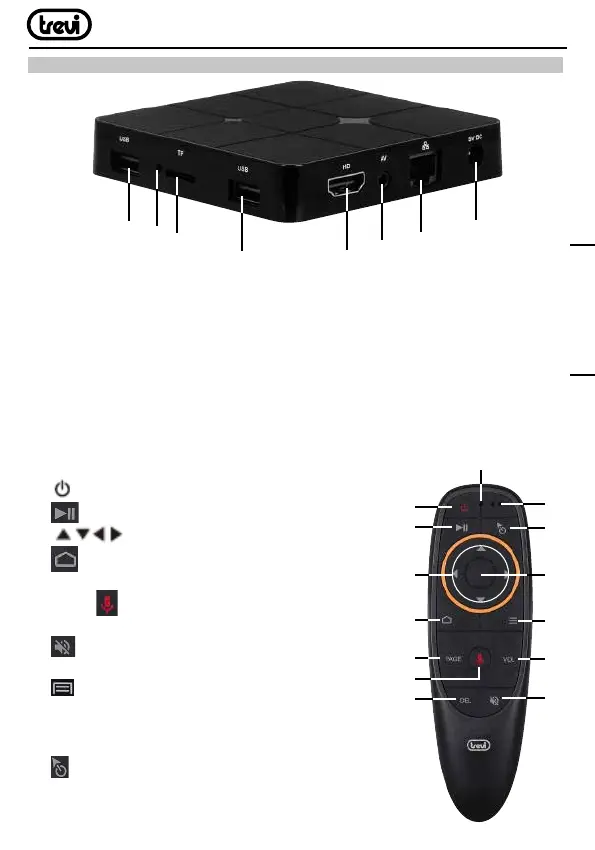
1. 2. USB Sockets: To connect external USB devices such as memory sticks, Hard External
disk, wireless mouse, wireless keyboards, etc....
3. Slot for Micro SD Card.
4. Reset.
5. HDMI: Video output for connection to HDTV.
6. AV Output: Composite video signal output (CVBS). cable not included.
7. LAN RJ45 Ethernet: 10 / 100Mbps Ethernet interface for connection to the local network.
8. Power socket DC IN 5V: Connect the supplied power adapter.
AIR MOUSE WIRELESS
9. BUTTON: Power ON/Stand-by key.
10.
BUTTON: Play/Pause.
11.
KEYS: Move highlight.
12.
BUTTON: Return to previous step/Main (Home) page.
13. PAGE BUTTON: To move in the page.
14. TASTO
: Voice ON/OFF
15. DEL BUTTON: Key to delete typed characters.
16.
BUTTON: Mute.
17. VOL BUTTON: Increase/decrease Volume.
18.
BUTTON: To open the sub-menu folder
in certain applications/functions.
19. OK BUTTON: to confirm and Activate the
highlighted menu item.
20.
MOUSE BUTTON: To enable moving fast by
arrow (using the navigation keys), press again to
enable the displacement step.
1
3
2
5
6
7
8
4
12
11
13
15
14
10
9
18
17
16
20
21
22
19
ENGLISH


 To Next Page