21
IP 365 S8
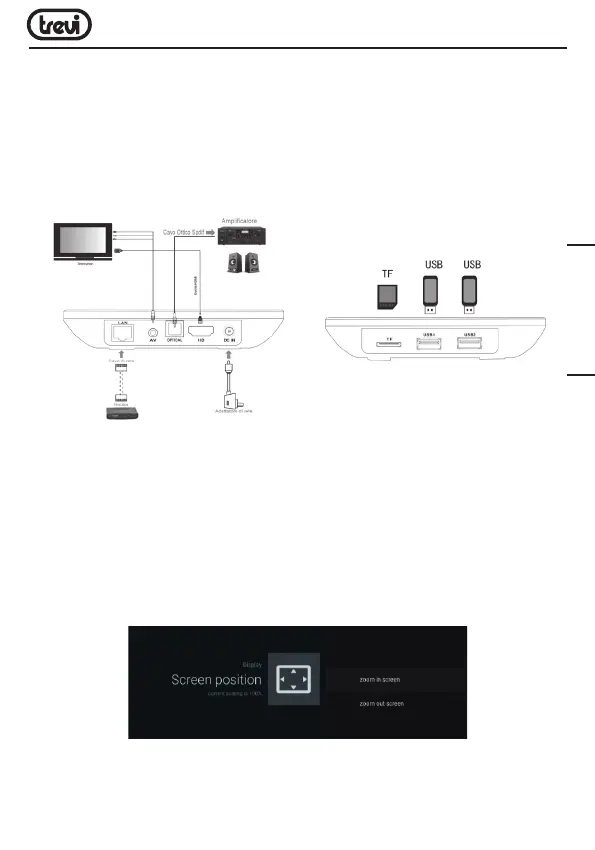
• Connect one end of the HDMI cable to socket (8), connect the other end to the HDMI
socket of your TV.
• Turn on the TV and press power On/Off button (11) on the remote control.
• Wait a few seconds for the device loads the operating system.
WARNING: The unit is factory set with video output on HDMI, if you want to use the composite
AV output (cable not included), first connect the unit to a TV via HDMI and then from the
menu “Settings”/“Display”/“Screen resolution“, select the video resolution to 480 or 576.
Shutdown:
• To completely switch off the device press and hold for a few seconds the on/standby button
(11) on the remote control, select Shutdown with the navigation keys (17) and press OK
(23) to confirm. Wait a few seconds the Green Led on the front panel becomes Red.
Regulation framework:
At first power you need to set some parameters such as language, the connection to the
network and regulation of the framework.
Adjust the image according to your TV; to adjust the picture, select “Setting”- “Display”-
“Screenposition”. Select “Zoom out” to tighten, select “Zoom in” to enlarge.
ENGLISH



 To Next Page