46
3 Indicator Icons
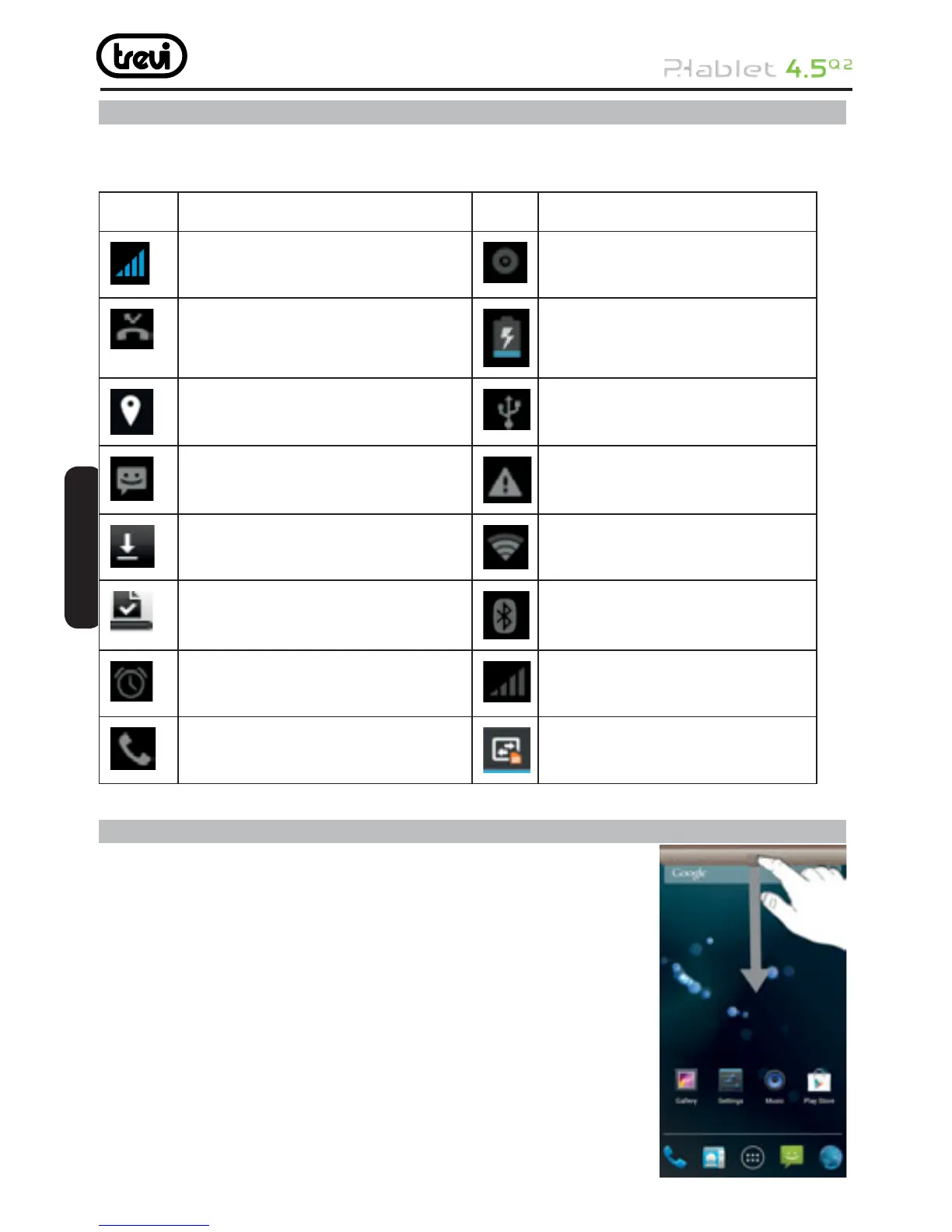
The icons displayed at the top of the screen provide information about the status of the
device. The icons listed in the table below are most common.
Icon Description
Indicate the intensity of network
signals
The phone is playing a song
Show missed calls The phone is being charged
Location by satellite Enable USB
Receive a new message The access is blocked
An application is being down-
loaded
Get connected to the wireless
network
The downloading is over Turn on the Bluetooth
The alarm clock has been set
and activated
No SIM card is installed in
the phone
A call is in progress GPRS data connection is on
4 Status and notifi cation
The icons in the status bar inform you of new messages,
calendar notifi cations, signal strength, battery status, and
activities in progress such as fi le downloads. You can drag
down the status bar to open the Notifi cation panel and handle
your notifi cations.
To open the Notifi cation panel:
Swipe from the top in home screen
To take action on a Notifi cation
Tap the notifi cation
ENGLISH



 To Next Page