EN EN
5 6
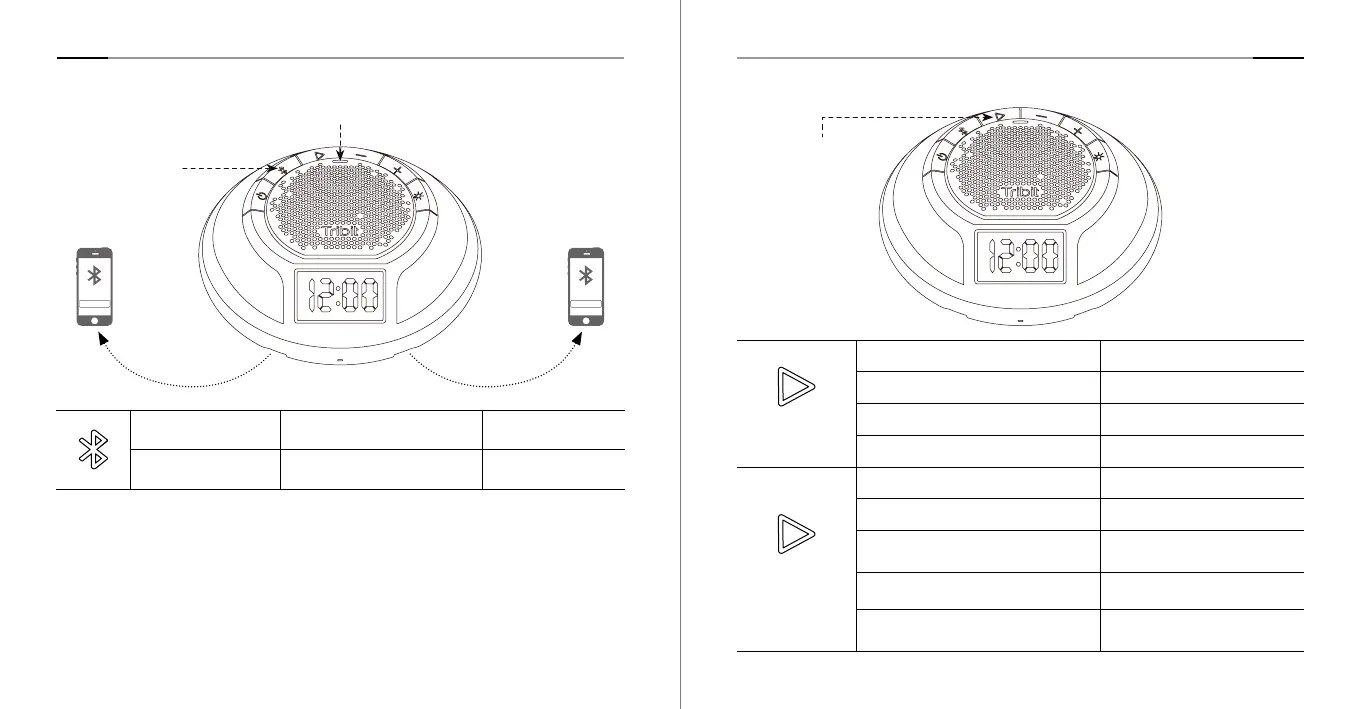
2. Bluetooth Connection 3. Multifunctional Button (MFB)
Device A Device B
Press and hold the
Bluetooth button for 1s
The speaker will automatically enter
into Bluetooth pairing mode.
The blue indicator light
will flash rapidly.
Press twice Micro SD card playback mode White light is always on
Music Mode
Press once Play / Pause
Press twice Next track
Press three times Previous track
Press and hold for 1 second Activate voice assistant
Phone
Conversation
Press Answer / end a call
Press and hold for 1 second Reject a call
Press and hold for 1 second
(during a call)
Pause the current call and
answer an incoming call
Press (during a three-way calling) Switch between the 2 calls.
Press and hold for 1 second
(during a three-way calling)
End the call with the caller
not in the line.
MFB
Tribit AquaEase:
• Automatically re-connects to the last paired device.
• Connects 2 bluetooth devices at the same time.
• Memories 8 bluetooth devices.
Note: When 2 devices are connected to the Tribit AquaEase speaker, device A
and device B cannot play simultaneously---only one speaker at a time.
Tribit AuaRun Tribit AuaRun
Status Indicator Light
Bluetooth Button



 To Next Page