EN EN
9 10
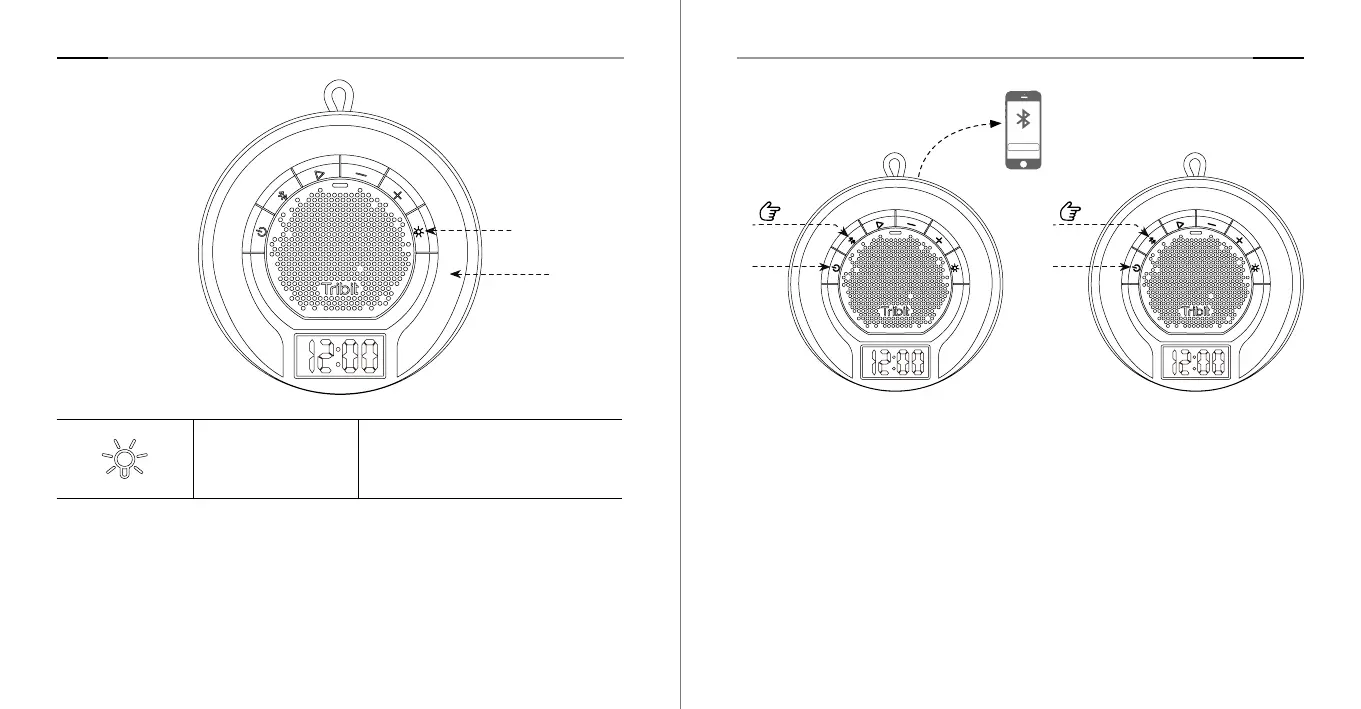
7. Stereo Mode
①
Make sure speaker A and speaker B are both are turned on.
②
Press and hold the Bluetooth button on speaker A for 5 seconds to enter the
stereo pairing mode. ( Speaker A is the primary speaker.)
③
Press and hold the Bluetooth button on speaker B for 1 seconds to enter the
stereo pairing mode. (Note: If this speaker is already in pairing mode, there is
no need to perform this operation)
④
When you hear the prompt, “Stereo Mode”, the stereo pairing is successful.
When entering the Stereo Mode, the primary speaker reads, “left Channel” and
the secondary speaker reads, “Right Channel”.
Note: Stereo mode is only available when there are 2 Tribit AquaEase speakers.
And make sure the firmware of both speakers have been upgraded to the
latest version through the APP.
Tribit AuaRun
>1S
①
③
>5S
①
②
Speaker A Speaker B
6. Ambient Light
Press Switch / Turn off the light effect.
Lighting Button
RGB Light



 To Next Page