Trident 88 Owners Manual8
Trident 88 Input Channel Aux Sends
Trident 88 Input Channel The Equaliser
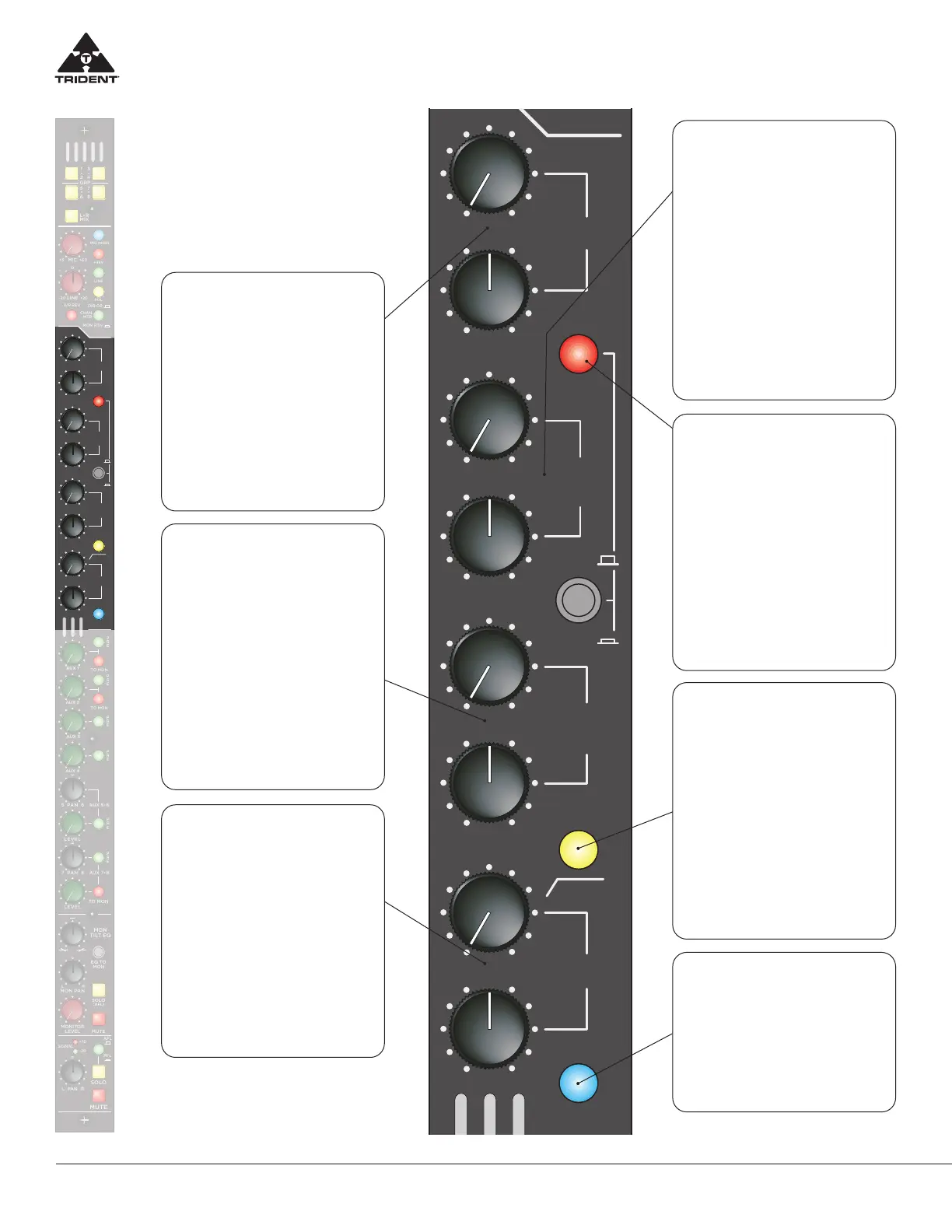
HIGH Frequency
Section – Shelving
Adjusts the high frequency shelving
EQ response. The Frequency con-
trol selects the corner frequency of
the shelving fil er (between 1kHz and
15kHz) and the Level control adjusts
the cut/boost between +/- 15dB. The
centre “0” position of the Level con-
trol has a detent to indicate that it is
having no eect on the associated
channel signal. Cut or boost of the
high frequency Level control is usually
used for minor tonal adjustments.
LOW – MID
Frequency Section
Adjusts the low-mid frequency EQ
response. The Frequency control
selects the centre frequency of the
fil er (between 100Hz and 1.5kHz)
and the Level control adjusts the cut/
boost between +/- 15dB. The centre
“0” position of the Level control has
a detent to indicate that it is having
no eect on this frequency band. The
bandwidth of this fil er is approxi-
mately one octave. The low-mid fre-
quency controls are used for minor
tonal adjustment or repair of a specif-
ic band of frequencies.
LOW Frequency
Section – Shelving
Adjusts the low frequency shelving
EQ response. The Frequency control
selects the corner frequency of the
shelving fil er (between 40Hz and
650Hz) and the Level control adjusts
the cut/boost between +/- 15dB. The
centre “0” position of the Level con-
trol has a detent to indicate that it
is having no eect on the associated
channel signal. Cut or boost of the
low frequency level control is usually
used for minor tonal adjustments on
mixdown (remix).
HIGH – MID
Frequency Section
Adjusts the high-mid frequency EQ
response. The Frequency control
selects the centre frequency of the
fil er (between 700Hz and 10kHz)
and the Level control adjusts the cut/
boost between +/- 15dB. The centre
“0” position of the Level control has
a detent to indicate that it is having
no eect on this frequency band. The
bandwidth of this fil er is approxi-
mately one octave. The high-mid fre-
quency controls are used for minor
tonal adjustment or repair of a specif-
ic band of frequencies.
INSERT ON
When depressed, this switch places
the rear panel channel TRS insert con-
nector in line with the signal path. This
insert point by default is after the chan-
nel EQ (unless it is selected pre EQ be-
low). By routing the signal through this
connector, the insert may be used for
applications such as an eect that can
be switched in/out. In the event the
user wants to patch in his/her favourite
external EQ, it can be connected to the
channel insert TRS and activated with
this switch, it could be used in conjunc-
tion with or without the Trident EQ.
Channel Equaliser
A four band fully sweepable
Trident EQ with overlapping ranges
is provided with a switchable high
pass fil er. The HIGH and LOW
sections of the equaliser have a
shelving response and the MID have
a peaking (Bell) response.
HPF
When selected, inserts a high-pass (or
low-cut) fil er with a corner frequency
50Hz and a roll off rate of 18dB per oc-
tave into the signal path. This control is
used to remove unwanted signal con-
tent below 50Hz. The result is usually
improved signal quality of the associ-
ated input signal, while decreasing the
low frequency amplific tion demand
of the audio systems amplifier and
speaker combination. Mainly for use
with microphones, this helps remove
low frequency rumble and handling
noise.
EQ IN
This switch inserts the 4-band EQ
and High Pass Filter into the channel/
monitor (see EQ TO MON switch de-
scription below) signal path. When not
in use, it is suggested that the EQ be
kept in the OUT position for best phase
performance.


 To Next Page
 Loading...