1700 81 6584 | www.digitallock.com.my
TRIDENT - SMART DIGITAL DOOR LOCK
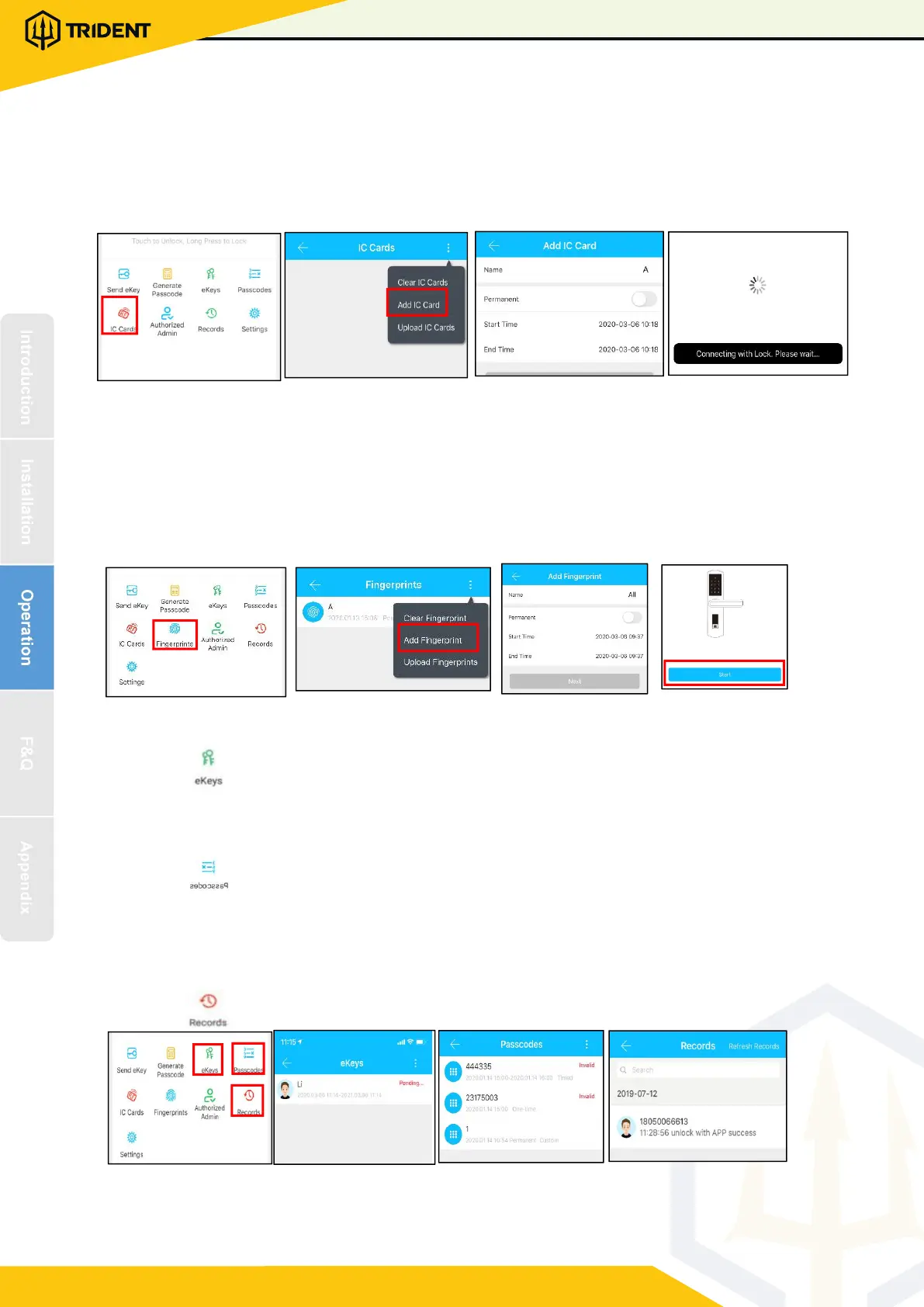
3.4.4.Add card
Supports opening d oors through v ari ous IC cards. Before an IC c ard is used to
open the door, it ne eds to be added first. The adding process needs to be perform
ed by the app beside the lock.The validity period of the IC can be set, it can be per
manent, or it can be limited in t ime.
3.4.5. Add fingerprint
The premise t hat a fingerprint can be used to open a door is that it needs to be
added first. The adding process needs to be performed by the APP beside the lock.
The fingerp
rint expiration data can be set, it can be permanent, or it can be limited .
After setting ,you can modi f y its validity pe r iod.
3.4.6. e-Key manag emen t
Click “ “ The manager can delete ekey, reset ekey, send and adjust the
ekey, meanwhile he can search the lo ck re cord.
3.4.7. Passcode management
Click " " .All generated passwords can be vi ewed and manage d in the
password management module. This includes a password change, password
deletion, p assword reset, and password unlock record.
3.4.8.Unlock records
Click " "you can query your unloc k record as shown in figure


 To Next Page